Manual for 45256 ver2

Manual for 45256 ver2

Brand: GE

Category: Digital Camera

Document Type: Manual

Language: EN
Uploaded: Nov. 21, 2025, 9:23 p.m.

Warranty Information

Jasco Products Company warrants this product against manufacturing defects for one year from the purchase date.

Camera Setup:

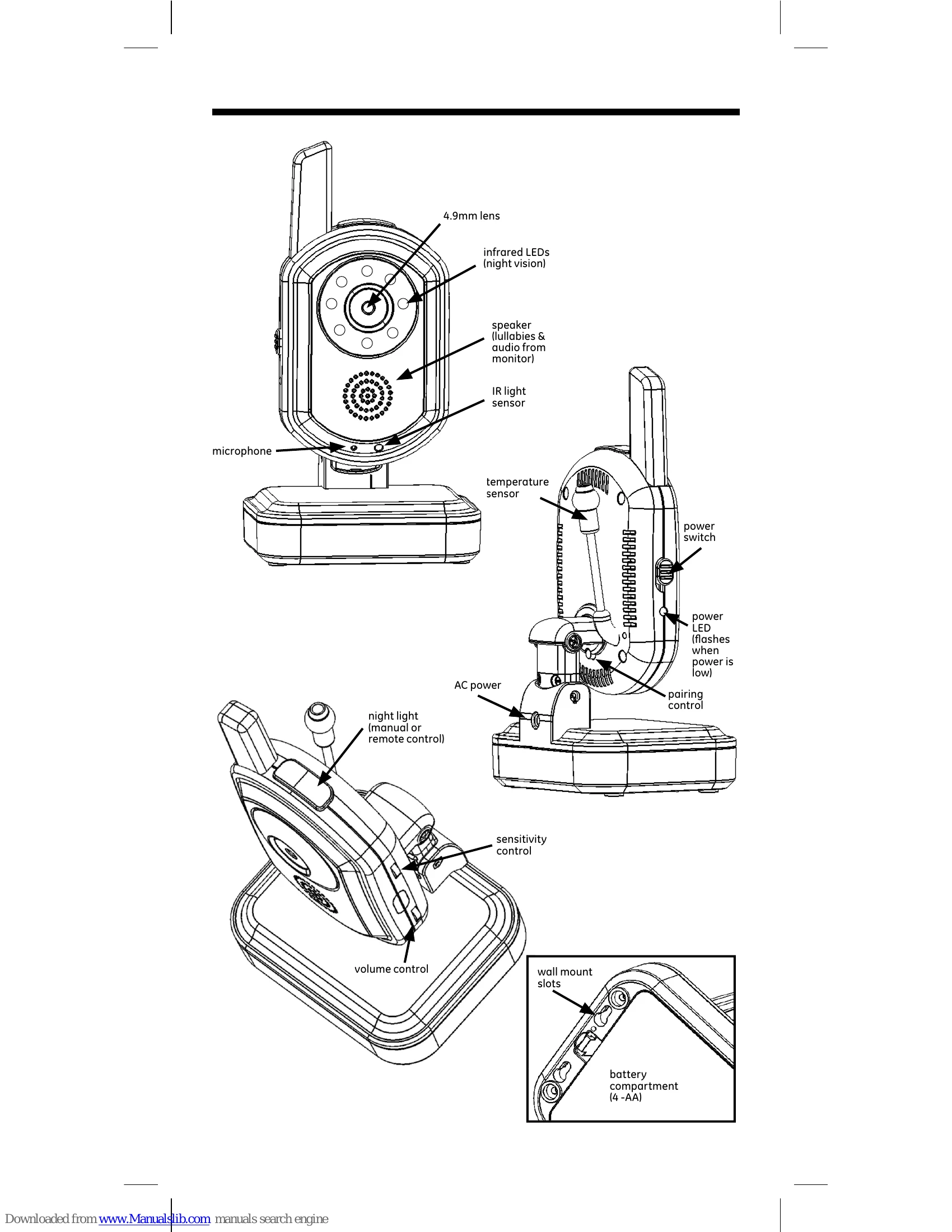
  1. Plug the AC adapter into an electrical outlet and the camera base.
  2. Slide the power switch to 'on'. The power LED will illuminate green.
  3. For battery power, insert 4 AA batteries into the compartment, following the polarity diagram.
  4. Slide the power switch to 'on'. The power LED will illuminate green. A flashing LED indicates low battery.

Camera Placement:

  • Use the included wall mounting plate as a template.
  • Drill holes, insert anchors if needed, and secure the plate to the wall.
  • Disconnect AC power, slide the camera base onto the plate, and reconnect AC power.

Night Light:

  • Manually: Press the button on top of the camera.
  • Remotely: Press the button on the right side of the monitor.

Pairing the Camera:

  1. Complete 'Initial Setup' on the monitor.
  2. Access the 'Pairing' option via the monitor's menu.
  3. Select a camera number and press 'ok'.
  4. Press the 'pair' button on the camera head within 30 seconds.

Adjusting Sensitivity:

  • Sound: Adjust the 'sensitivity' dial on the camera. Turn fully down to disable.
  • Motion: Access 'Record' and then 'Motion Sensitivity' via the monitor menu. Select 'High', 'Medium', 'Low', or 'Off'.

Troubleshooting and error codes

Problem Possible Cause Solution
No image on monitor Camera not powered on Ensure camera power switch is ON and power LED is green.
Camera not paired Re-pair the camera following the instructions.
Monitor not powered on Ensure monitor power is on.
Interference on screen Wireless interference Ensure camera and monitor are not near other wireless devices. Adjust antenna if applicable.
Distance too great Move camera closer to the monitor.
Night vision not working Ambient light too high Night vision activates in low light conditions.
IR LEDs blocked Ensure the IR LEDs around the lens are not obstructed.
Privacy Policy