Brand: GE
Category: Digital Camera
Document Type:
Language: EN
Brand: GE
Category: Digital Camera
Document Type:
Language: EN
Uploaded: Aug. 9, 2025, 11:57 p.m.
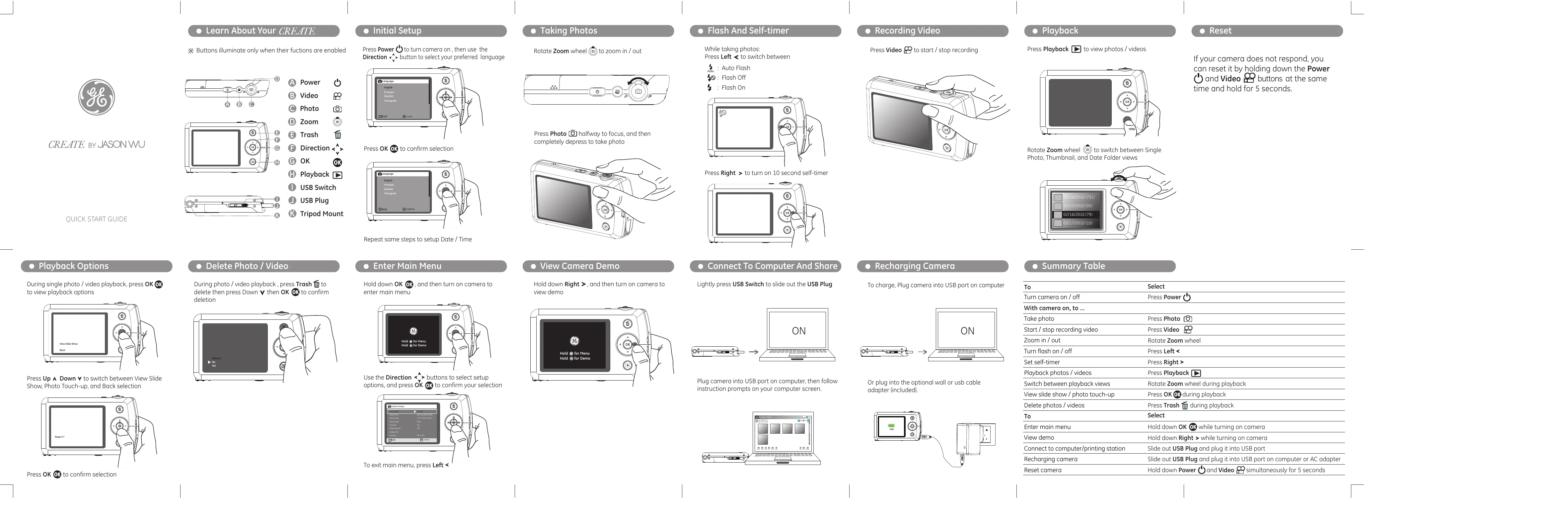
| To | Select |
|---|---|
| Turn camera on / off | Press Power |
| With camera on, to ... | |
| Take photo | Press Photo |
| Start / stop recording video | Press Video |
| Zoom in / out | Rotate Zoom wheel |
| Turn flash on / off | Press Left < |
| Set self-timer | Press Right > |
| Playback photos / videos | Press Playback |
| Switch between playback views | Rotate Zoom wheel during playback |
| View slide show / photo touch-up | Press OK OK during playback |
| Delete photos / videos | Press Trash during playback |
| To | Select |
| Enter main menu | Hold down OK OK while turning on camera |
| View demo | Hold down Right > while turning on camera |
| Connect to computer/printing station | Slide out USB Plug and plug it into USB port |
| Recharging camera | Slide out USB Plug and plug it into USB port on computer or AC adapter |
| Reset camera | Hold down Power and Video simultaneously for 5 seconds |