Brand: GE
Category: Digital Camera
Document Type:
Language: EN
Brand: GE
Category: Digital Camera
Document Type:
Language: EN
Uploaded: Aug. 9, 2025, 11:58 p.m.
Your package should contain the camera model you purchased along with the following items. If anything is missing or appears to be damaged, please contact your vendor. (The accessories will vary based on model purchased and are noted below.)
Included Items:
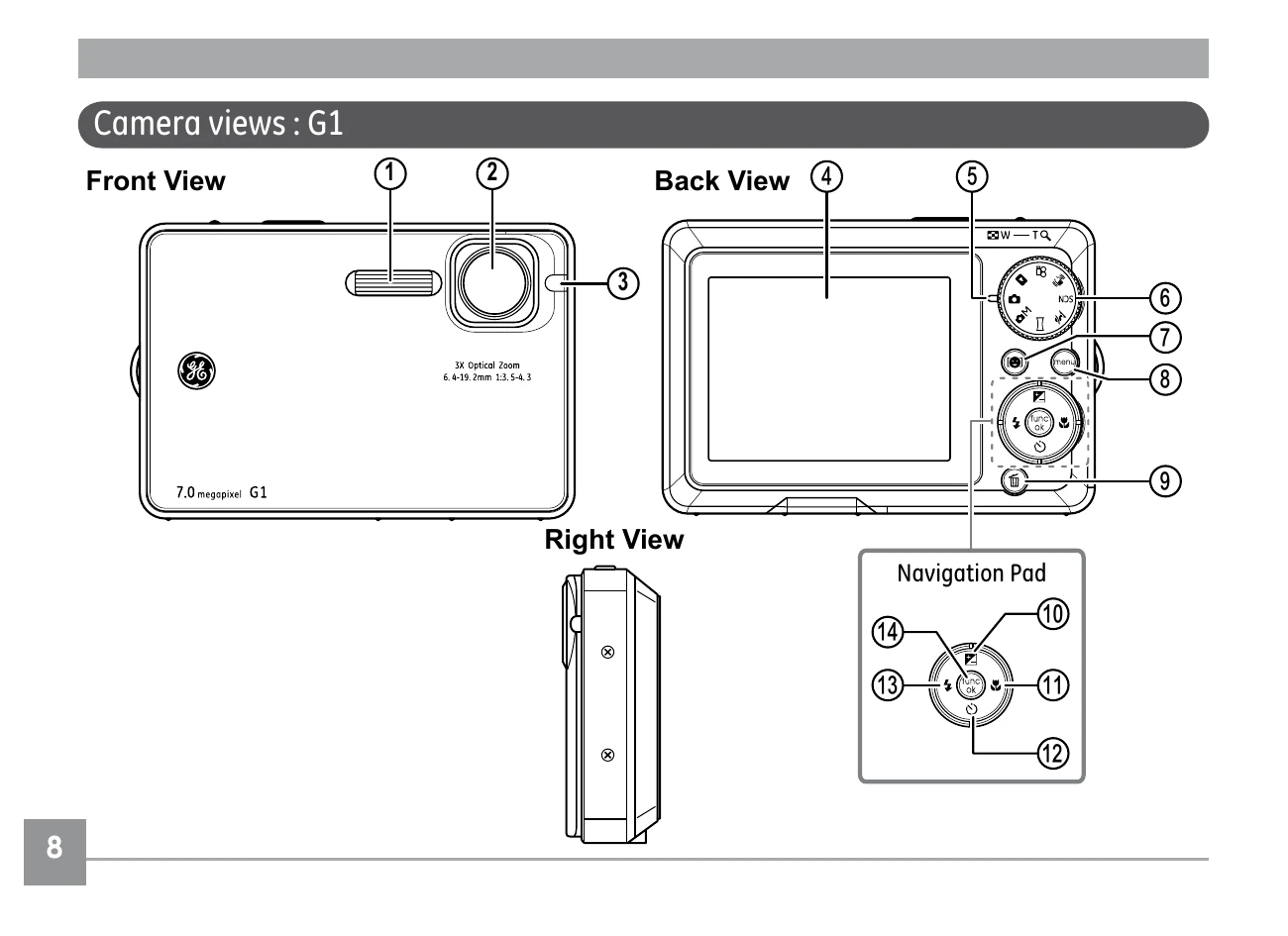
1. Flash
2. Lens
3. AF assist beam/Timer indicator
4. LCD screen
5. Status LED
6. Mode dial
7. Face detection AF button
8. Menu button
9. Erase button
Navigation Pad:
10. Exposure compensation/ Up button
11. Macro mode/ Right button
12. Self-timer/ Down button
13. Flash mode/ Left button
14. Func/ok button
15. Speaker
| Problem | Possible causes | Solution |
|---|---|---|
| Camera does not turn on. |
• The battery has run out. • The battery is not inserted correctly. |
• Charge the battery or replace with a fully charged battery. • Re-insert the battery observing the correct polarity. |
| Camera turns off suddenly during operation. | • The battery has run out. | • Charge the battery or replace with a fully charged battery. |
| The picture is blurred. |
• The lens is dirty. • [icon] appears when taking pictures. |
• Use a soft cloth to clean the lens on your camera • Use the Image Stabilization mode. |
| Images, video clips, and audio files cannot be saved. | • The memory card is full. |
• Replace the memory card with a new one. • Delete unwanted images. • Unlock the memory card. |
| No picture is taken when pressing the shutter button. |
• The memory card is full. • No available space to store the files. • The mode dial is in Playback mode. |
• Replace the memory card with a new one or clean off current memory card. • Delete unwanted images. • The memory card is locked. • Turn the mode dial to any still shooting mode. |
| Images cannot print from the connected printer. |
• The camera is not connected to the printer correctly. • The printer is not PictBridge compatible. • The printer is out of paper or out of ink. • The paper is jammed. |
• Check the connection between the camera and printer. • Use a PictBridge compatible printer. • Load some paper in the printer. • Replace the ink cartridge in the printer. • Remove the jammed paper. |