Brand: GE
Category: Dryer
Document Type: Manual
Language: EN
Brand: GE
Category: Dryer
Document Type: Manual
Language: EN
Uploaded: Nov. 21, 2025, 7:09 p.m.
GE offers a one-year limited warranty covering defects in materials or workmanship.
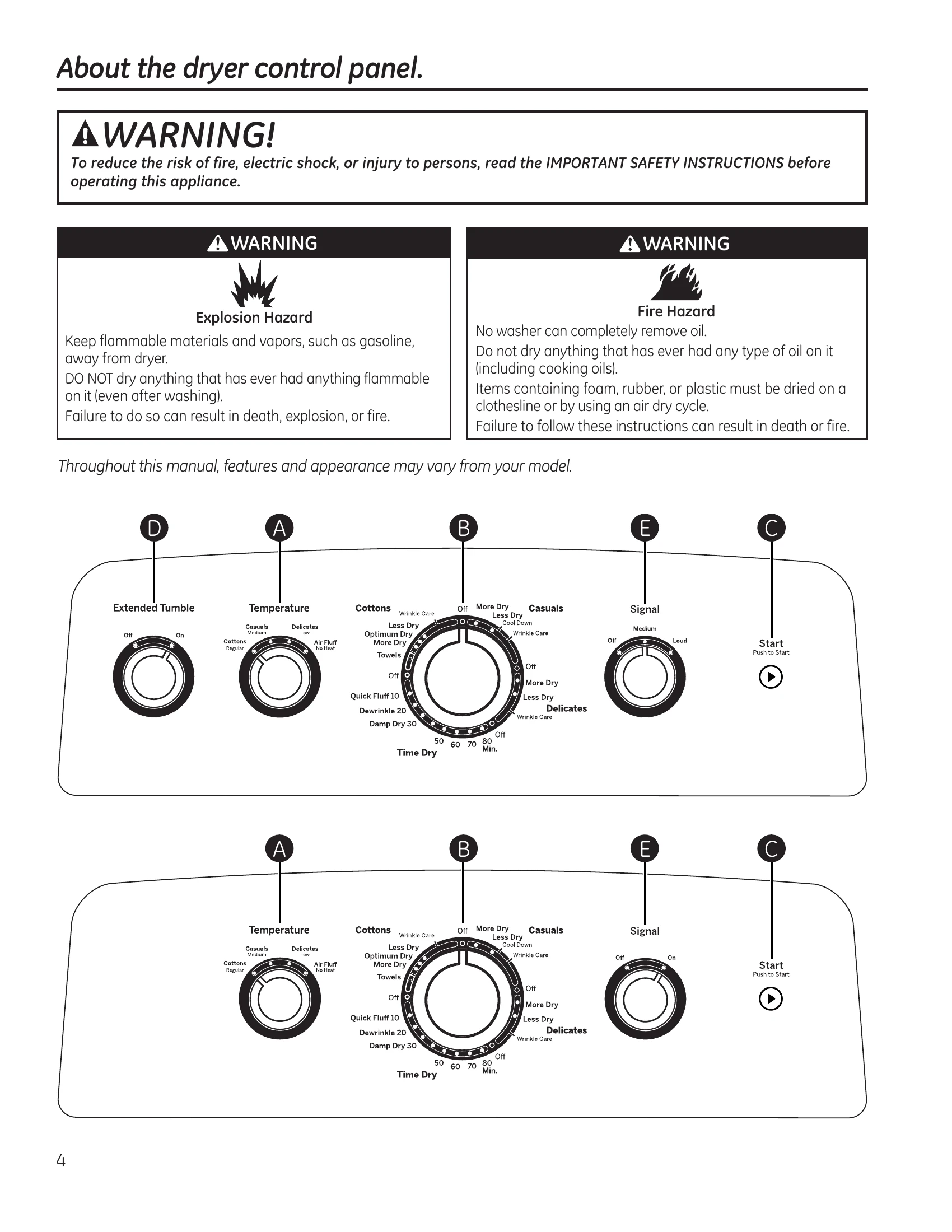
The GE Dryer offers various settings for efficient laundry care. Key features include:
Refer to the manual for detailed instructions on loading, using specific cycles, and care.
| Problem | Possible Causes | What To Do |
|---|---|---|
| Dryer doesn't start | Dryer is unplugged | Make sure the dryer plug is pushed completely into the outlet. |
| Fuse is blown/circuit breaker is tripped | Check the house fuse/circuit breaker box and replace fuse or reset breaker. NOTE: Most electric dryers use 2 fuses/breakers. | |
| Dryer doesn't heat | Fuse is blown/circuit breaker is tripped; the dryer may tumble but not heat | Check the house fuse/circuit breaker box and replace both fuses or reset both breakers. Your dryer may tumble if only one fuse is blown or one breaker tripped. |
| Gas service is off | Make sure gas shutoff at dryer and main shutoff are fully open. | |
| Dryer shakes or makes noise | Some shaking/noise is normal. Dryer may be sitting unevenly | Move dryer to an even floor space, or adjust leveling legs as necessary until even. |
| Greasy spots on clothes | Improper use of fabric softener | Follow directions on fabric softener package. |
| Drying dirty items with clean ones | Use your dryer to dry only clean items. Dirty items can stain clean items and the dryer. | |
| Clothes were not completely clean | Sometimes stains which cannot be seen when the clothes are wet appear after drying. Use proper washing procedures before drying. | |
| Lint on clothes | Lint filter is full | Clean lint screen before each load. |
| Improper sorting | Sort lint producers (like chenille) from lint collectors (like corduroy). | |
| Static occurs | Static electricity can attract lint | See suggestions in this section under Static occurs. |
| Overloading | Separate large loads into smaller ones. | |
| Paper, tissue, etc. left in pockets | Empty all pockets before laundering clothes. | |
| No fabric softener was used | Try a fabric softener. Bounce® Fabric Conditioner Dryer Sheets have been approved for use in all GE Dryers when used in accordance with the manufacturer's instructions. | |
| Overdrying | Try a fabric softener. Adjust setting to Less Dry or Damp Dry. | |
| Synthetics, permanent press and blends can cause static | Try a fabric softener. | |
| Inconsistent drying times | Type of heat | Automatic drying times will vary according to the type of heat used (electric, natural or LP gas), size of load, types of fabrics, wetness of clothes and condition of exhaust ducts. |
| Clothes take too long to dry | Improper sorting | Separate heavy items from lightweight items (generally, a well-sorted washer load is a well-sorted dryer load). |
| Large loads of heavy fabrics (like beach towels) | Large, heavy fabrics contain more moisture and take longer to dry. Separate large, heavy fabrics into smaller loads to speed drying time. | |
| Controls improperly set | Match control settings to the load you are drying. | |
| Lint filter is full | Clean lint filter before every load. | |
| Improper or obstructed ducting | Check installation instructions for proper ducting/venting. Make sure ducting is clean, free of kinks and unobstructed. Check to see if outside wall damper operates easily. Check the Installation Instructions to make sure the dryer venting is correct. | |
| Blown fuses or tripped circuit breaker | Replace fuses or reset circuit breakers. Since most dryers use 2 fuses/breakers, make sure both are operating. | |
| Overloading/combining loads | Do not put more than one washer load in the dryer at a time. | |
| Underloading | If you are drying only one or two items, add a few items to ensure proper tumbling. | |
| Clothes are wrinkled | Overdrying | Select a shorter drying time. |
| Letting items sit in dryer after cycle ends | Remove items while they still hold a slight amount of moisture. Select a Less Dry or Damp Dry setting. Remove items when cycle ends and fold or hang immediately. | |
| Overloading | Separate large loads into smaller ones. | |
| Clothes shrink | Some fabrics will naturally shrink when washed. Others can be safely washed, but will shrink in the dryer | To avoid shrinkage, follow garment care labels exactly. Some items may be pressed back into shape after drying. If you are concerned about shrinkage in a particular item, do not machine wash or tumble dry it. |