Manual for 26955

Manual for 26955

Brand: GE

Category: Other

Document Type: Manual

Language: EN
Uploaded: Nov. 21, 2025, 7:38 p.m.

Warranty Information

This warranty covers any defects in materials or workmanship for one year after purchase.

Phone Basics: Learn to answer, make, and redial calls. Understand the IN USE indicator and auto standby feature.

Cordless Handset Features: Explore manual channel selection, call duration counter, and ringer volume control.

Base Unit Features: Discover speakerphone operation, volume control, and the ringer volume switch.

Advanced Features: Set up intercom calls, privacy mode, and manage voice messaging.

Caller ID and Memory: Understand how to receive, store, and review call records, and manage memory for speed dialing.

Troubleshooting: Find solutions for common problems like no dial tone, poor reception, and unit beeps.

Troubleshooting and error codes

Problem Solution
No dial tone
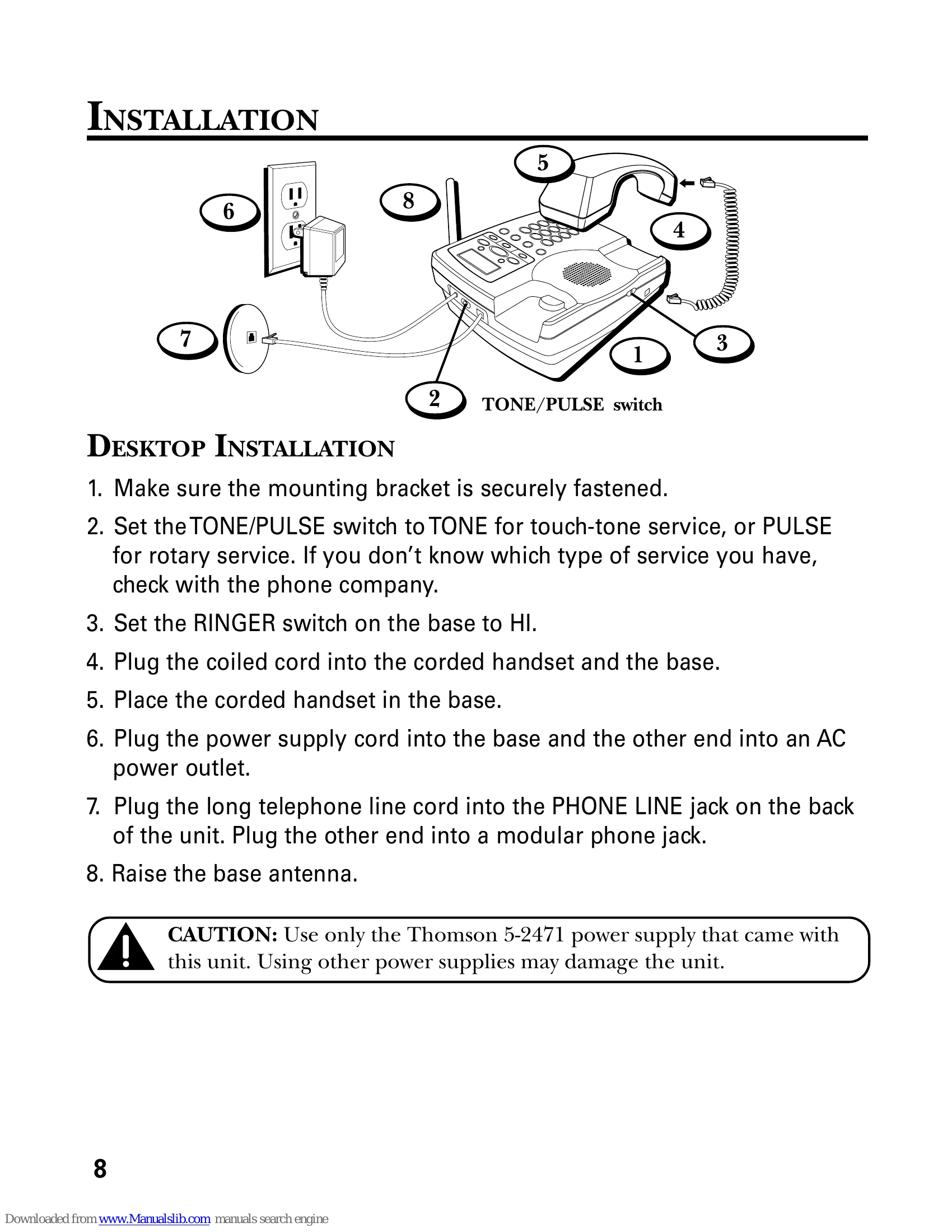
  • Check installation: Is the base power cord connected to a working outlet? Is the telephone line cord connected to the base unit and the wall jack?
  • Connect another phone to the same jack; the problem might be your wiring or local service.
  • Is the cordless handset out of range of the base?
  • Make sure the battery is properly charged (12 hours).
  • Is the battery pack installed correctly?
  • Did the handset beep when you pressed the TALK button? Did the IN USE indicator come on? The battery may need to be charged.
  • Place the cordless handset in the cordless handset charger for at least 20 seconds.
Dial tone is OK, but can't dial out
  • Make sure the TONE/PULSE switch on the base is correctly set.
Cordless handset does not ring
  • Make sure the RINGER switch on the cordless handset is turned to ON.
  • Move closer to the base. The handset may be out of range.
  • You may have too many extension phones on your line. Try unplugging some phones.
  • Check for dial tone.
You experience static, noise, or fading in and out
  • Change channels.
  • Move closer to base (cordless handset might be out of range).
  • Does the base need to be relocated? Make sure base is not plugged into an outlet with another household appliance.
  • Charge battery.
Unit beeps
  • Place cordless handset in charger for 20 seconds; if it still beeps, charge battery for 12 hours.
  • Clean charging contacts on cordless handset and charger with a soft cloth, or an eraser.
  • See solutions for "No dial tone."
  • Replace battery.
Memory Dialing doesn't work
  • Did you program the memory location keys correctly?
  • Did you follow proper dialing sequence?
Unit locks up and no communication between the base and cordless handset
  • See "Setting a New Security Code from the Base" or "Setting a New Security Code from the Cordless Handset."
CALLER ID
No Display
  • Is battery fully charged? Try replacing the battery.
  • Make sure that the unit is connected to a non-switched electrical outlet. Disconnect the AC power supply from the base and reconnect it.
Caller ID Error Message
  • The unit displays this message if it detects anything other than valid Caller ID information during the silent period after the first ring. This message indicates the presence of noise on the line.
No Caller ID
  • Did you order Caller ID service from your phone company?
BATTERY
If you experience any of the following problems, even after fully recharging the battery, you may need to replace the battery pack:
  • Short talk time
  • Poor sound quality
  • Limited range
  • IN USE indicator fails to light
Privacy Policy