Manual for Digital Camera

Manual for Digital Camera

Brand: Generic

Category: Digital Camera

Document Type:

Language: EN

Uploaded: Aug. 9, 2025, 11:45 p.m.
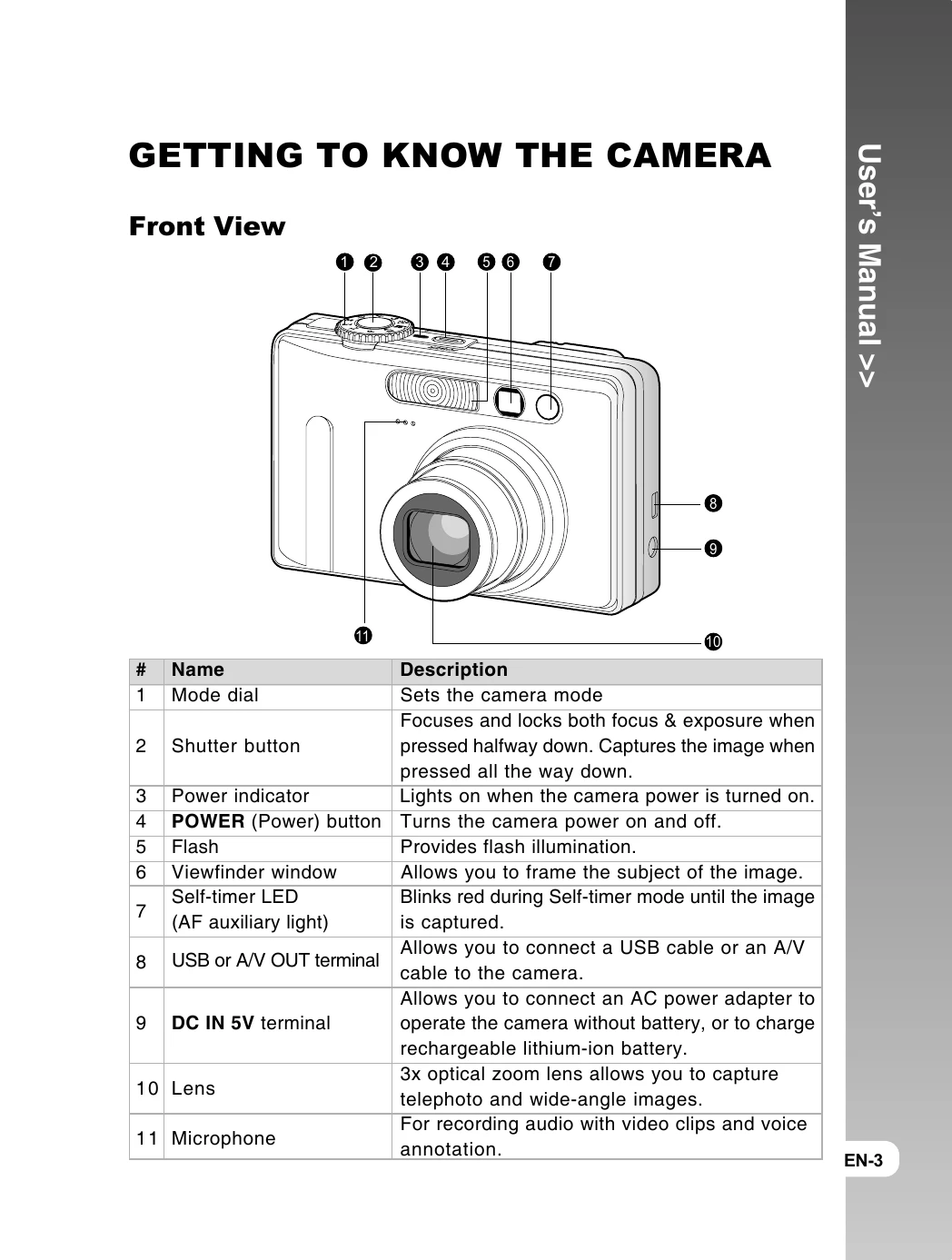
Basic Operation Summary

Getting Started:

  • Inserting/Removing Battery: Open cover, align battery, close cover.
  • Charging Battery: Connect AC adapter to camera and wall outlet. Status LED indicates charging.
  • Inserting/Removing SD Card: Open cover, insert card until click, close cover. Press lightly to eject.
  • Setting Date/Time: Navigate Setup Menu -> Custom -> Date/Time. Adjust values using buttons.
  • Choosing Language: Navigate Setup Menu -> Custom -> Language. Select desired language.
  • Formatting SD Card: Navigate Setup Menu -> Basic -> Format. Confirm execution.

Photography Modes:

  • Auto Mode [A]: Camera automatically sets exposure. Use viewfinder or LCD to compose.
  • Digital Zoom: Enable via MENU -> Function -> Digital Zoom ON. Use zoom buttons to adjust.
  • Flash Settings: Use the flash button to cycle through modes (Auto, Red-eye, Forced, Off).
  • Focus Settings: Use focus buttons to select Auto, Macro, or Infinity.
  • Self-timer: Use self-timer button to select 10s, 2s, or 10+2s.

Playback and Transfer:

  • Playback Menu: Set mode dial to playback. Use MENU to access options like Slide Show, DPOF, Protect, LCD Bright.
  • Transferring Files: Connect camera via USB. Install driver if needed. Navigate to DCIM folder to copy files.
  • Direct Printing (PictBridge): Connect camera directly to PictBridge printer via USB. Select print options.
Privacy Policy