Manual for Keychain Digital Camera

Manual for Keychain Digital Camera

Brand: Generic

Category: Digital Camera

Document Type: Manual

Language: EN
Uploaded: Nov. 21, 2025, 6 p.m.

Warranty Information

One-year limited warranty covering defects in material and workmanship.

Getting Started

  1. Insert AAA battery.
  2. Close battery door.
  3. Camera turns on automatically or press Mode button.

Taking a Picture

  1. Verify LCD shows picture count.
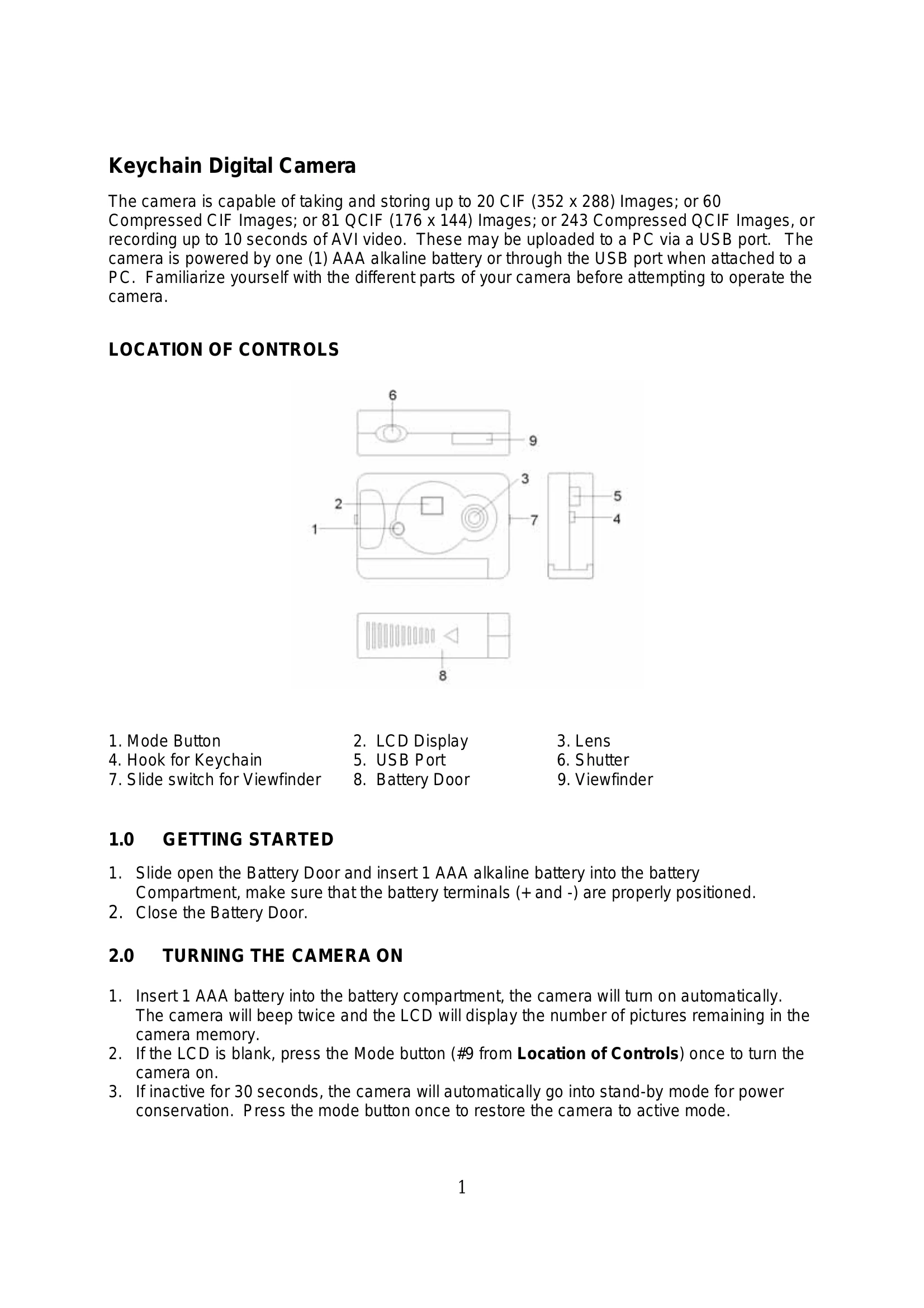
  2. Slide up viewfinder.
  3. Hold steady and press Shutter button.
  4. LCD count decrements.

Additional Features

  • Press Mode button to cycle through features (e.g., Self-Timer, Continuous Shooting, Compression Modes, Video Mode).
  • Press Shutter button to activate selected feature.

Uploading Pictures

  1. Install software from CD.
  2. Connect camera to PC via USB.
  3. Double-click "MyCam CIF" shortcut.
  4. Select images and click SAVE or SAVE ALL.

Troubleshooting and error codes

Troubleshooting Issue Solution
The camera does not work
  • Make sure the battery has inserted with the correct polarity.
  • Check if the battery power is low / run out of battery, replace a new one.
"No New Hardware Found" message appears
  • Make sure the camera and PC are connected properly.
  • Go to "My Computer" icon→ Right click your mouse→ Choose "Property” → Select "Device Manager" → Check for "Imaging Device".
  • If "Imaging Device" is not listed or "CIF Dual Mode Camera" driver is not present, unplug and re-connect the camera.
  • If other cameras are installed, disable them.
"Camera not connected" or "Device cannot be detected" message appears
  • Remove previous driver and reinstall.
  • Go to "My Computer” icon→ Right click your mouse→ Choose "Property” → Select "Device Manager" → "Imaging Device" → select the driver “CIF Dual Mode Camera” and choose "Remove" to uninstall.
  • Uninstall the driver program named “Camera Driver” from Add/Remove programs.
  • Restart computer and reinstall driver.
Camera not detected by software after installation
  • Ensure USB port mode is enabled in system CMOS setup.
  • Refer to "Driver Fix" document if "Driver Open Fail" error occurs.
Privacy Policy