Introduction: Provides an overview of the digital camera's features, including its megapixel count, auto flash, LCD monitor, zoom capabilities, internal memory, and connectivity options (USB, PictBridge).
Package Contents: Lists the items included in the camera kit, such as the camera itself, user manual, USB cable, software CD-ROM, warranty card, AV cable, camera strap, pouch, and batteries.
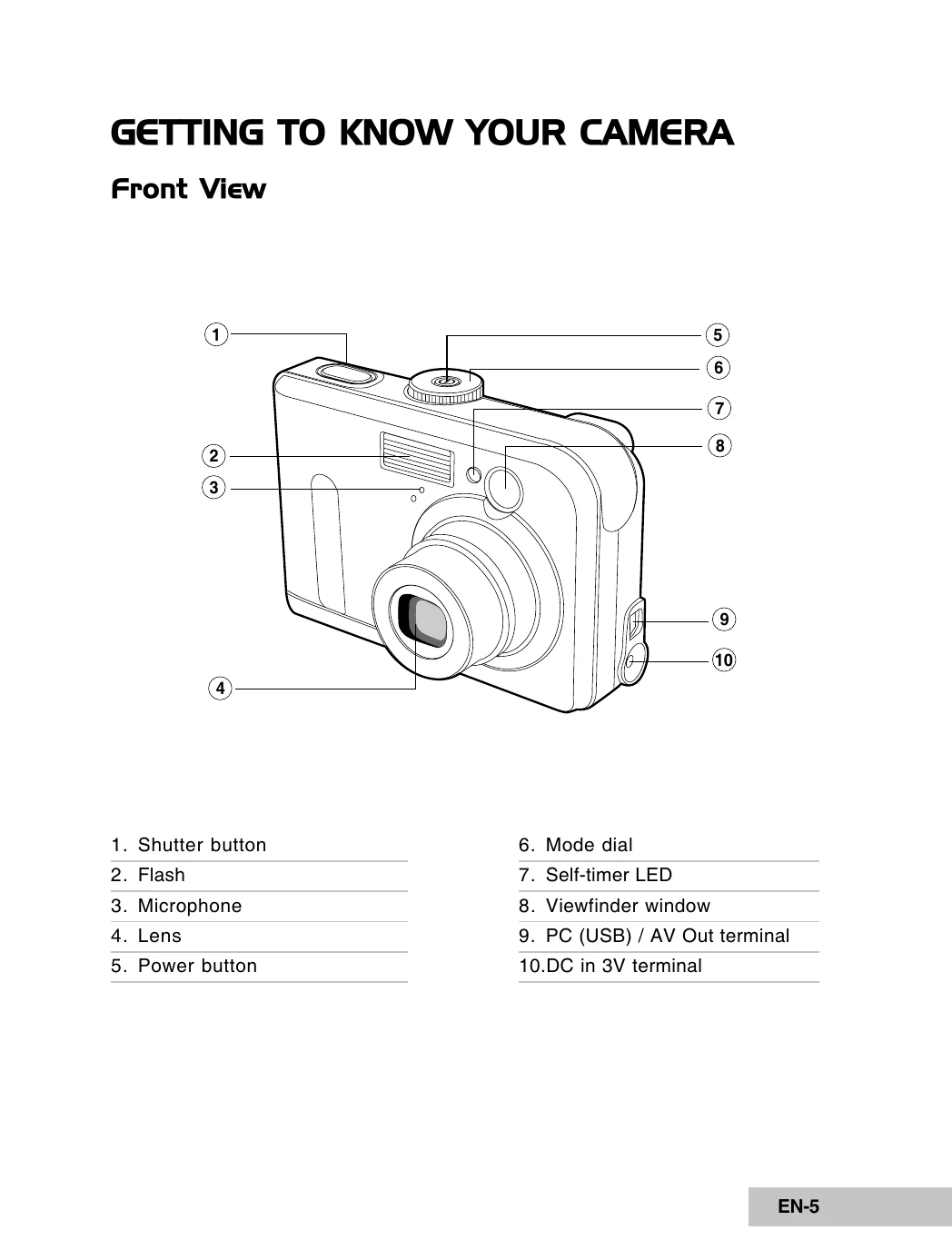
Getting to Know Your Camera: Details the front and rear views of the camera, identifying key buttons and components like the shutter button, flash, lens, mode dial, LCD monitor, and various control buttons.
Preparing the Camera: Explains how to install batteries, use the AC power adapter, and insert/remove an SD memory card, emphasizing battery orientation and safety precautions.
Getting Started: Guides the user through turning the camera on/off, choosing the screen language, setting the date and time, and formatting memory cards.
Photography Mode: Covers the basics of shooting images, including composing shots, focusing, and capturing the image. It also explains how to set image resolution and quality, and use the zoom function.
Using the Flash: Describes the different flash modes (Auto Flash, Red Eye, Forced Flash, No Flash) and when to use them.
Using the Self-Timer: Explains how to use the self-timer for group shots or other situations where the photographer needs to be in the picture.
Adjusting Exposure and White Balance: Details how to manually adjust exposure (EV compensation) and set the white balance to suit various lighting conditions.
Using the Mode Dial: Explains the different shooting modes available on the mode dial (Auto, Program, Portrait, Landscape, Sports, Night), and how each mode is optimized for specific scenarios.
Advanced Shooting: Covers features like Burst mode, Auto Exposure Bracketing (AEB), and selecting the metering mode.
Playback Mode: Describes how to view images, magnify them, use the slideshow display, and resize images.
Video Mode: Explains how to record and play back video clips.
Playback Mode - Advanced Features: Covers playing back images/videos on TV, deleting, protecting, and setting DPOF for images.
Transferring Files: Provides steps for transferring images and video clips from the camera to a computer via USB.
Editing Software Installation: Guides the user on installing provided editing software.
Using the Camera as a PC Camera: Explains how to connect the camera to a computer and use it for video conferencing.
Menu Options: Details the Camera Menu, Video Menu, Playback Menu, and Setup Menu, outlining various settings and their functions.
Specifications: Lists the technical specifications of the camera, including image sensor, resolution, recording media, lens details, and dimensions.