Brand: Generic
Category: Digital Camera
Document Type:
Language: EN
Brand: Generic
Category: Digital Camera
Document Type:
Language: EN
Uploaded: Aug. 9, 2025, 11:39 p.m.
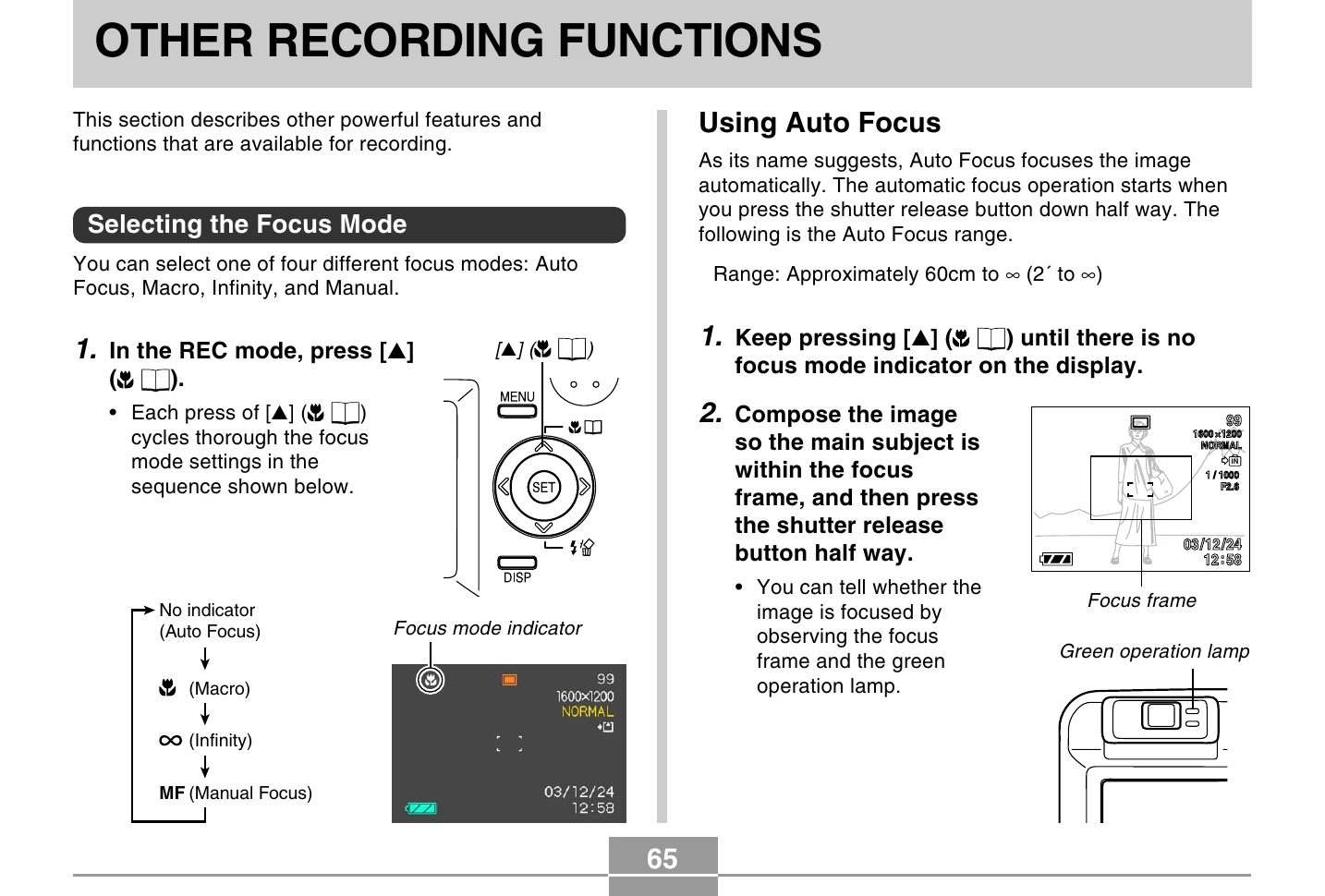
In REC mode, press [▲] to cycle through focus modes: Auto Focus, Macro, Infinity, Manual. Observe the focus mode indicator on the display.
Press the shutter release button halfway. The camera automatically focuses. Range: 60cm to infinity.
Compose the image, press the shutter release halfway. Check the focus frame and green operation lamp for confirmation.
Press [MENU], select REC tab, then "AF Area", and press [►]. Choose "Spot" or "Multi" and press [SET].
Press and hold [▲] until the Macro indicator appears. Range: 10cm to 70cm.
Press and hold [▲] until the infinity indicator (∞) appears. Best for faraway subjects.
Press and hold [▲] until "MF" appears. A boundary indicates the manual focus area. Use [◀] and [►] to adjust focus.
Compose the image with the subject in the focus frame, press the shutter release halfway. Recompose as needed. Press the shutter release fully to capture.
Press [MENU], select REC tab, then "EV Shift", and press [►]. Use [▲] and [▼] to adjust the EV value, then press [SET].
Press [MENU], select REC tab, then "White Balance", and press [►]. Select "Auto" or "Manual" and press [SET]. For Manual, point at a white object and press the shutter release.
Press [MENU], select REC tab, then "REC Mode", and press [►]. Select "BS (Best Shot)" and press [SET]. Use [◀] and [►] to select a scene, then press [SET].
Follow steps for Best Shot mode, then navigate to "Register User Scene". Select an image, use [▲] and [▼] to select "Save", and press [SET].
Use Best Shot mode, select "Coupling Shot". Capture the first person, then align the second person with the semi-transparent first image and capture.
Use Best Shot mode, select "Pre-shot". Compose and capture the background, then ask someone to photograph you against that background, using the screen as a guide.
Press [MENU], select REC tab, then "REC Mode", and press [►]. Select "Movie" and press [SET]. Point and press the shutter release to record.
Press [DISP] to display a histogram. Analyze it for exposure. Use EV shift to adjust if needed.
Access settings like ISO sensitivity, Metering, Filters, Saturation, Contrast, Sharpness, Grid, Review, and Key assignments via the MENU.
Press [MENU], select REC tab, then "ISO", and press [►]. Select desired sensitivity and press [SET].
Press [MENU], select REC tab, then "Metering", and press [►]. Choose Multi-pattern, Center-weighted, or Spot and press [SET].
Press [MENU], select REC tab, then "Filter", and press [►]. Select a filter effect and press [SET].
Press [MENU], select REC tab, then "Saturation", and press [►]. Choose High, Normal, or Low saturation and press [SET].
Press [MENU], select REC tab, then "Contrast", and press [►]. Choose High, Normal, or Low contrast and press [SET].
Press [MENU], select REC tab, then "Sharpness", and press [►]. Choose Hard, Normal, or Soft sharpness and press [SET].
Press [MENU], select REC tab, then "Grid", and press [►]. Select "On" or "Off" and press [SET].
Press [MENU], select REC tab, then "Review", and press [►]. Select "On" or "Off" and press [SET].
Press [MENU], select REC tab, then "L/R Key", and press [►]. Assign functions like REC Mode, EV Shift, White Balance, ISO, or Self-timer to the keys.
Access the "Memory" tab in the MENU to turn mode memory "On" or "Off" for various settings like REC Mode, Flash, Focus, etc.
Press [MENU], select "Set Up" tab, then "Reset", and press [►]. Select "Reset" and press [SET] to restore factory defaults.