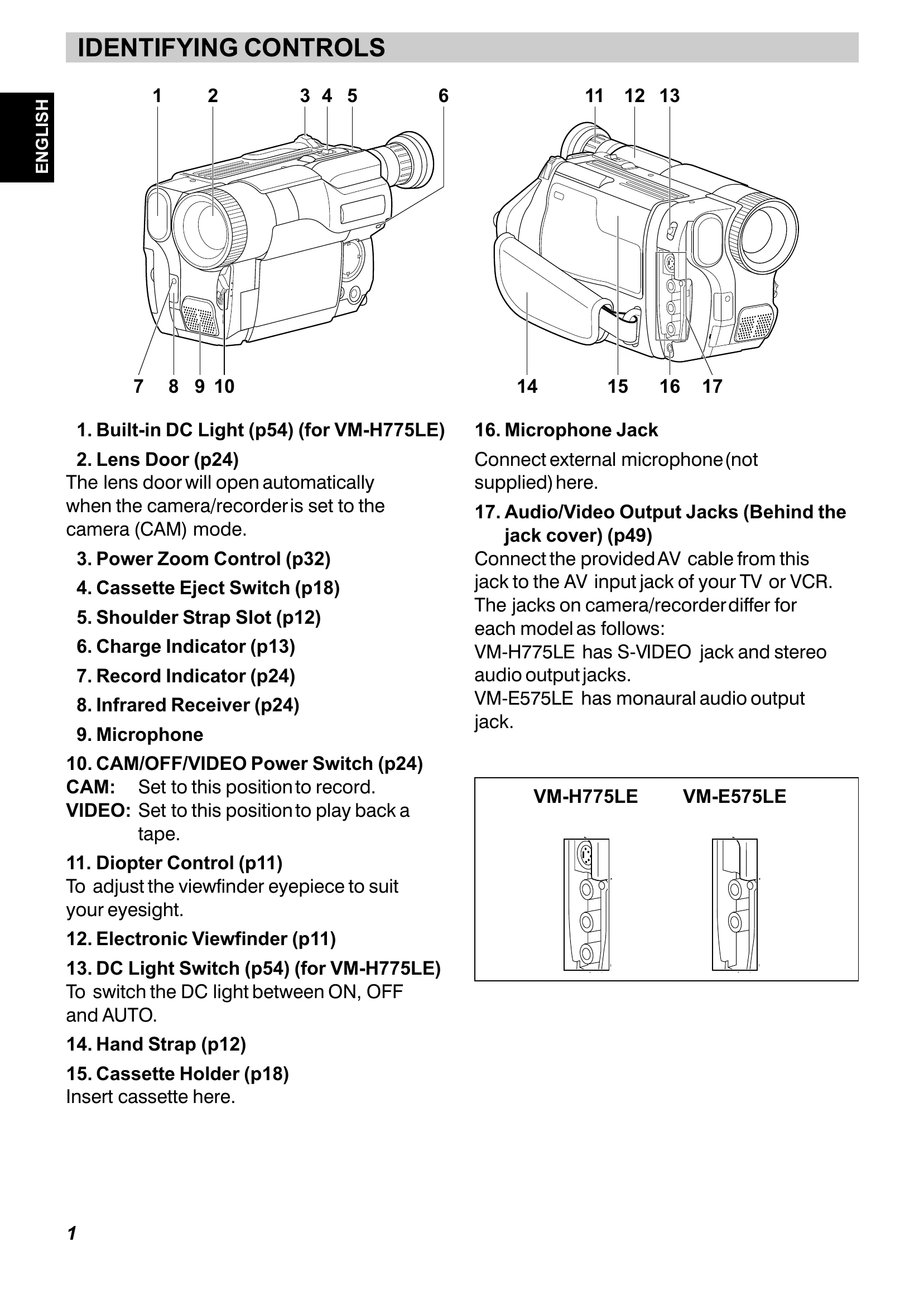
Familiarize yourself with the camera's buttons and features, such as the DC Light, Lens Door, Power Zoom Control, and various indicators (Record, Charge).
Understand the CAM/OFF/VIDEO Power Switch for recording and playback modes.
Learn about input/output jacks for microphones and audio/video connections.
Date/Time Setting
Set the date and time for accurate recording reference.
Use the DATE button and transport controls (PLAY, STOP, FF) to adjust year, month, day, hour, and minute.
The camera enters automatic date recording mode after setting.
Charging the Battery
Charge the battery using the provided AC adaptor and connecting it to the DC IN jack.
The BATT. CHARGE indicator shows the charging status (flashing or steady light).
Full charge is indicated by a steady light. Battery life varies by model and usage.
Items Selectable with Menu Displays
Access the menu by pressing the MENU button.
Navigate and select items using PLAY/STOP and FF/REW buttons.
Options include camera shake correction, white balance, digital zoom, tape settings, and display options depending on the mode (CAM or VIDEO).