Brand: Generic
Category: Mobile Phone
Document Type: Manual
Language: EN
Brand: Generic
Category: Mobile Phone
Document Type: Manual
Language: EN
Uploaded: Nov. 21, 2025, 6:46 p.m.
Power off the phone. Remove the back cover, then the battery. Insert the SIM card with the golden chip facing down. Reinstall the battery and back cover.
Connect the charger to the phone. The battery icon will indicate charging status. Full charge takes approximately 2.5 hours.
Press and hold the END/POWER Key. Enter lock code if prompted. The homescreen will appear.
Press and hold the END/POWER key for approximately 4 seconds.
The display shows Status Indication (signal strength, battery, messages), Standby information (network supplier, date, time, messages), and Wallpaper.
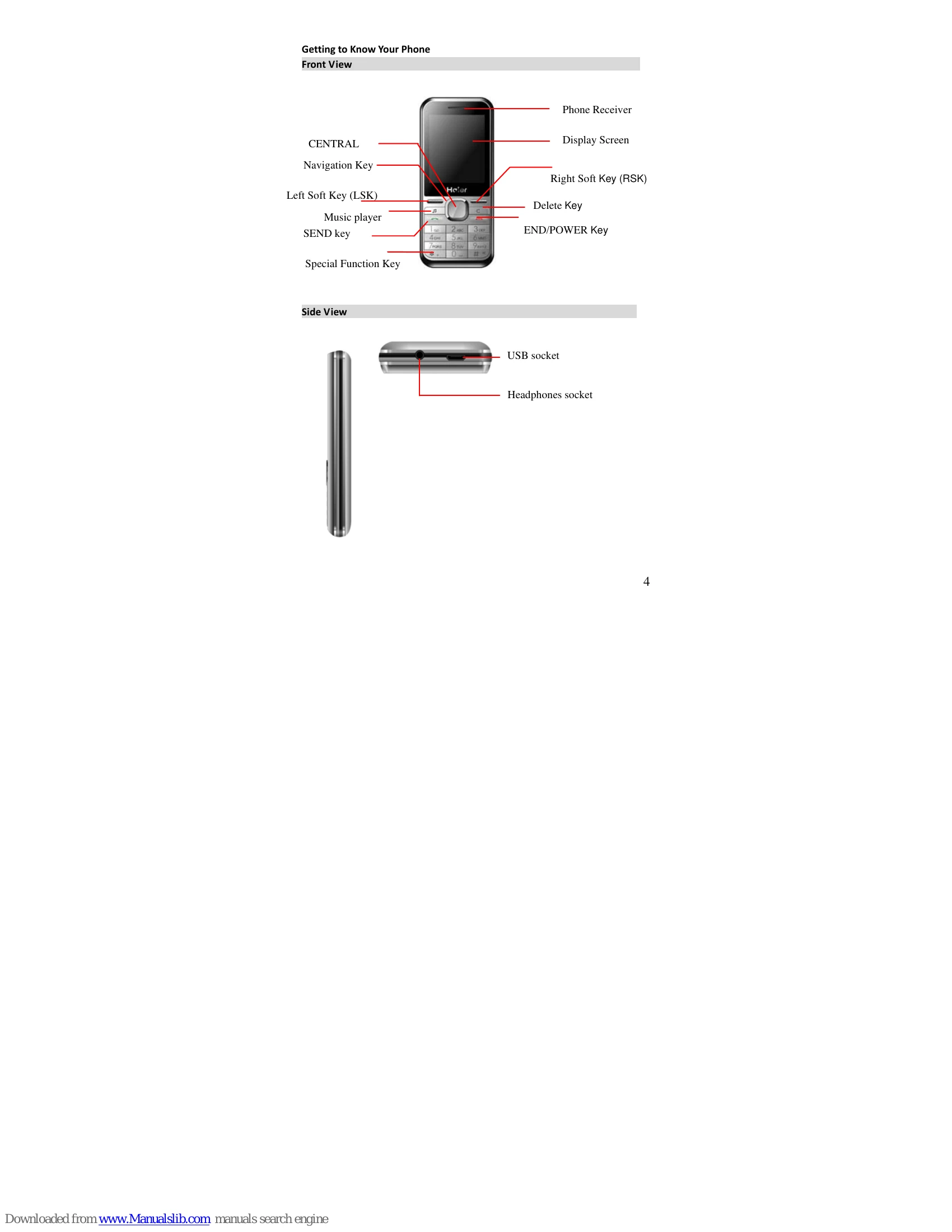
Various keys perform different functions: CENTRAL KEY for menu/confirmation, Navigation Key for scrolling, SEND key for calls, END/POWER key for ending calls/powering on/off, numeric keys for dialing and input.
| Issue | Solution |
|---|---|
| The phone cannot be started up |
|
| There is a lock screen displayed upon powering on the phone |
|
| (U)SIM Card is Error |
|
| The network cannot be accessed |
|
| Cannot Dial Out |
|
| Bad call quality |
|
| Contact cannot call you |
|
| Contact cannot hear you |
|
| Short standby time |
|
| Cannot charge |
|