Brand: Generic
Category: Mobile Phone
Document Type:
Language: EN
Brand: Generic
Category: Mobile Phone
Document Type:
Language: EN
Uploaded: Aug. 10, 2025, 12:05 a.m.
No warranties of any kind are made regarding the accuracy or contents of this manual.
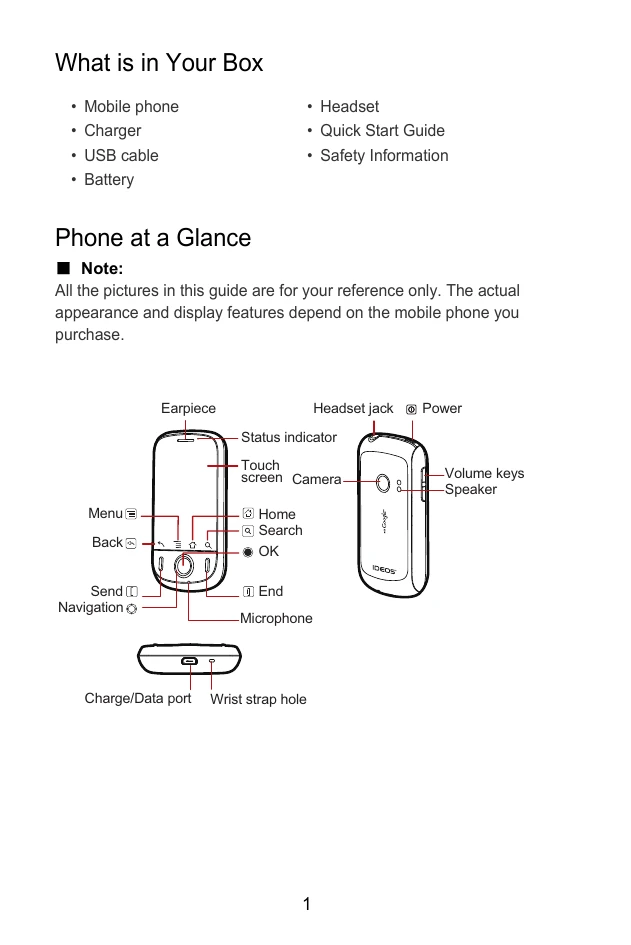
Powering On/Off: Press the Power button to turn on. Press and hold to access the Phone options menu, then select 'Power off' and confirm.
Touchscreen Usage: Use touch to select, touch and hold to reveal options, and flick to scroll or switch screens.
Navigation: Use the Home, Back, and OK buttons for navigation. The Navigation keys allow selection of items.
Calls: Press the call button to make or answer calls. Press the end button to hang up.
Messaging: Access Messaging to create and send new messages. Attach media for multimedia messages.
Connectivity: Turn on Data Service and Wi-Fi in Settings for internet access. Use the phone as a Wi-Fi hotspot.