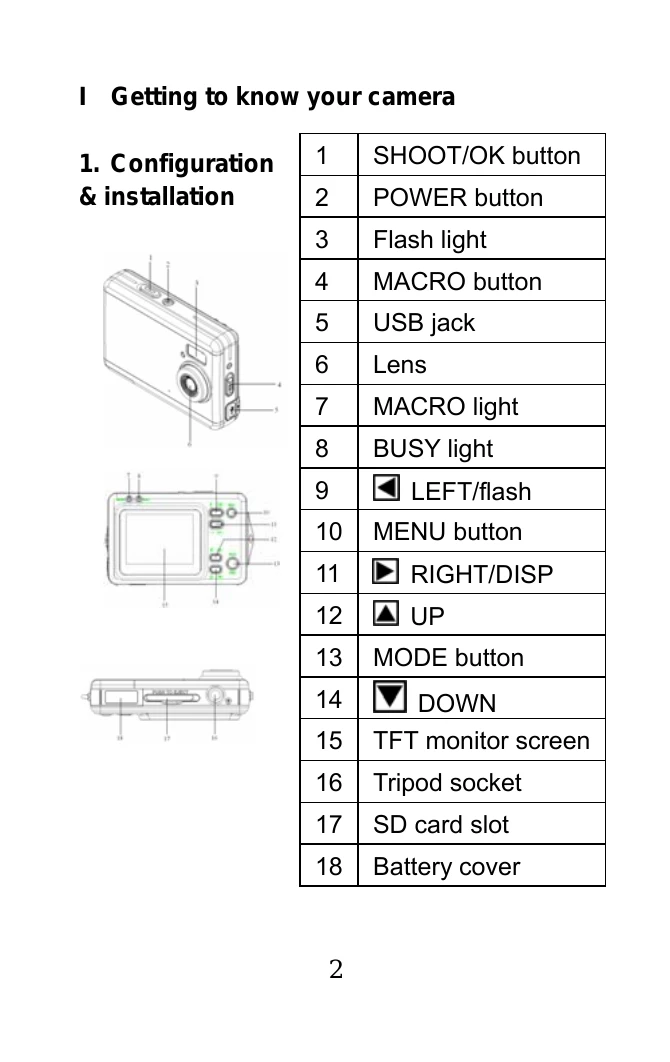
1. Configuration & Installation: Familiarize yourself with camera buttons and ports (Page 4).
2. Monitor Screen Display: Understand the icons on the display (Page 5).
3. Preparation: Insert battery and memory card (Page 5).
4. Shooting: Slide cover to reveal lens, power on, and press shutter button. Access image and setup menus via the MENU button (Pages 6-10).
5. Video & Audio Recording: Select video mode, adjust resolution and frame rate, and record audio (Pages 11-13).
6. Image Review: Enter playback mode to view photos and videos, with options for delete, rotate, and slideshow (Pages 13-18).
7. Other Settings: Customize language, auto power off, TV output, light frequency, date/time, buzzer, and format (Pages 19-22).