Brand: GoPro
Category: Electronics
Document Type: Manual
Language: EN
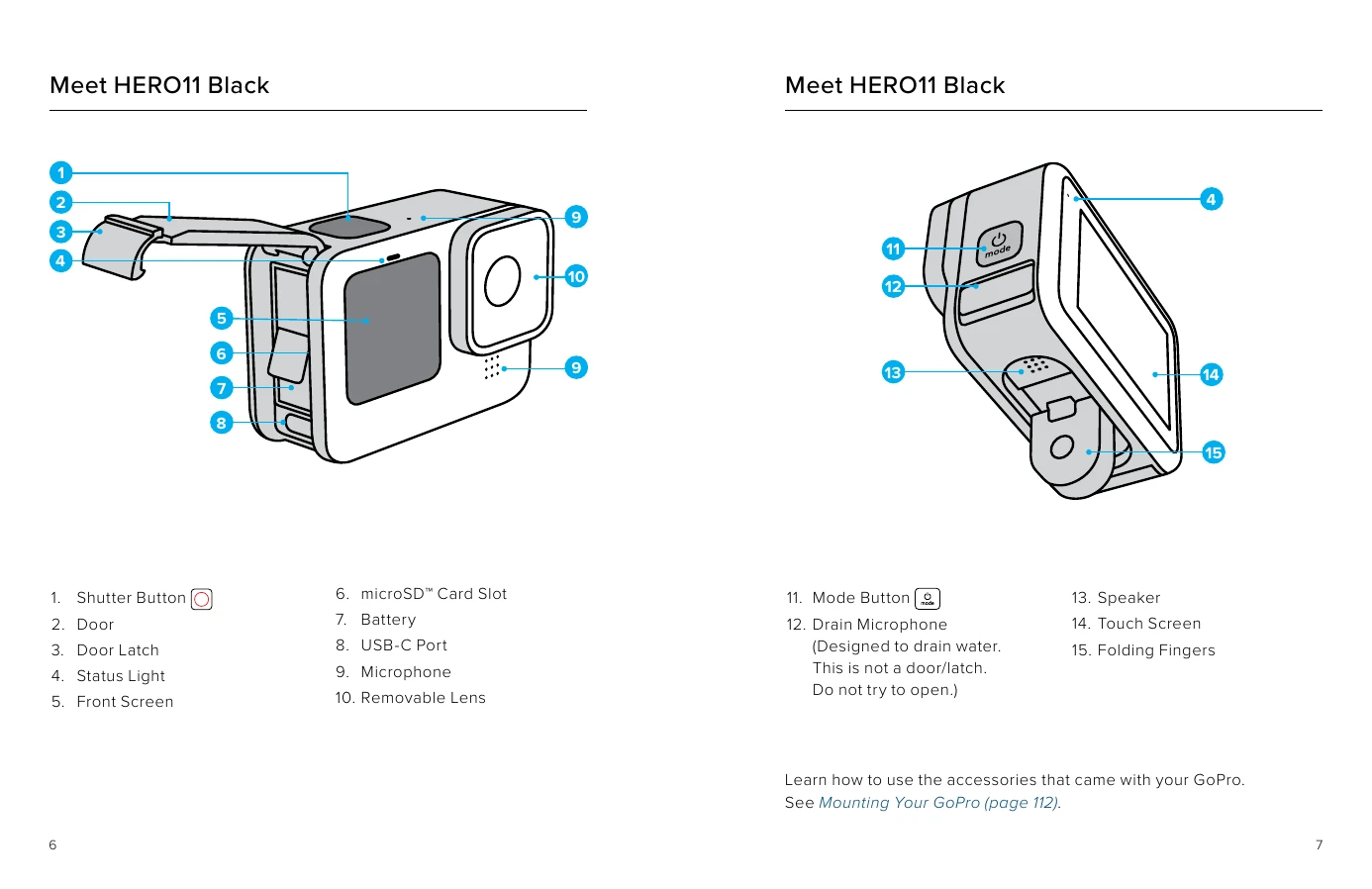
Brand: GoPro
Category: Electronics
Document Type: Manual
Language: EN
Uploaded: Aug. 10, 2025, 12:49 a.m.
Powering On/Off: Press the Mode button to turn on the camera. Press and hold the Mode button for 3 seconds to turn it off.
Front Screen: Displays camera status, live view, and capture settings. Options include Full Screen, Actual Screen, Status Only, and Screen Off.
Rear Touch Screen: Used for navigation and settings. Swipe gestures allow switching modes, opening the Dashboard, and accessing the Media Gallery. Tapping selects items.
Capture Modes: Three main modes: Video, Photo, and Time Lapse. Each has Easy Controls (default) and Pro Controls for advanced settings.
Customizing Presets: Users can create and save custom capture settings for different activities.
Power Tools: Features like HindSight (captures video before Shutter button press) and Scheduled Capture (automatic recording) enhance usability.