Brand: GoPro
Category: Electronics
Document Type: Manual
Language: EN
Brand: GoPro
Category: Electronics
Document Type: Manual
Language: EN
Uploaded: Aug. 10, 2025, 12:49 a.m.
Your GoPro HERO12 Black requires a microSD card for saving media. Ensure your hands are clean and dry before handling the card. For maximum performance, use the included Enduro Battery. To check battery status, swipe down on the rear screen, then tap Preferences > About > Battery Info.
Updating the camera is essential before use. This can be done via the GoPro Quik app or manually by visiting gopro.com/update. Always ensure the battery and SD card are securely in place during updates to avoid damage.
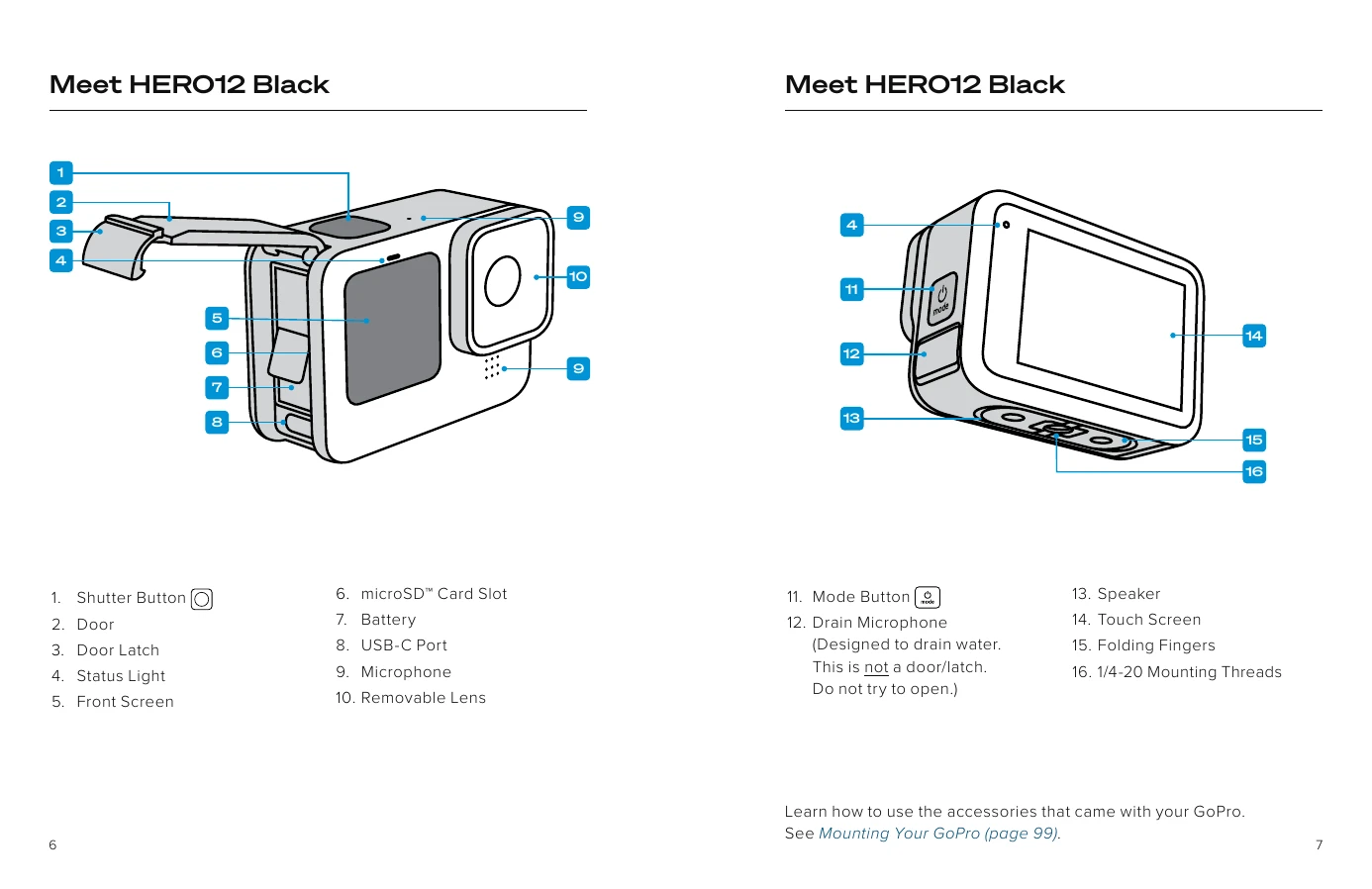
Powering On/Off: Press the Mode button to turn the camera on. Press and hold the Mode button for 3 seconds to turn it off.
Front Screen: Displays camera status and a live view, aiding in framing shots. Options include Full Screen, Actual Screen, Status Only, and Screen Off.
Rear Touch Screen: Used for navigating modes (Video, Photo, Time Lapse), accessing the Dashboard, viewing captured media, and adjusting settings.
| Problem | Possible Cause | Solution |
|---|---|---|
| Camera won't turn on | Battery is low or drained. | Charge the battery. If the battery is drained, it may take a few minutes to show charge indication. |
| Camera won't turn on | SD card is not inserted properly. | Ensure the SD card is inserted correctly into the slot. |
| Camera won't turn on | Camera needs to be updated. | Update the camera's firmware. |
| No image in viewfinder or on screen | Screen is off. | Press the Shutter button or the Mode button to turn the screen on. |
| No image in viewfinder or on screen | Lens is dirty or obstructed. | Clean the lens. |
| No image in viewfinder or on screen | Camera is in a mode that does not show a live preview. | Press the Mode button to switch to a different mode. |
| Cannot record video or take photos | SD card is full. | Save your media or insert a new SD card. |
| Cannot record video or take photos | SD card is not formatted properly. | Format the SD card. |
| Cannot record video or take photos | SD card is not compatible. | Ensure you are using a compatible microSD card. |