Manual for HERO3 BLACK EDITION

Manual for HERO3 BLACK EDITION

Brand: GoPro

Category: Electronics

Document Type: Manual

Language: EN
Uploaded: Aug. 10, 2025, 12:49 a.m.

Warranty Information

Refer to gopro.com/support for warranty information.

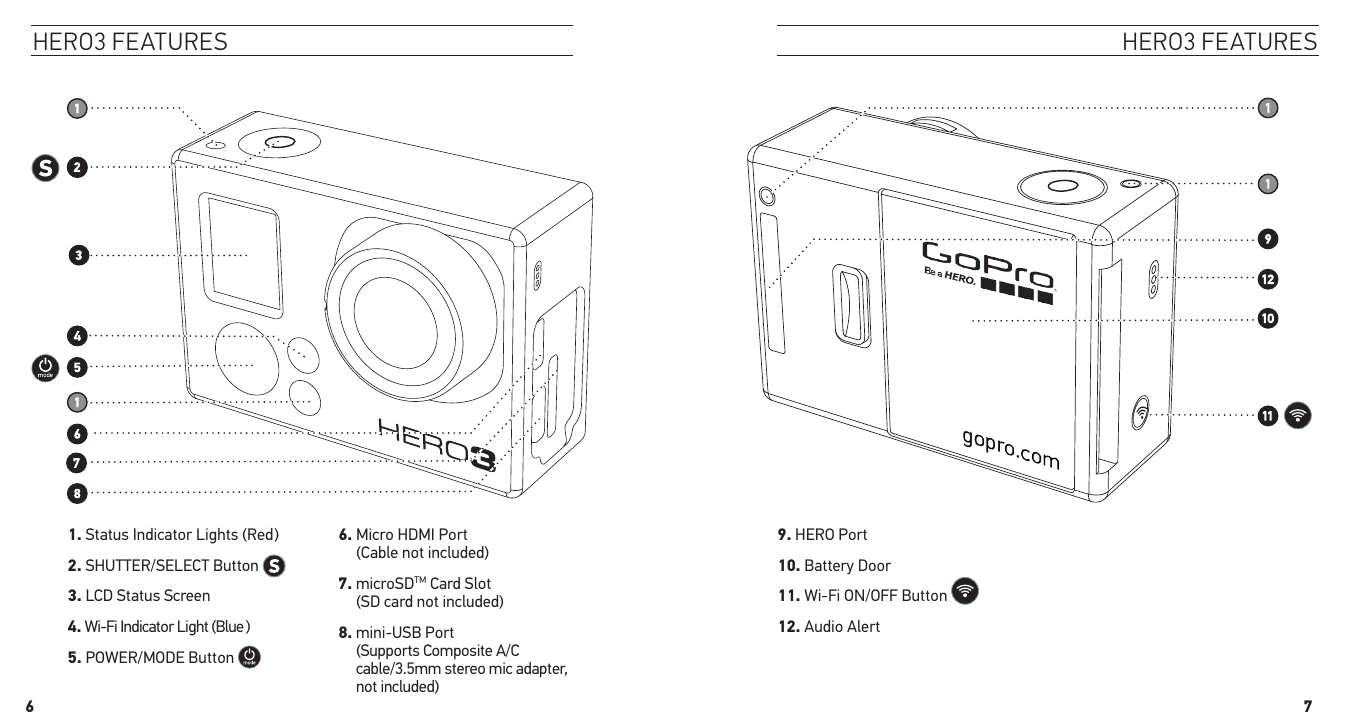
Getting Started: Insert microSD card, place and charge battery.
Powering On/Off: Press and release the Power button to turn ON. Press and hold for two seconds to turn OFF.
Camera Modes: Cycle through modes (Video, Photo, Photo Burst, Time Lapse, Playback) using the Mode button.
Recording Video: Select Video mode, press Shutter/Select button to start/stop.
Taking Photos: Select Photo mode, press Shutter/Select button to take a photo.
Settings: Access Settings menu via Mode button to adjust various options like resolution, Wi-Fi, etc.
Transferring Files: Connect camera to computer via USB, copy files from DCIM folder.

Troubleshooting and error codes

ISSUE SOLUTION
No card present Insert a microSD, microSDHC or microSDXC card.
SD FULL Delete files or swap card.
SD ERROR Camera unable to access card.
File Repair Icon Press any button to repair the video file.
Temperature Warning Icon Let the camera cool down before next use.
Privacy Policy