Manual for HERO3+ BLACK EDITION

Manual for HERO3+ BLACK EDITION

Brand: GoPro

Category: Electronics

Document Type: Manual

Language: EN
Uploaded: Aug. 10, 2025, 12:49 a.m.

Warranty Information

Refer to gopro.com/support for warranty information.

Getting Started
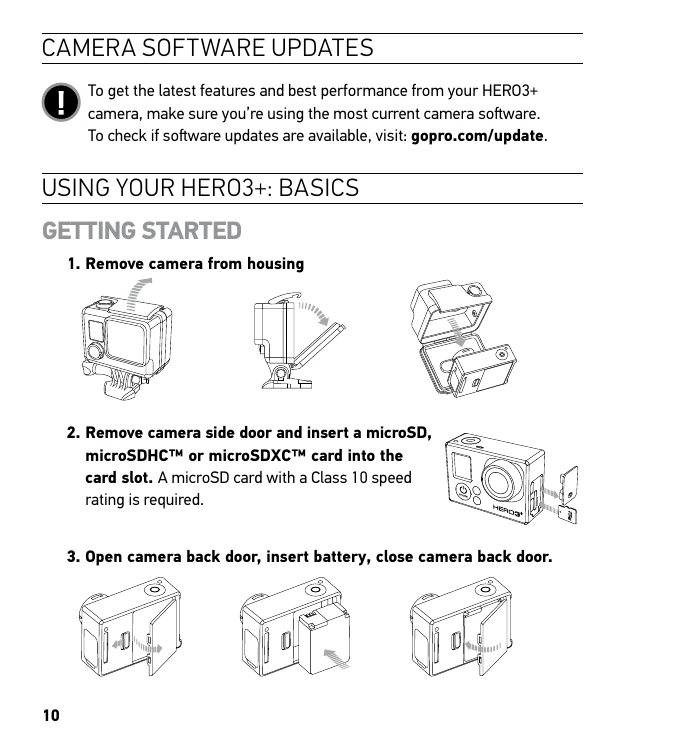
1. Remove camera from housing.
2. Remove camera side door and insert a microSD, microSDHC™ or microSDXC™ card into the card slot. A microSD card with a Class 10 speed rating is required.
3. Open camera back door, insert battery, close camera back door.
4. Charge the battery. Connect the included USB cable to the camera and the other end to a power source. The red Camera Status Light will turn ON when charging and OFF when complete.
Powering On and Off
To power ON: Press the Power/Mode Button. The red Camera Status Lights flash three times and the Sound Indicator emits three beeps.
To power OFF: Press and hold the Power/Mode Button. The red Camera Status Lights flash several times and the Sound Indicator emits seven beeps.
Camera Modes
Cycle through modes by pressing the Power/Mode Button: VIDEO, PHOTO, BURST PHOTO, TIME LAPSE, SETTINGS, PLAYBACK. Each mode has specific functions for capturing content.

Troubleshooting and error codes

Error MessageSolution
NO SD No card present. Insert a microSD, microSDHC, or microSDXC card.
SD FULL Card is full. Delete files or swap card.
SD ERROR Camera unable to access card. Ensure the card is inserted correctly and is compatible.
File Repair Icon Video file was corrupted during recording. Press any button to repair the file.
Temperature Warning Icon Camera has become too hot. Let it cool down before use.
Privacy Policy