Brand: GoPro
Category: Electronics
Document Type: Quick Start Guide
Language: EN
Brand: GoPro
Category: Electronics
Document Type: Quick Start Guide
Language: EN
Uploaded: Aug. 10, 2025, 12:49 a.m.
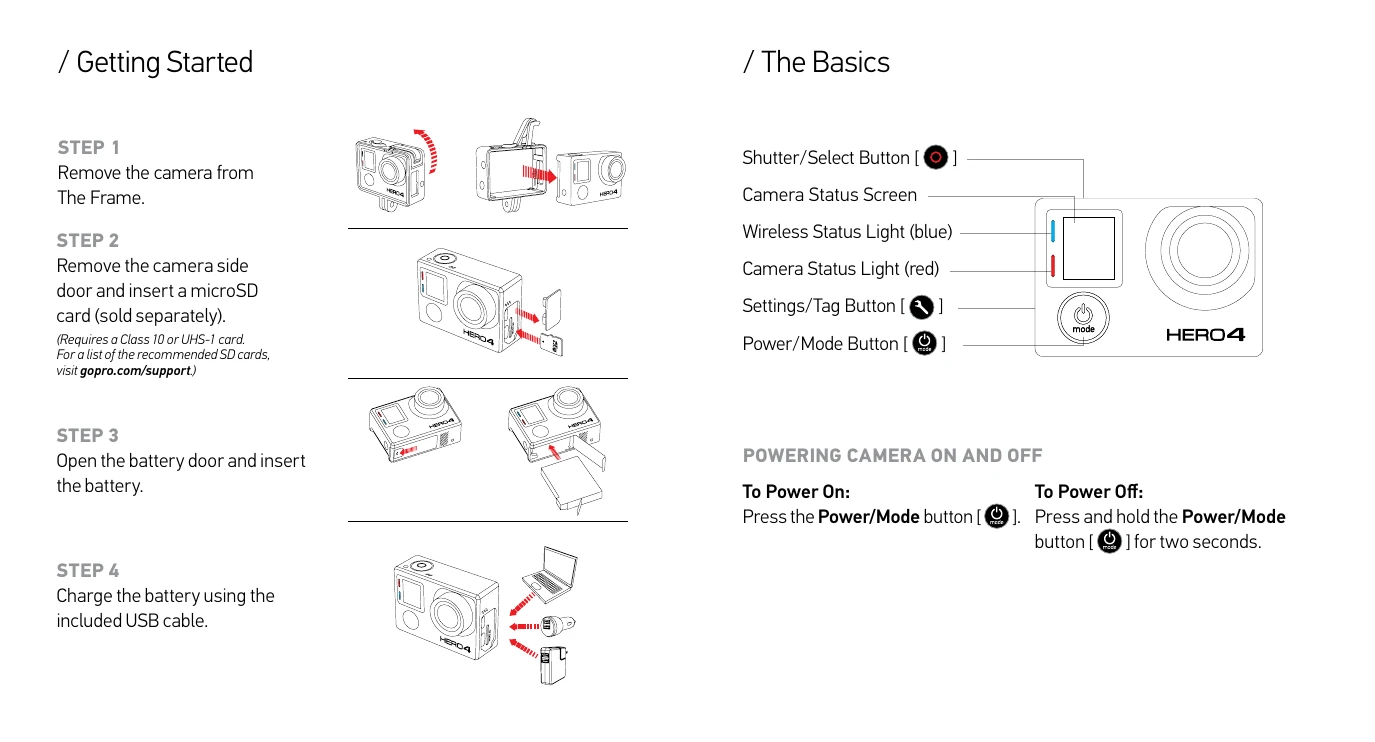
Getting Started:
Powering Camera On and Off:
Selecting Camera Modes: Press the Power/Mode button repeatedly to cycle through modes (Video, Photo, Multi-Shot, Playback, Setup). Use the Settings/Tag button and Shutter/Select button to navigate and select options.
Capturing Video and Photos: Select your camera mode, then press the Shutter/Select button to start/stop recording or take a photo.
Mounting: Use various mounts (instrument, mic stand, side, vertical) to attach the camera to different surfaces and equipment.
Playing Back and Sharing: Connect to a computer or use the GoPro App with a smartphone/tablet to play back and share content.