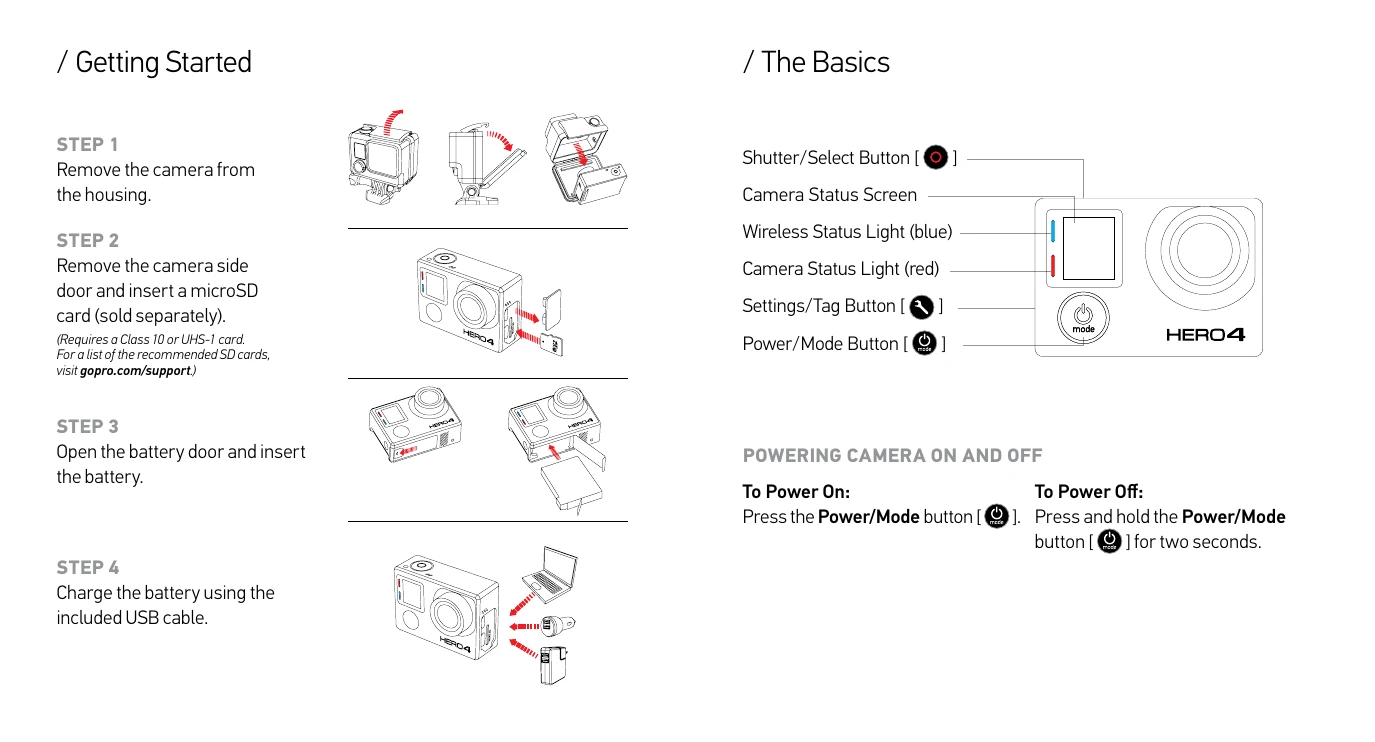
Getting Started:
1. Remove camera from housing.
2. Insert microSD card.
3. Insert battery.
4. Charge battery.
The Basics:
Powering On/Off: Press Power/Mode button to power on. Press and hold Power/Mode button for two seconds to power off.
Camera Modes: Cycle through modes (Video, Photo, Multi-Shot, Playback, Setup) using the Power/Mode button. Select desired mode using Shutter/Select button after opening settings menu with Settings/Tag button.
Capturing Video and Photos: Select mode, then press Shutter/Select button to start/stop recording or take a photo.
QuikCapture: Press Shutter/Select button when camera is off (if enabled) to start capturing instantly.
HiLight Tag: Press Settings/Tag button while recording to tag key moments.
Adjusting Settings: Cycle to desired mode using Power/Mode button. Enter settings menu with Settings/Tag button. Cycle through options with Power/Mode button. Select option with Shutter/Select button. Exit settings with Settings/Tag button.
Mounting: Use included adhesive mounts for flat or curved surfaces, or other mounting hardware. Apply to clean, smooth surfaces at room temperature, 24 hours before use.
Housing Backdoors: Use Standard Backdoor for waterproof protection (up to 40m). Use Skeleton Backdoor for dry environments to enhance audio.
Swapping Backdoors: Open housing, pull backdoor off hinge, align new backdoor, push up until it clicks.
Playback: Connect to computer via USB, use LCD Touch BacPac (sold separately), or connect to TV via micro HDMI/composite/combo cable (sold separately).
Sharing: Connect to computer via USB for sharing. Use GoPro App to share via text, email, or social networks.
GoPro App: Control, view, and share remotely. Download the app, open, and connect your camera following on-screen instructions.