Brand: GoPro
Category: Electronics
Document Type: Quick Start Guide
Language: EN
Brand: GoPro
Category: Electronics
Document Type: Quick Start Guide
Language: EN
Uploaded: Aug. 10, 2025, 12:48 a.m.
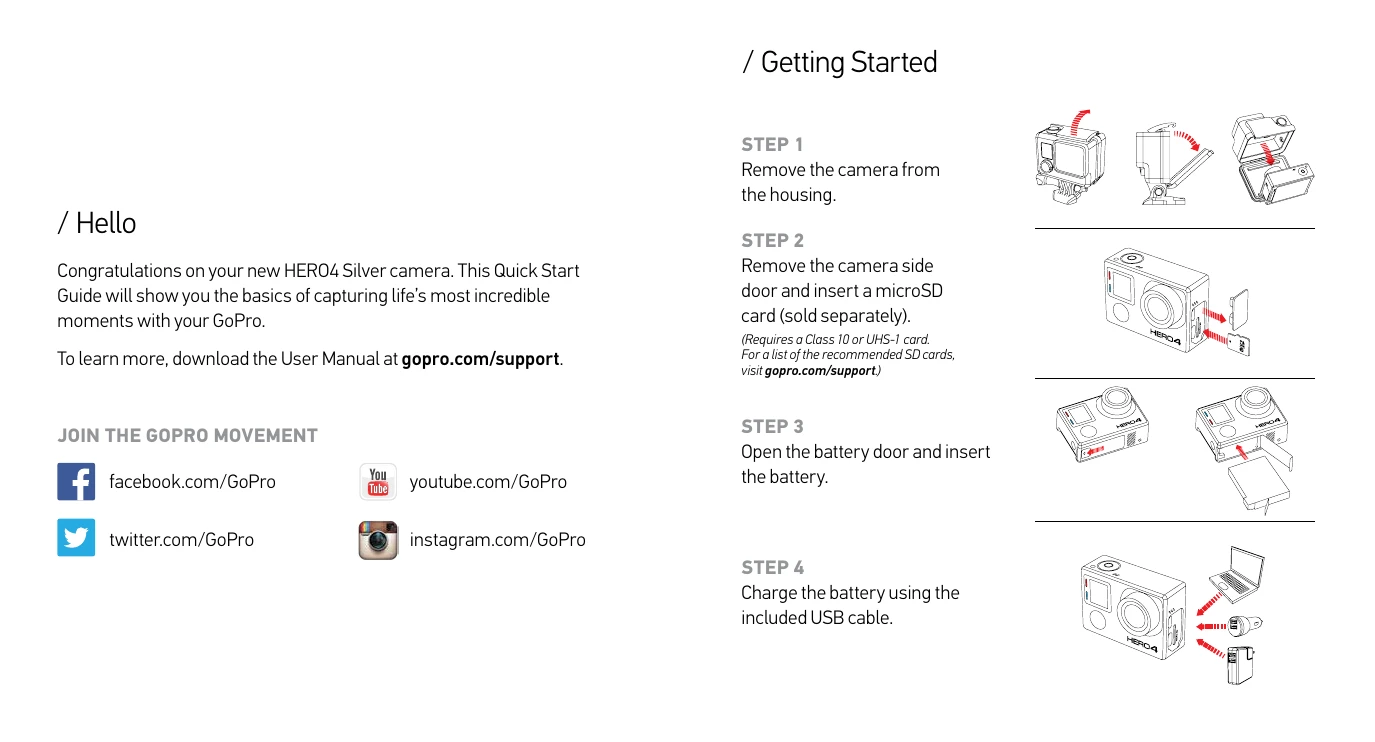
Getting Started: 1. Remove camera from housing. 2. Insert microSD card. 3. Insert battery. 4. Charge battery.
Basic Operations: - Power On/Off: Press Power/Mode button. - Shutter/Select: Start/stop recording or take a photo. - Settings/Tag: Access settings or tag highlights.
Touch Display Gestures: - Swipe Left: Display camera modes. - Swipe Up from Bottom Edge: Open settings menu. - Swipe Up/Down: Navigate settings lists. - Swipe Left/Right: Display gallery images (Playback mode). - Tap: Select item or toggle setting. - Double Tap: Change field of view.