Manual for HERO5 Black

Manual for HERO5 Black

Brand: GoPro

Category: Electronics

Document Type: Manual

Language: EN
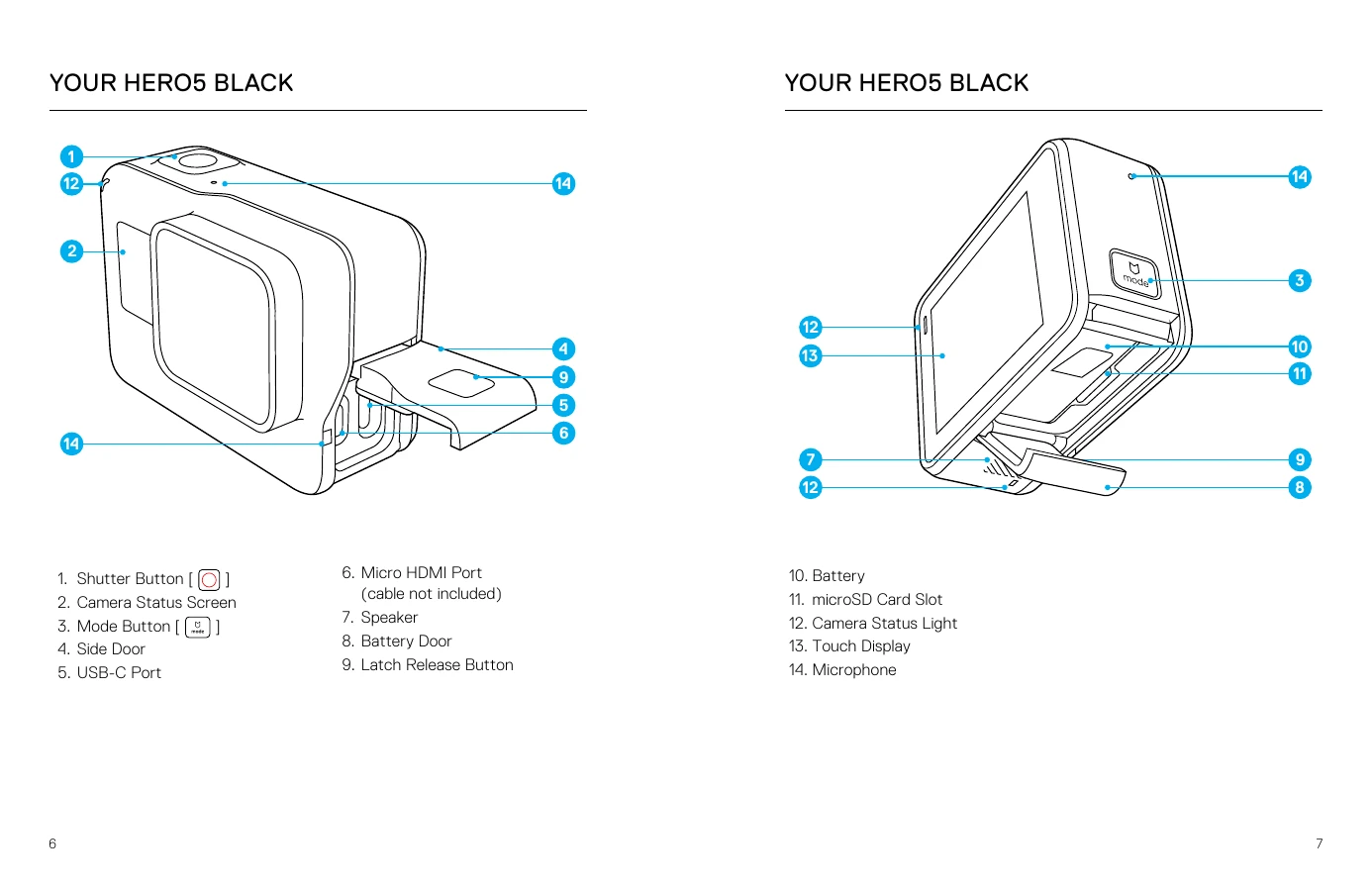
Uploaded: Aug. 10, 2025, 12:49 a.m.

Getting Started

  • MicroSD Cards: Use brand name cards meeting Class 10/UHS-I, up to 128GB.
  • Charging: Fully charge the battery before first use. Connect via USB-C.
  • Software Updates: Download Capture app/Quik for desktop to update camera software.
  • Powering On/Off: Press Mode button to turn on, press and hold to turn off.
  • Touch Display: Navigate modes and settings using touch gestures like tap, press and hold, swipe.
  • QuikCapture: Press Shutter button with camera off to quickly capture video or time lapse.
  • Capturing Video/Photos: Use touch display to select modes/settings, then press Shutter button.
  • Voice Control: Use voice commands to control camera functions.
  • Playback: View content on camera, computer, TV, or mobile device. Create short clips from videos.
  • Mounting: Use The Frame and mounting accessories to attach camera to various surfaces.
  • Maintenance: Keep camera clean and dry, especially doors and lens.
  • Battery Info: Maximize battery life by turning off features, use recommended chargers, and dispose properly.
  • Troubleshooting: Consult manual for issues like no power, choppy playback, or forgotten password.

Troubleshooting and error codes

Issue Solution
MY GOPRO WON'T POWER ON Ensure camera is charged using the included USB-C cable or a GoPro charger. Check for 5V 1A output on charging devices.
MY GOPRO WON'T RESPOND WHEN I PRESS A BUTTON See Restarting Your GoPro (page 79).
PLAYBACK ON MY COMPUTER IS CHOPPY Use an compatible video player (download Quik for desktop), ensure computer meets minimum requirements for HD playback. If issues persist, try recording at 1080p60 with Protune off or 720p30.
I FORGOT MY CAMERA'S USERNAME OR PASSWORD Swipe down, then tap Connect > Name & Password.
I DON'T KNOW WHAT SOFTWARE VERSION I HAVE From main screen, swipe down, tap Preferences > About This GoPro. Version Number displays software version.
I CAN'T FIND MY CAMERA'S SERIAL NUMBER Check Preferences > About This GoPro, inside battery bay, or on microSD card (version.txt file).
Privacy Policy