Brand: Haier
Category: Dryers
Document Type: Manual
Language: EN
Brand: Haier
Category: Dryers
Document Type: Manual
Language: EN
Uploaded: Nov. 21, 2025, 6:54 p.m.
Manual Publish Date: 2008-08-08
| Step | Action | Condition | Next Step |
|---|---|---|---|
| 1 | Switch on the power, push down the start button | Set timed drying (above 15 min) | |
| 2 | Observe the heater | Is the heater aglow from the back of the machine? | Yes: Measure resistance of heater, No: Check ventilation condition |
| 3 | Measure the resistance of the heater | The resistance is infinite | Replace the heater |
| 3 | Measure the resistance of the heater | The resistance is off | Measure voltage between heater ends |
| 4 | Measure voltage between heater ends | Check if sequencer plug inserts correctly | |
| 5 | Check if sequencer plug inserts correctly | Yes | Check control thermostat and high limit thermostat |
| 5 | Check if sequencer plug inserts correctly | No | Check if wire unit is good |
| 6 | Check control thermostat and high limit thermostat | Replace control thermostat and high limit thermostat | |
| 6 | Check control thermostat and high limit thermostat | Check if wire unit is good | |
| 7 | Check ventilation condition | No ventilating | Check if vent-pipe and vent-way is blocked |
| Step | Action | Condition | Next Step |
|---|---|---|---|
| 1 | Switch on the power, push down the start button | Yes | |
| 2 | Check if the belt is broken | Yes | Replace the belt |
| 2 | Check if the belt is broken | No | Check if the tensive arm unit is installed well |
| 3 | Check if the tensive arm unit is installed well | No | Reinstall the tensive wheel unit and try rotating the tub manually |
| Step | Action | Condition | Next Step |
|---|---|---|---|
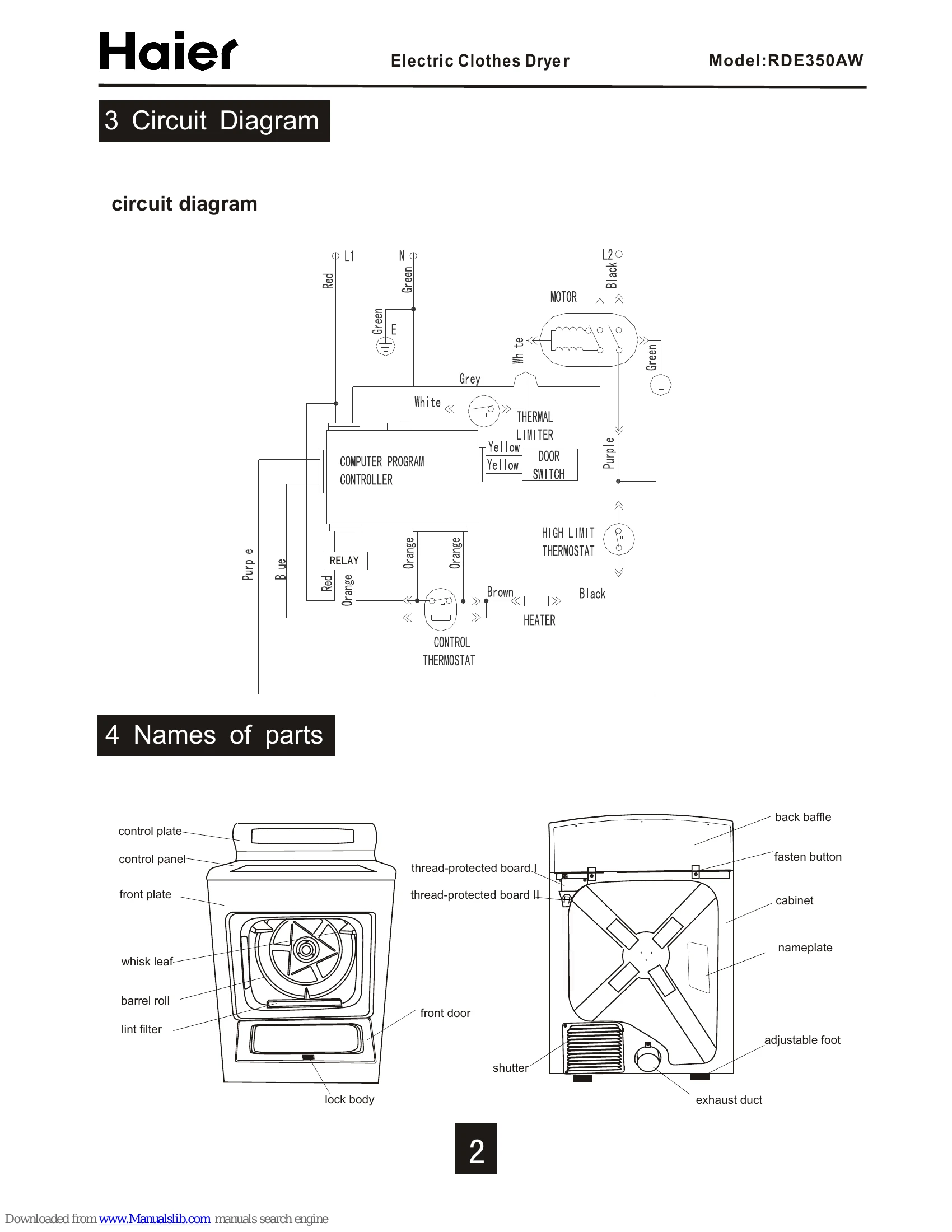
| 1 | Confirm power failure, power down-lead connection, and switch | Check and replace the power down-lead | |
| 2 | Check voltage between L, N, E | No | Check and replace the power down-lead |
| 2 | Check voltage between L, N, E | Yes | Pull the power |
| 3 | Check if the computer program panel is on | No | Check and replace the computer program panel |
| 4 | Check if the thermal limiter is on | The resistance is infinite | Replace the thermal limiter |
| 4 | Check if the thermal limiter is on | The resistance is 0 | Push down the searching unit and check if the door switch is on |
| 5 | Push down the searching unit and check if the door switch is on | The resistance is infinite | Replace the door switch |
| 5 | Push down the searching unit and check if the door switch is on | The resistance is 0 | While pushing down the start button, measure the resistance between the two joints to judge whether it is on or off |
| 6 | Measure resistance between two joints | Yes The resistance is 0 | Check if the control thermostat and high limit thermostat are good |
| 6 | Measure resistance between two joints | The resistance is infinite | Replace the temperature fuse |
| 7 | Check if the control thermostat and high limit thermostat are good | No | Replace the control thermostat and high limit thermostat |
| 7 | Check if the control thermostat and high limit thermostat are good | Yes | Check if the heater is good |
| 8 | Check if the heater is good | The resistance is infinite | Replace the heater |
| 8 | Check if the heater is good | The resistance is not infinite | Check if the motor is good |
| 9 | Check if the motor is good | Check if the wire unit is good |
| Step | Action | Condition | Next Step |
|---|---|---|---|
| 1 | Switch on the power, push down the start button | Search the root of the noise | |
| 2 | Search the root of the noise | Check if these come from vibration between supporter and cabinet or abrasion between support wheel and bracket | |
| 3 | Check vibration/abrasion | Yes | Fasten the support bracket or replace the support wheel |
| 3 | Check vibration/abrasion | No | If there is a noise from the tensive spring |
| 4 | Check for noise from tensive spring | Yes | Check the tensive condition, replace the tensive spring |
| 4 | Check for noise from tensive spring | No | If there is metallic bangs because screws of heating ring become flexible |
| 5 | Check for metallic bangs | Yes | Fasten the heating ring and the fasten screw |
| 5 | Check for metallic bangs | No | If there is gratings between the impeller and the worm shell |
| 6 | Check for gratings | Yes | Adjust or replace the worm shell |