Brand: Haier
Category: Mobile Phone
Document Type: Manual
Language: EN
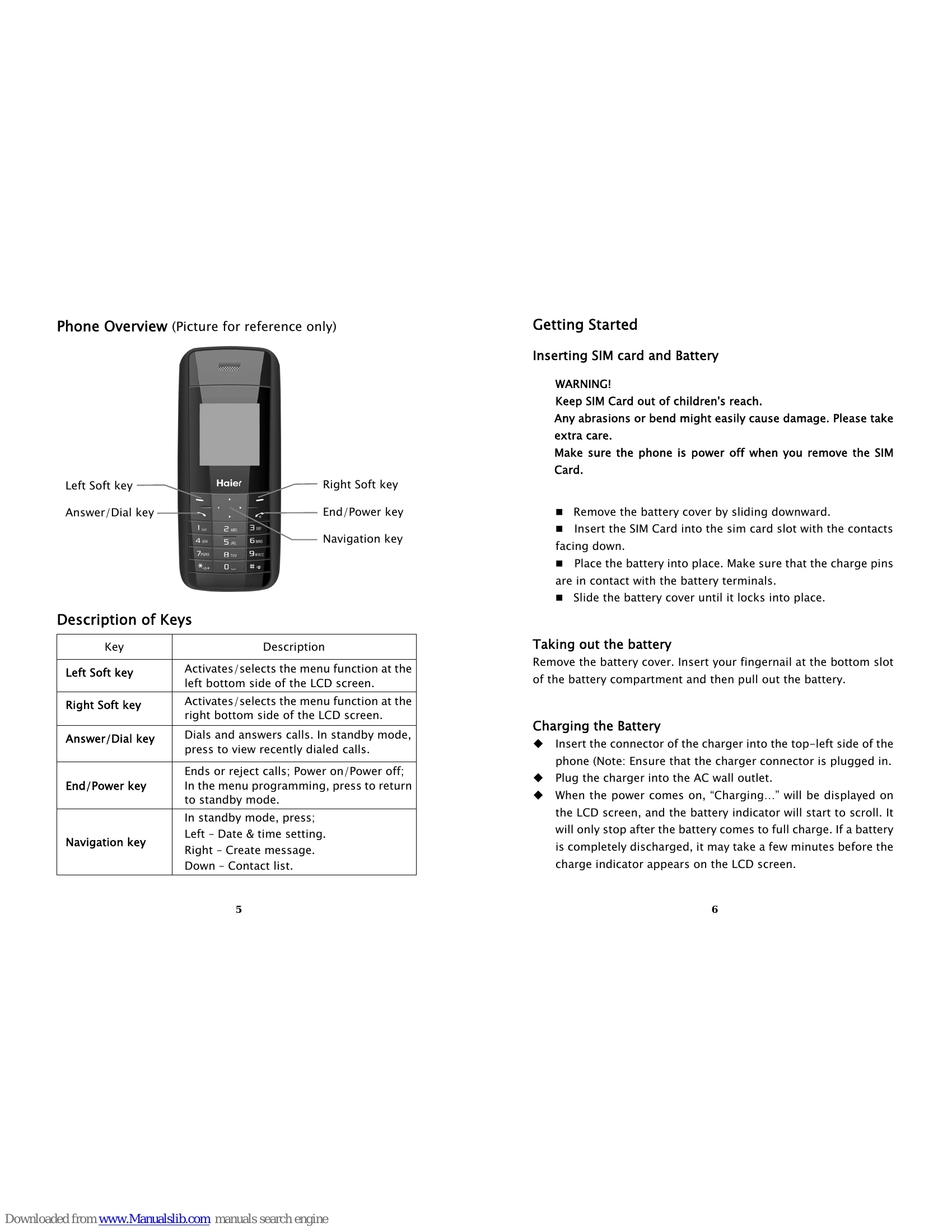
Brand: Haier
Category: Mobile Phone
Document Type: Manual
Language: EN
Uploaded: Nov. 21, 2025, 8:18 p.m.
None
Insert SIM card and Battery: Remove battery cover, insert SIM card with contacts facing down, place battery, and slide cover until it locks. Ensure the phone is powered off before removing the SIM card.
Charging the Battery: Insert the charger into the phone and AC outlet. "Charging..." will display on the LCD screen, and the battery indicator will scroll. It stops when fully charged. Use the phone in a well-ventilated environment with normal room temperature (5°C-40°C).
Turn on the phone: Press and hold the power key. If prompted, enter your phone password or PIN. The phone will search for the network.
Domestic Calls: Enter the phone number with area code and press the dial key.
Answer/Reject Call: Press the Answer/Dial key to answer, or the Right Soft key to reject an incoming call.
End Call: Press the End/Power key to end a conversation.
Create message: Navigate to Message window, select 'Create message'. Choose text input method (Guobi or traditional). Enter message and recipient number.
Inbox: View received messages. Use Option key for Reply, Forward, Call, Save number, or Delete.