Brand: Haier
Category: Mobile Phones
Document Type: Quick Start Guide
Language: EN
Brand: Haier
Category: Mobile Phones
Document Type: Quick Start Guide
Language: EN
Uploaded: Nov. 21, 2025, 8:35 p.m.
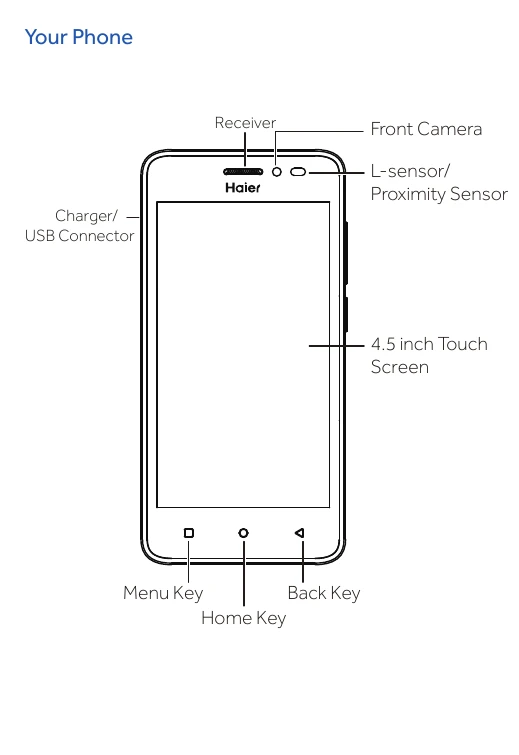
Identify the different parts of your Haier G32 phone, including the receiver, front camera, L-sensor/proximity sensor, charger/USB connector, 4.5-inch touch screen, menu key, home key, and back key on the front. The back of the phone features a back camera, flash, volume key, power key, back cover, and speaker.
Learn the functions of the navigation keys: Back (△) to return or exit, Home (○) to return to the home screen, and Recent Apps (□) to view recent applications. The volume key controls volume up/down and can mute calls or switch to silent/vibrate mode. The power key turns the screen on/off, turns the phone on/off (3S press), or restarts the phone (15S press).
Ensure the phone is powered off and the battery is removed before inserting SIM and Micro-SD cards. The phone supports dual SIM cards, with SIM 1 supporting 4G. It also supports external Micro-SD cards up to 128GB, which should be inserted correctly into the designated slot.
Navigate your phone using the home screen, which includes a notification bar at the top, application icons, and shortcut icons at the bottom.
Slide down the notification bar to view detailed notices. It also provides quick access to settings and brightness adjustment.
Understand the meaning of various status icons, such as network signal strength (4G, 3.5G, 3G, 2G), battery level, vibration mode, flight mode, incoming/held calls, missed calls, new SMS, computer connection, alarm, downloading, new voice mail, and synchronizing.