Brand: Haier
Category: Washing Machines
Document Type: Manual
Language: EN
Brand: Haier
Category: Washing Machines
Document Type: Manual
Language: EN
Uploaded: Nov. 21, 2025, 9:17 p.m.
Warranty details are not explicitly stated in this section, but a warranty card is included.
To operate the washing machine, first select a program using the Program Dial (J). You can then adjust settings like Spin Speed (C) and Wash Temp (H). For certain programs, additional functions like Delay (B), Extra Rinse (D), or Intense (F) can be selected. Press the Start/Pause button (I) to begin the wash cycle. The LED Display (E) will show remaining time and error messages. After the cycle, turn off the water supply and unplug the power cord. Open the door to prevent odors. Save energy by washing full loads and using appropriate temperatures and detergent amounts.
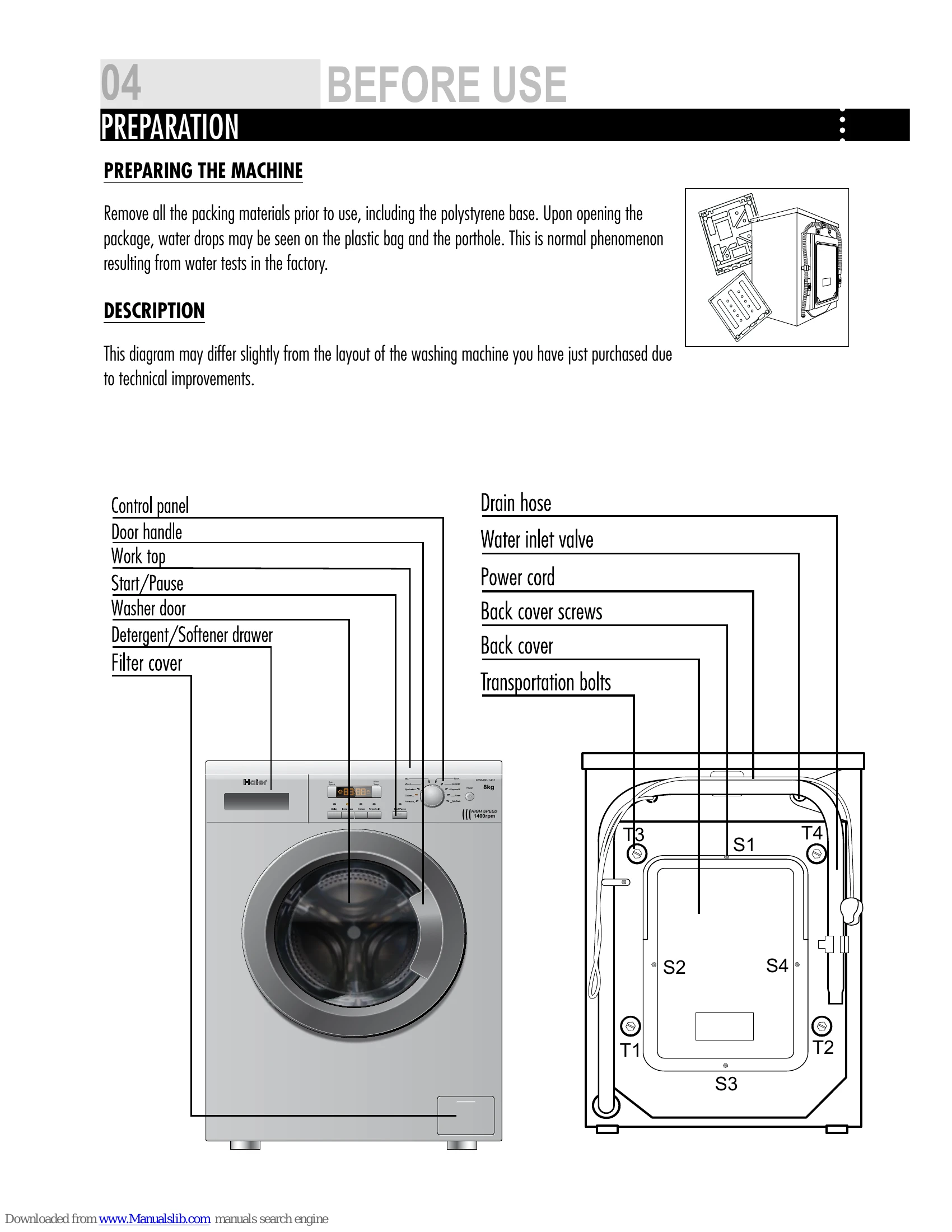
Regularly clean the detergent drawer and the filter. After each wash, turn off the water supply and unplug the machine. For long periods of non-operation, turn off the water supply, drain the machine, and leave the door ajar. Ensure transportation bolts are reinstalled when moving the machine.
| PROBLEM | CAUSES | SOLUTIONS |
|---|---|---|
| Washing machine fails to operate. | → Poor connection to the power supply. → Power failure. → The washer door is not properly closed. → Machine has not been switched on. |
Check connection to the power supply. Check the power supply. Close the washer door properly. Make sure the machine is switched on. |
| Washing machine cannot be filled with water. | → The "Start/Pause" button is not pressed. → Water tap is not turned on. → Water pressure is less than 0,03 MPa. → The inlet hose is kinked. → Water supply failure. → The program knob is not properly set. → The washer door is not properly closed. → The inlet hose filter is blocked. |
press the "Start/Pause" button. Turn on the water tap. Check water pressure. Check the inlet hose. Ensure the water supply. Set the program knob properly. Close the washer door properly. Unblock the inlet hose filter. |
| Machine is draining while being filled. | → The height of the drain hose is below 80 cm. → The drain hose is in water. |
Install drain hose within 80-100 cm of height. Make sure the drain hose is not in water. |
| Drainage failure. | → Drain hose is blocked. → Drain hose end is higher than 100 cm above the floor level. → The filter is blocked. |
Unblock the drain hose. Make sure the drain hose end is lower than 100 cm above floor level. Unblock the filter. |
| Strong vibration while spinning. | → Not all transportation bolts have been removed. → Washing machine is located on an uneven surface or is not level. → Machine load is over 7kg(8kg). |
Remove all transportation bolts. Make sure the washing machine is on an even surface and levelled. Reduce amount of laundry in the drum. |
| Operation stops before completing wash cycle. | → Water or electricity failure. | Check the power supply or water supply. |
| Operation stops for a period of time. | → Washing machine gives an error message. → Washing machine is in soaking cycle? |
Check display codes. Press the rinse hold button or the Start/pause button again to cancel it. |
| Excessive foam in the drum, which is spilled to the distribution drawer. | → The detergent is not a low-foaming type or for manual wash. → Excessive use of detergent. |
Check if your detergent is appropriate. Reduce amount of detergent in the distribution drawer. |
| Automatic adjustment of the washing time. | → The washing program duration will be adjusted | This is normal and doesn't affect the functionality. |
| Spinning fails | → Unbalance of the laundry | Add clothes or run a spinning program again. |