Manual for NAUTIZ X9

Manual for NAUTIZ X9

Brand: Handheld

Category: Rugged Mobile Computer

Document Type:

Language: EN
Uploaded: Aug. 10, 2025, 12:08 a.m.

Warranty Information

This product is warranted to be in good working order during the warranty period.

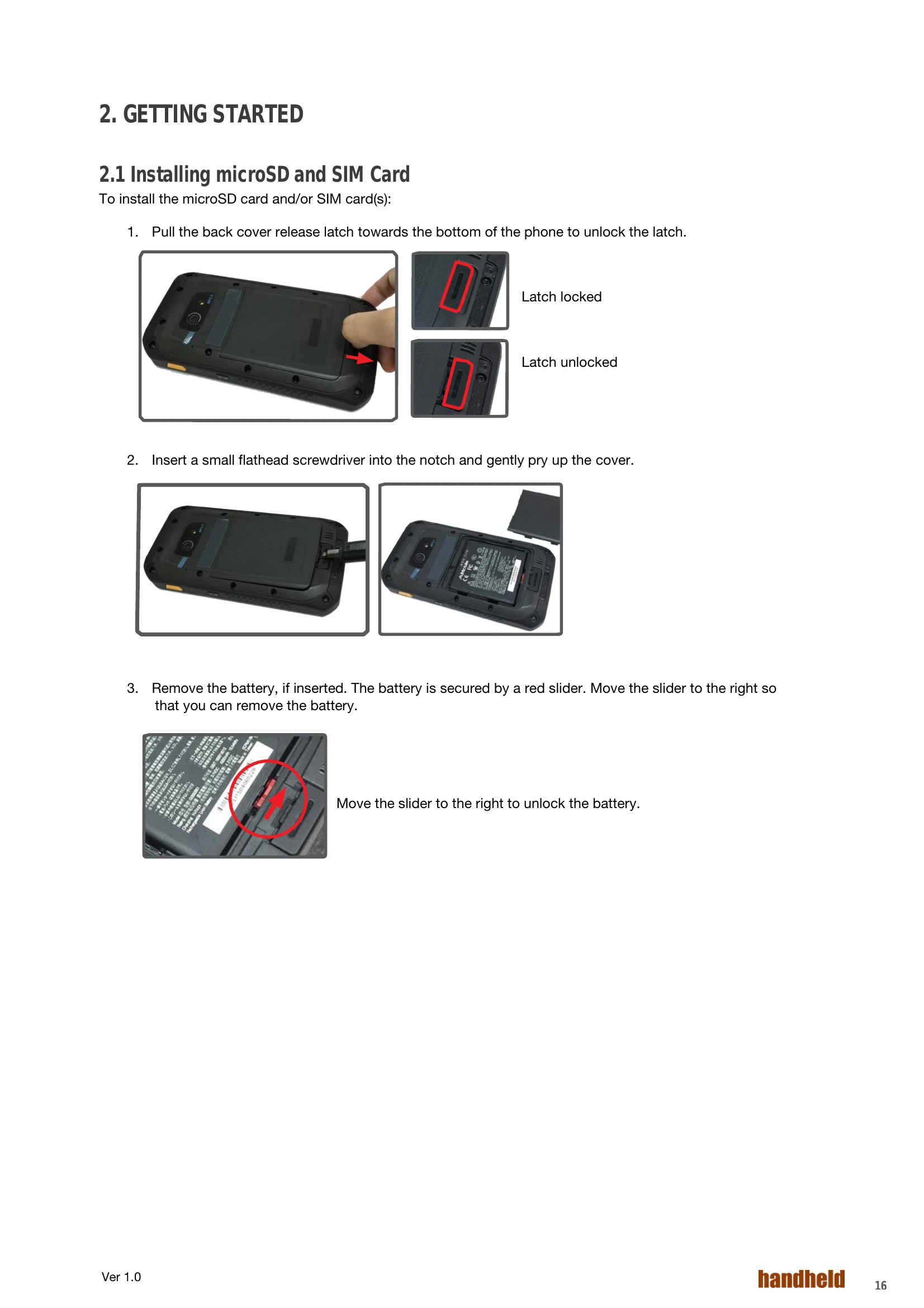
  • Installing microSD and SIM Card: Pull the back cover release latch, pry open the cover, remove/insert the battery, then insert SIM cards or microSD card. Secure the battery and replace the back cover.
  • Charging the Battery: Connect the provided power adapter or a computer USB cable to charge the device. Ensure the battery is fully charged for first-time use.
  • Optimizing Battery Life: Decrease LCD brightness, set a shorter screen timeout, turn off the display when not in use, exit unused applications, disable Wi-Fi/Bluetooth/GPS when not needed, and disconnect USB devices when not in use.
  • Using the Barcode Scanner: Press the scan keys on either side of the device to scan. For optional BarcodeScanWizard app, launch it, turn on the Scan button in the notification area, and press the on-screen scan button.
Privacy Policy