Brand: Hewlett Packard Enterprise
Category: Networking
Document Type: Installation Guide
Language: EN
Brand: Hewlett Packard Enterprise
Category: Networking
Document Type: Installation Guide
Language: EN
Uploaded: Nov. 21, 2025, 7:26 p.m.
Manual Publish Date: 2017-06-01
Warranty information is provided, including details for HPE Networking Products.
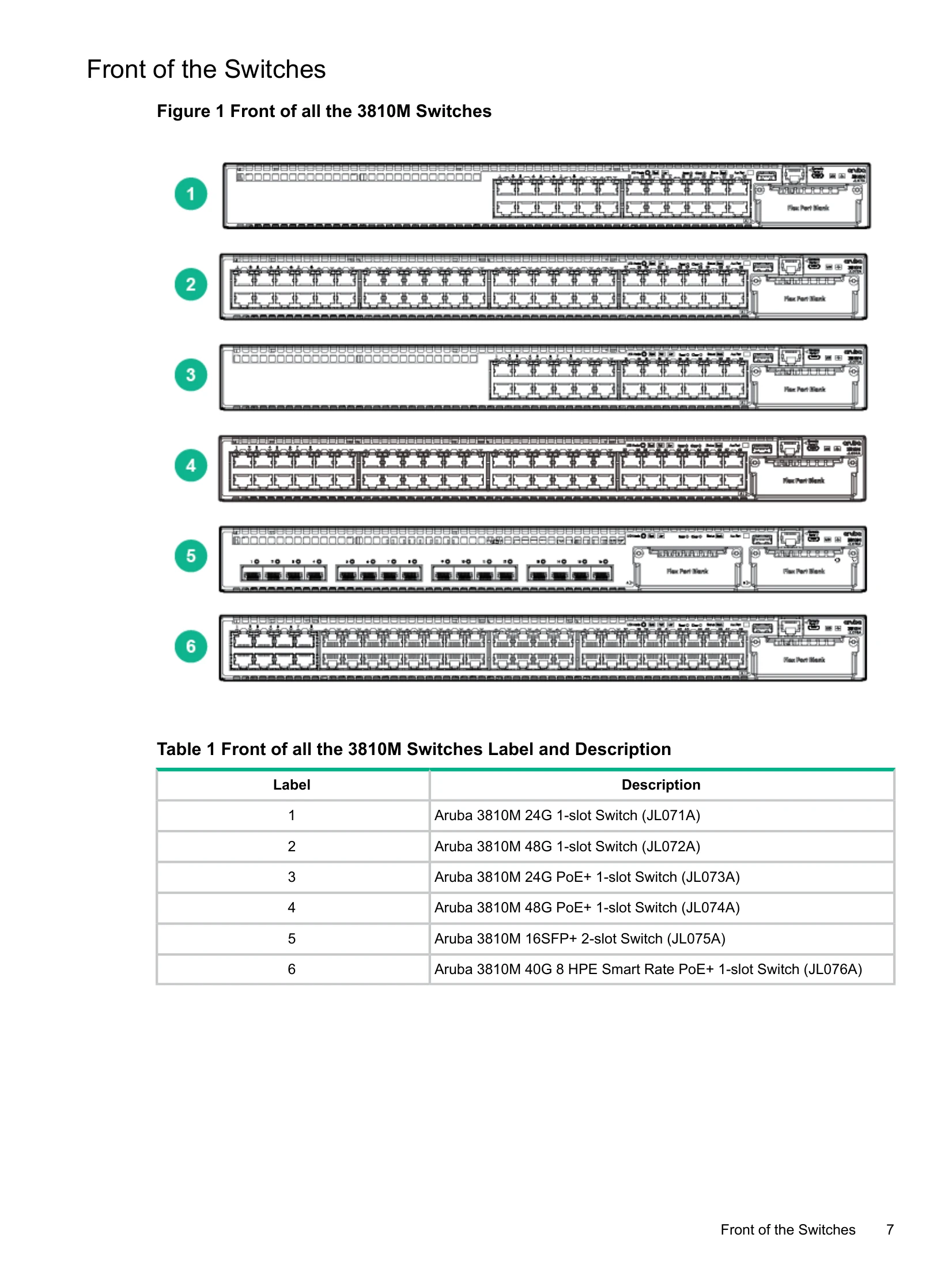
The Aruba 3810M are multiport switches that can be used to build high-performance switched networks. These switches are store-and-forward devices offering low latency for high-speed networking. The 3810M switches also support a field-replaceable Redundant Power Supply and fan tray, Power over Ethernet (PoE/PoE+) technologies, full network management capabilities and a flexible uplink port slot.
In addition, the 3810M switches support the FlexChassis Mesh feature for stacking the switches. When 3810M Stacking Modules (JL084A) are installed in the switches, any combination of up to ten 3810M switches can be stacked together via high-speed backplane cables to form a single extended virtual switch.
| Switch LEDs | Function | State/Mode | Meaning |
|---|---|---|---|
| Port LEDs | To display the information for the port as selected by the LED Mode select button. When transceivers and SFPs are installed, this LED is also used to indicate that the installation has occurred by going on for two seconds then off. | Activity/Link | Shows port Activity and Link status. This is the DEFAULT. There is no dedicated mode LED indicating this mode. The Mode LED function should return to this selection 10 minutes after the last press of the LED Mode button. |
| Speed | Shows port speed configuration. | ||
| PoE | Shows PoE information. | ||
| User | Shows User selectable User behavior. | ||
| Slow Flash Orange* | The corresponding port has failed its self-test. Flashes simultaneously with the Global Status LED flashing orange. | ||
| Activity/Link Mode Selected | Port LEDs are displaying Link status and network activity information simultaneously. Activity/Link Mode is the default mode and is in effect unless another LED mode has been selected. | Half-Bright Green | The port is enabled and receiving a Link indication from the connected device. The percentage of time that the LED is full-bright is roughly proportional to the percentage of full bandwidth utilization of the port. Half-Bright Green port Link indication remains on as Activity flickers from half-bright to full-bright. |
| Activity Flicker Green | The percentage of time that the LED is full-bright is roughly proportional to the percentage of full bandwidth utilization of the port. | ||
| Slow Flash Orange* | The corresponding port has failed its self-test. Flashes simultaneously with the Global Status LED flashing orange. | ||
| Speed Mode Selected | Port LEDs are displaying the connection speed at which each port is operating. | Off | The Port is disabled, not connected, or not receiving link. |
| Fast Flash Green** | The port is operating at 40 Gbps. | ||
| On Green | The port is operating at 10 Gbps. | ||
| Triple Blink Green | The port is operating at 5 Gbps. (HPE SMART RATE ports only) | ||
| PoE Mode Selected | Port LEDs are displaying PoE information. | Double Blink Green | The port is operating at 2.5 Gbps. (HPE SMART RATE ports only) |
| Slow Flash Green* | The port is operating at 1 Gbps. | ||
| Off | The port is not Linked, or is operating at 10 or 100 Mbps. | ||
| On Green | The port is providing PoE power. | ||
| User Mode Selected | Mode currently active only in stacked configurations. Used to display the number of members in a stack and their current status. The status information is sticky and if a unit's status changes while in USER mode, you must exit and re-enter USER mode to get the updated status. | On Orange | PoE is disabled on the port. |
| Fast Flash Orange** | The port is denied power or is detecting an external PD fault. | ||
| Slow Flash Orange* | The port has an internal hardware failure. Flashes simultaneously with the Global Status LED flashing orange. | ||
| Off | The port is not providing PoE power. | ||
| On Green | Stack Member exists in the stack and is operational. | ||
| Slow Flash Green* | Indicates the Member # of the chassis. | ||
| Fast Flash Green** | Indicates the Member # of the Commander of the stack. | ||
| On Orange | Stack Member is currently booting or has a fault that is preventing it from communicating. | ||
| Slow Flash Orange* | Stack Member is in a known fault condition (i.e. Fan fault, PSU fault, etc.). The Global Status LED on all stack members will also Slow Flash Orange. | ||
| Fast Flash Orange** | Stack Member is in a Alert condition (i.e. Overtemp, PoE Over subscript, etc.). The Global Status LEDs on all stack members will remain in normal operational. | ||
| Off | Stack Member does not exist in the stack configuration. |