Brand: HITACHI
Category: Audio
Document Type: Manual
Language: EN
Brand: HITACHI
Category: Audio
Document Type: Manual
Language: EN
Uploaded: Nov. 21, 2025, 9:23 p.m.
Refer to the warranty information provided separately or contact the retailer for details.
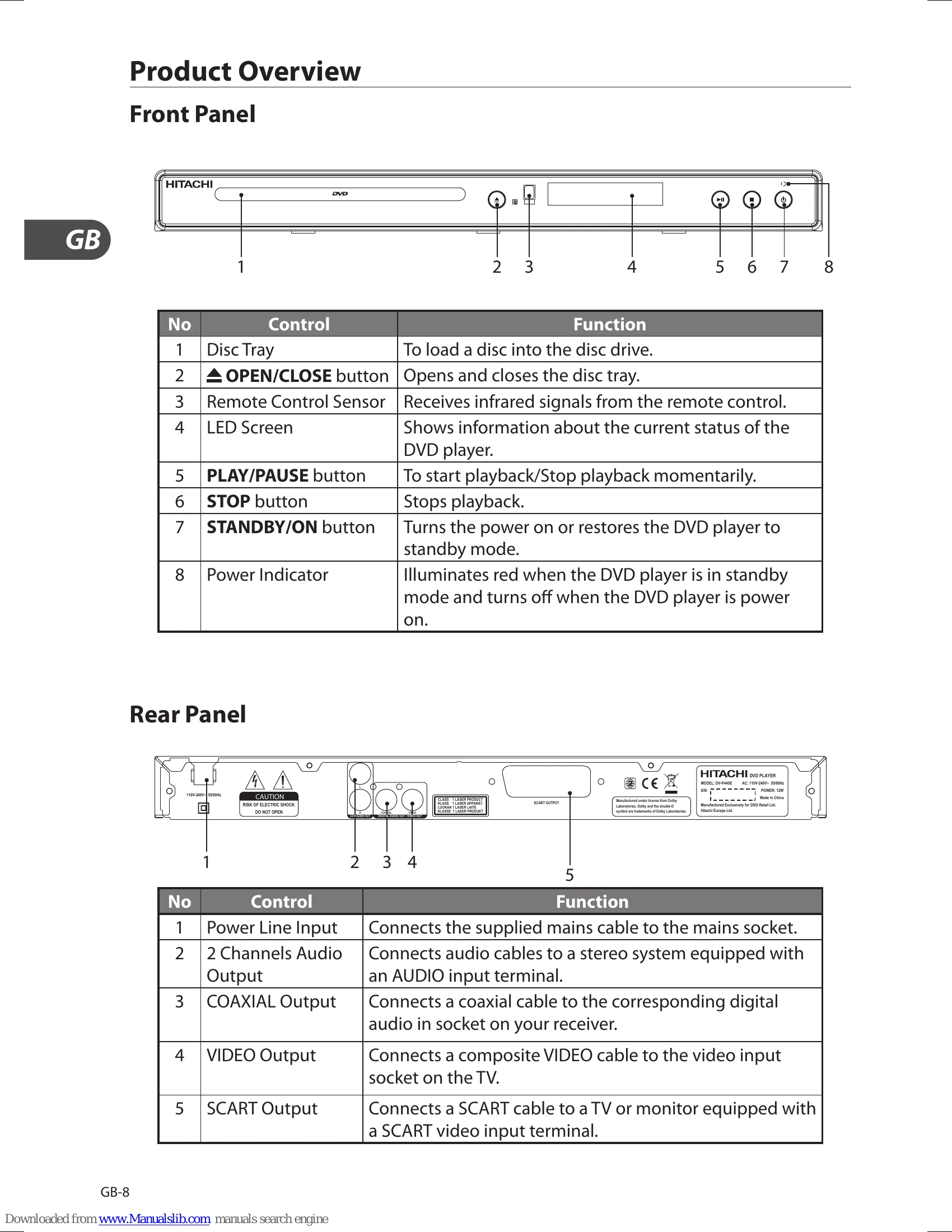
Press the STANDBY/ON button on the DVD player or the remote control. Turn on the TV, it will automatically switch to SCART mode and the opening screen of the DVD player will show on the TV.
| Problem | Solution |
|---|---|
| No operation can be performed with the remote control. | • Check the batteries in the remote control. They may need replacing. • Operate the remote control at a distance of no more than 6m. • Remove batteries and hold down one or more buttons for several minutes to drain the microprocessor inside the remote control to reset it. Reinstall batteries and try to operate the remote control again. |
| Disc does not play. | • Ensure that the disc is installed with the label side facing up. • Check the region number of the DVD. |
| Disc Menu does not appear. | • Check if the disc has a Menu. |
| No power | • Press the STANDBY/ON ⍇ button on the DVD or on the Remote Control to turn on the unit. • Make sure the mains socket has power. |
| The picture is distorted or turns in black and white colour during playback. | • The disc does not match with the TV colour system standard (PAL/ NTSC). • The disc is dirty. Clean the disc. • Sometimes a small amount of picture distortion may appear. This is not a malfunction of the unit. |
| The screen aspect ratio cannot be changed. | • The Screen Aspect Ratio is fixed on your DVDs. • Depending on the TV, it may not be possible to change the Screen Aspect Ratio. • This is not a problem with the player. |
| No audio. | • Make sure you have securely connected the DVD player and other devices. • Make sure the TV and the amplifier are in good condition and are setup properly. |
| Not able to select some items in the setup/ system menu. | • Press the STOP ■ button twice before selecting the setup/system menu. • Depending on the disc availability, some menu items cannot be selected. |
| The DVD player does not start the playback. | • Insert a readable disc with the playback side facing down. • Check the disc type, colour system (PAL/NTSC) and region code. • Check for any scratches or smudges on the disc. • Press the SETUP button to turn off the setup menu . • Enter the password in order to change the parental rating level or to unlock the disc for playback. • Moisture may have condensed inside the system. Remove the disc and leave the system turned on for about an hour. • Disconnect the mains cable from the mains socket for a few minutes. Reconnect the mains cable and try to operate again as usual. |
| Picture freezes momentarily during playback. | • Check the disc for fingerprint or scratches, and clean with a soft cloth wiping from the centre to the edge. |