Brand: HITACHI
Category: Camcorder
Document Type: Manual
Language: EN
Brand: HITACHI
Category: Camcorder
Document Type: Manual
Language: EN
Uploaded: Nov. 21, 2025, 7:25 p.m.
Power Supply: Use the specified power source. Ensure connectors are securely plugged in and unplugged with power off.
Handling: Avoid removing covers. Be careful not to let dust or water enter the camera when installing or removing lenses.
Installation & Storage: Avoid direct sunlight, rain, snow, combustible gases, extreme temperatures (-10 to 50°C), humidity, dust, vibration, shock, or strong magnetic fields.
Cleaning: Use a blower or lens brush for dust. Wipe the case with a dry cloth; use a neutral detergent solution if necessary. Avoid using solvents.
Camera Operation: Settings can be adjusted via the rear control keys (SETUP, ▲, ▼, ◀, ▶, SET). Settings are saved to memory.
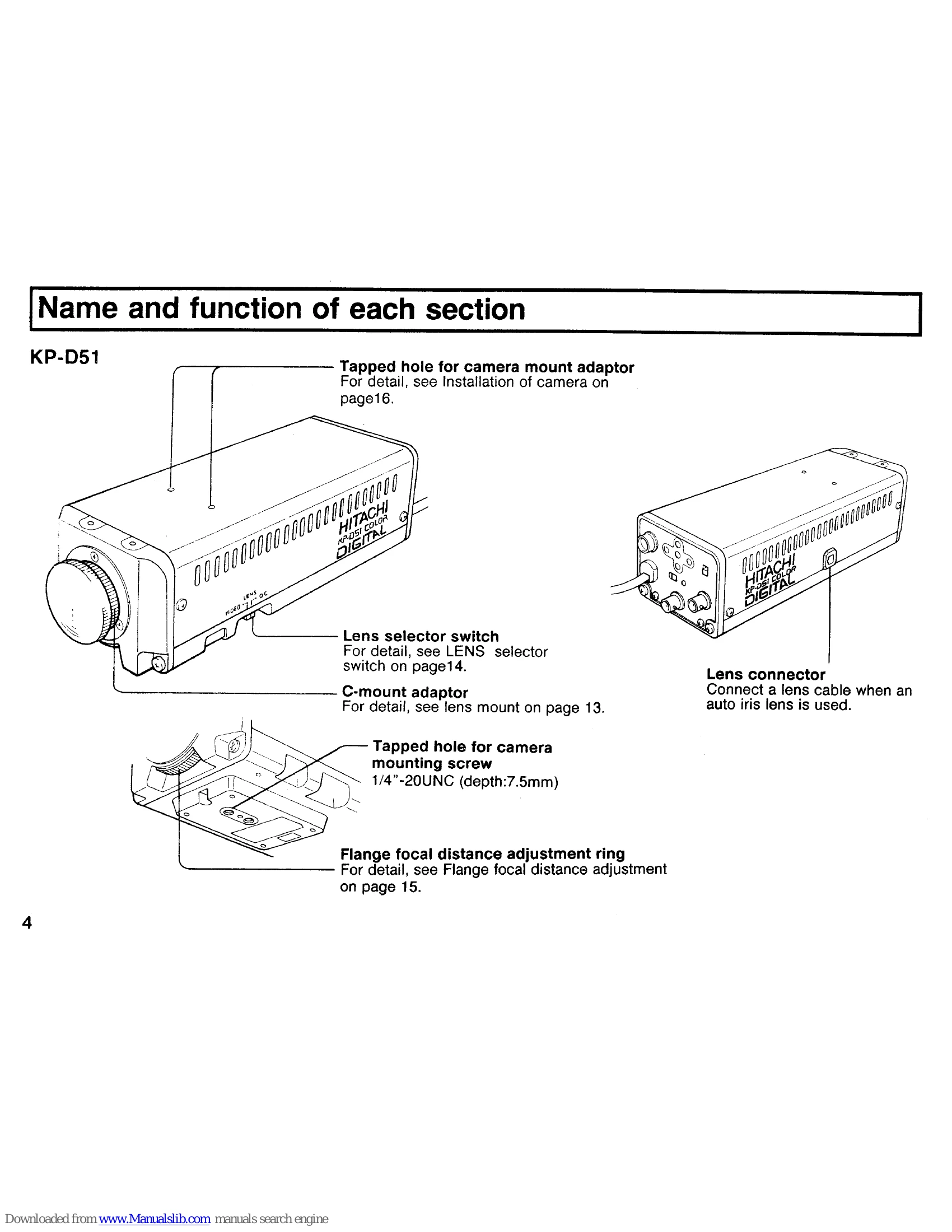
Lens Usage: Select the appropriate lens selector switch setting (VIDEO or DC). Connect auto-iris lenses using the lens cable and plug.
Flange Focal Distance Adjustment: Adjust for sharp focus with different lenses, especially zoom lenses.
Menu Navigation: Access setting menus (Main, Character, Light, AGC, White Balance, Shutter, Sync, Special) to configure camera parameters.