Brand: HITACHI
Category: Camcorder
Document Type: Manual
Language: EN
Brand: HITACHI
Category: Camcorder
Document Type: Manual
Language: EN
Uploaded: Nov. 21, 2025, 6:29 p.m.
Refer to your dealer for information on maintenance, adjustments, and warranty.
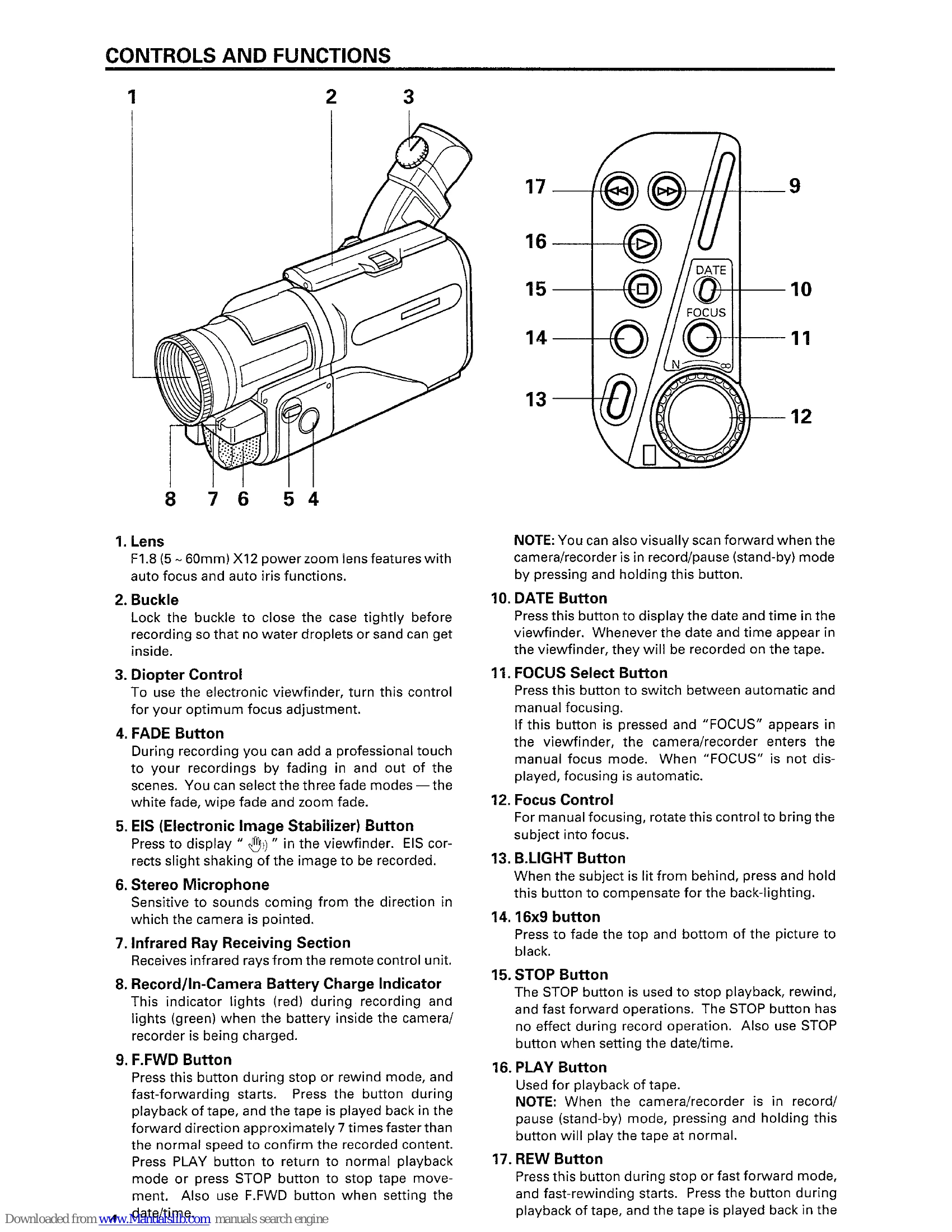
This manual covers the operation of the HITACHI VM-H70E/VM-H71E 8mm Video Camera/Recorder. Key functions include:
| Symptom | Check Point & Correction |
|---|---|
| Cassette holder cannot be opened when you press the EJECT button. | Connect the power source. |
| Cassette cannot be inserted into cassette compartment. | Load cassette in direction indicated by arrow on cassette. The cassette window must be towards the outside. |
| Picture does not appear in the viewfinder. | Remove the lens cap. |
| The camera/recorder cannot go into the recording mode, even when Start/Stop button is pressed. | Slide OPERATE switch to "CAM". Check the record-protect tab on the cassette. See page 22 for details. Set OPERATE switch to "CAM" position. Push the cassette holder embossed PUSH to close it. |
| PLAY button cannot be engaged. | The " " indication in the viewfinder flashes to indicate battery is discharged. Try another battery or charge the battery. |
| Interference on playback picture. (The TV is connected to the camera/recorder using the RF output adapter.) | Set OPERATE switch to "VIDEO" position. When you see the playback picture on your TV, adjust fine tuning knob on television set to obtain the best picture. |
| Picture is out of focus. Auto-focus does not operate correctly. | Press the FOCUS select button to erase "FOCUS" from the viewfinder. Auto-Focus does not operate correctly if a special-effects filter is attached or with the objects shown on page 25. |
| Power is interrupted. | If the record pause mode continues for more than 5 minutes, power is shut off automatically. Press the Start/Stop button to restore the power. |
| Power is not turned on and no button operations are accepted. | Remove the power source, and after about one minute, push the reset switch (behind the jack cover) gently using a toothpick, etc. until you feel a click. The display will be reset. Then set the information again. |
| "TAPE" appears in the viewfinder. | Have you moved the camera/recorder or cassette from a cold place to a warm place so that its temperature changed abruptly? If the temperature has changed, remove the cassette and set the OPERATE switch to "OFF", then wait for about one hour. |
| Playback volume is low or no sound recorded. | Remove the cassette and then try to reinsert; remove it several times. If the indication is still shown in the viewfinder, use a cleaning tape to clean the heads and replace the cassette. |
| Sound is heard only from one channel or no sound was recorded. | Recording was done with the microphone cap attached. If water splashes directly on the microphone, no sound may be recorded. Dry the microphone thoroughly and make a trial recording before using the camera/recorder. |