Brand: HITACHI
Category: Digital Camera
Document Type:
Language: EN
Brand: HITACHI
Category: Digital Camera
Document Type:
Language: EN
Uploaded: Aug. 9, 2025, 11:48 p.m.
This product is exclusively available through Argos and requires returning to Argos for repair/replacement.
| Problem | Possible Cause | Solution |
|---|---|---|
| Camera does not turn on | Battery is depleted. | Charge the battery or use a new battery. |
| Cannot capture images | Memory card is full. | Insert a new memory card or delete unwanted images. |
| Images are blurry | Subject is too close or moving too fast for focus. | Move the camera further away from the subject or use a faster shutter speed setting. |
| LCD display is blank | Camera is in sleep mode. | Press any button to wake up the camera. |
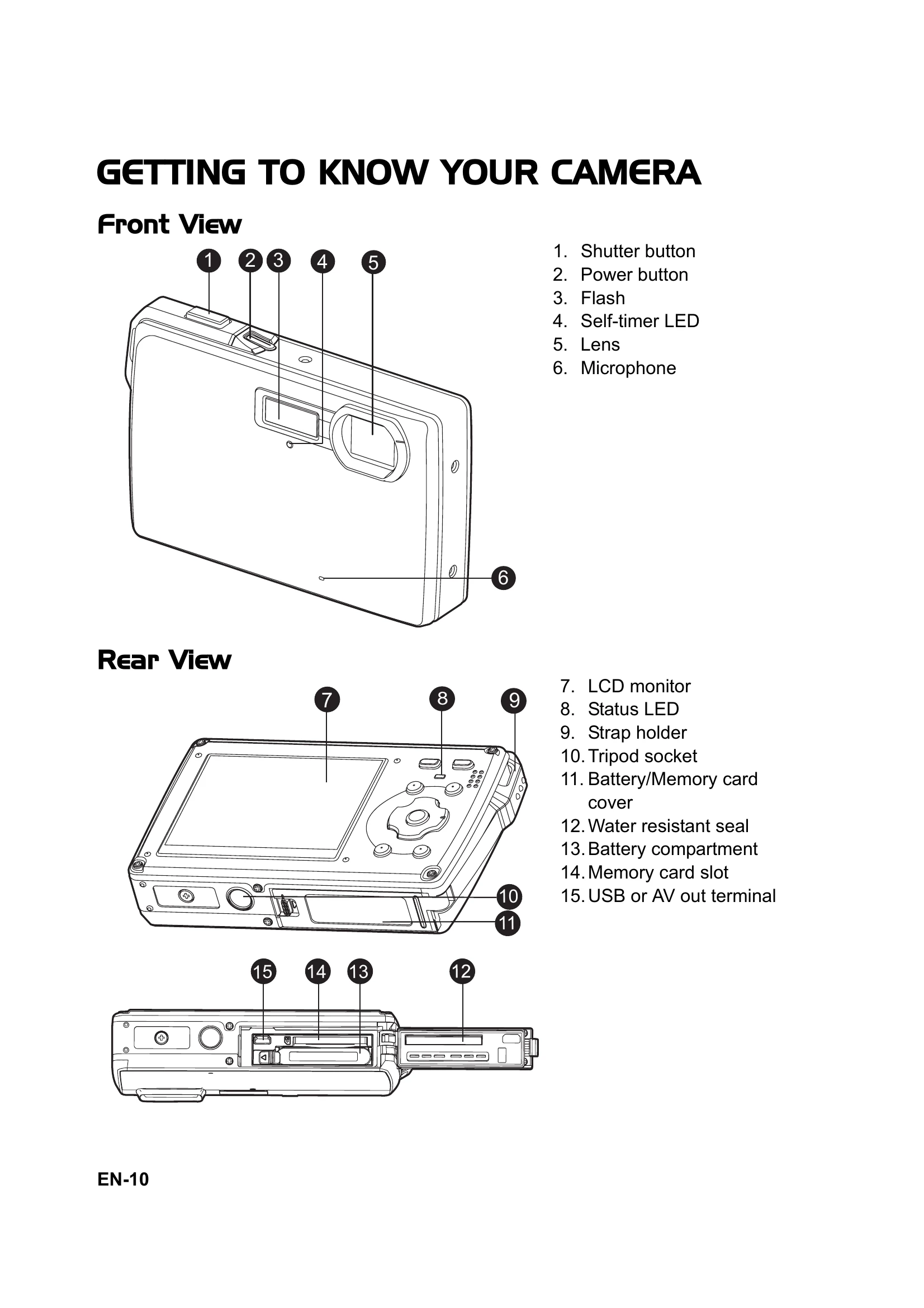
| Water resistance failure | Water resistant seal is damaged or cover is not properly closed. | Inspect the seal for damage and ensure the cover is securely locked. Contact service center if damaged. |