Manual for 13 GA1B

Manual for 13 GA1B

Brand: HITACHI

Category: TV

Document Type: Manual

Language: EN
Uploaded: Nov. 21, 2025, 7:39 p.m.

Warranty Information

Refer to your dealer for specific warranty information.

Basic Operation

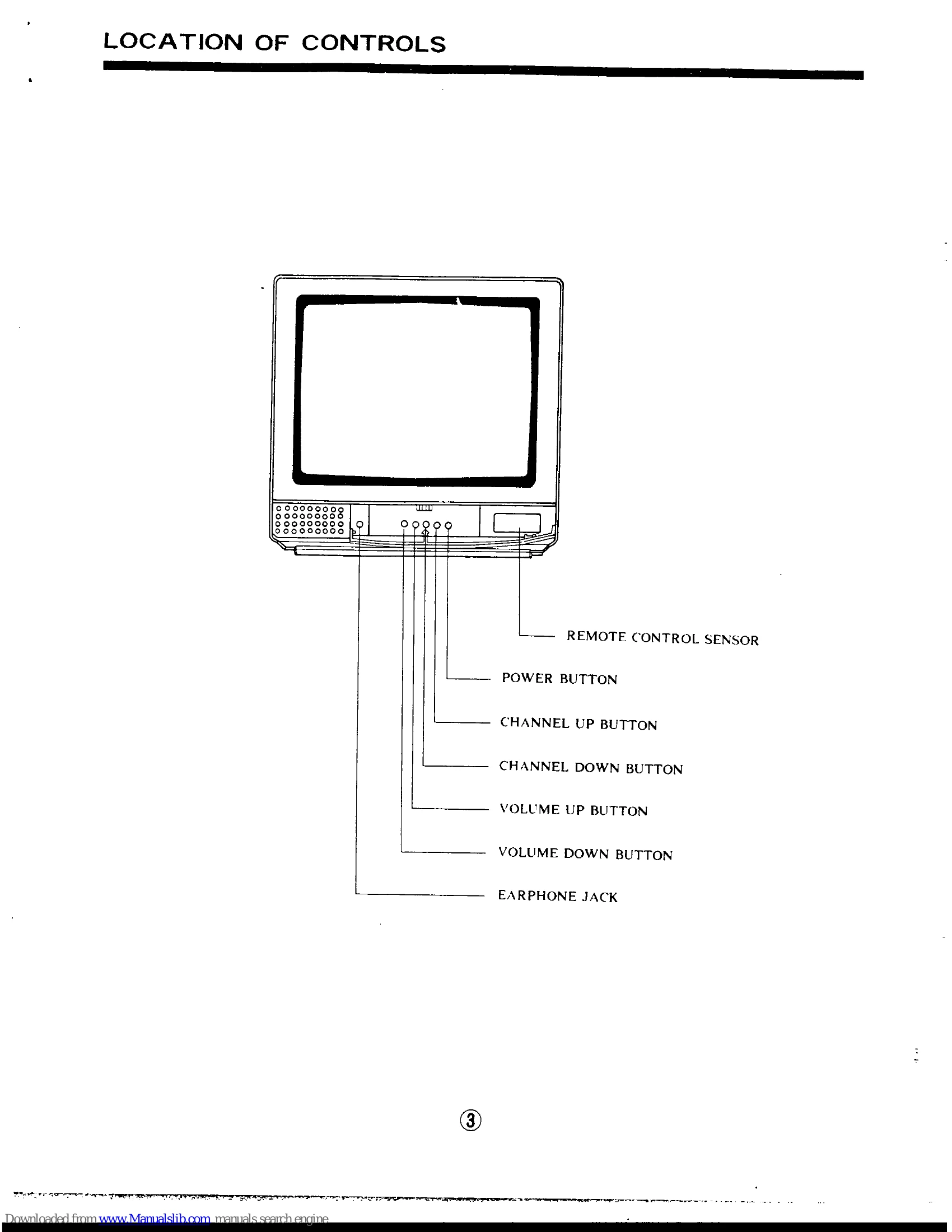
Turning TV On: Press the POWER button to turn the set ON or OFF.

Channel Selection: Use the CHANNEL UP/DOWN buttons to change channels. The channel number appears on screen briefly.

Volume Control: Use the VOLUME UP/DOWN buttons to adjust sound level. The volume level appears on screen briefly.

Remote Control Operation

Power: Turns the TV on or off.

Channel Number Buttons: Enter a two or three digit number to select a channel.

Recall Button: Returns to the previously viewed channel.

Last Channel (LST-CH): Toggles between the current and last viewed channel.

Menu Button: Accesses the TV's special features and settings.

Enter Button: Confirms selections within the menu system.

Menu Select Buttons (Up/Down/Left/Right): Navigate through menu options.

Channel Up/Down Buttons: Selects the next higher or lower channel.

Volume Buttons: Adjusts the sound volume.

Mute Button: Instantly turns the sound off and on.

Troubleshooting and error codes

SYMPTOMS CHECK THESE ITEMS AND TRY THESE ADJUSTMENTS
No picture, no sound
  • Be sure external connection is correct
  • Be sure power cord is plugged in
  • Be sure TV is switched "ON"
  • Try another channel (station trouble)
  • Check outside antenna
  • Check antenna for broken lead-in wire
  • Check antenna connections (back of TV)
  • Check for local interference
  • Adjust Contrast control
  • Adjust Brightness control
  • Adjust Color control
  • Adjust Tint control
  • Adjust Volume control
  • Adjust indoor antenna
Sound OK, poor picture
  • Try another channel (station trouble)
  • Check outside antenna
  • Check antenna for broken lead-in wire
  • Check antenna connections (back of TV)
  • Check for local interference
  • Adjust Contrast control
  • Adjust Brightness control
  • Adjust Color control
  • Adjust Tint control
  • Adjust indoor antenna
Picture OK, poor sound
  • Adjust Volume control
Picture blurred
  • Check outside antenna
  • Check antenna for broken lead-in wire
  • Check antenna connections (back of TV)
  • Check for local interference
  • Adjust Contrast control
  • Adjust Brightness control
  • Adjust Color control
  • Adjust Tint control
  • Adjust indoor antenna
Lines or streaks in picture
  • Check outside antenna
  • Check antenna for broken lead-in wire
  • Check antenna connections (back of TV)
  • Check for local interference
  • Adjust Contrast control
  • Adjust Brightness control
  • Adjust Color control
  • Adjust Tint control
  • Adjust indoor antenna
Poor reception on some channels
  • Try another channel (station trouble)
  • Check outside antenna
  • Check antenna for broken lead-in wire
  • Check antenna connections (back of TV)
  • Check for local interference
  • Adjust Contrast control
  • Adjust Brightness control
  • Adjust Color control
  • Adjust Tint control
  • Adjust indoor antenna
Picture rolls vertically
  • Check outside antenna
  • Check antenna for broken lead-in wire
  • Check antenna connections (back of TV)
  • Check for local interference
  • Adjust Contrast control
  • Adjust Brightness control
  • Adjust Color control
  • Adjust Tint control
  • Adjust indoor antenna
No color
  • Adjust Color control
  • Adjust Tint control
Poor color
  • Adjust Color control
  • Adjust Tint control
Privacy Policy