Manual for CG32W460AN

Manual for CG32W460AN

Brand: HITACHI

Category: TV

Document Type: Manual

Language: EN
Uploaded: Nov. 21, 2025, 7:29 p.m.

Manual Publish Date: 2004-07-13

Warranty Information

Refer to dealer for warranty information.

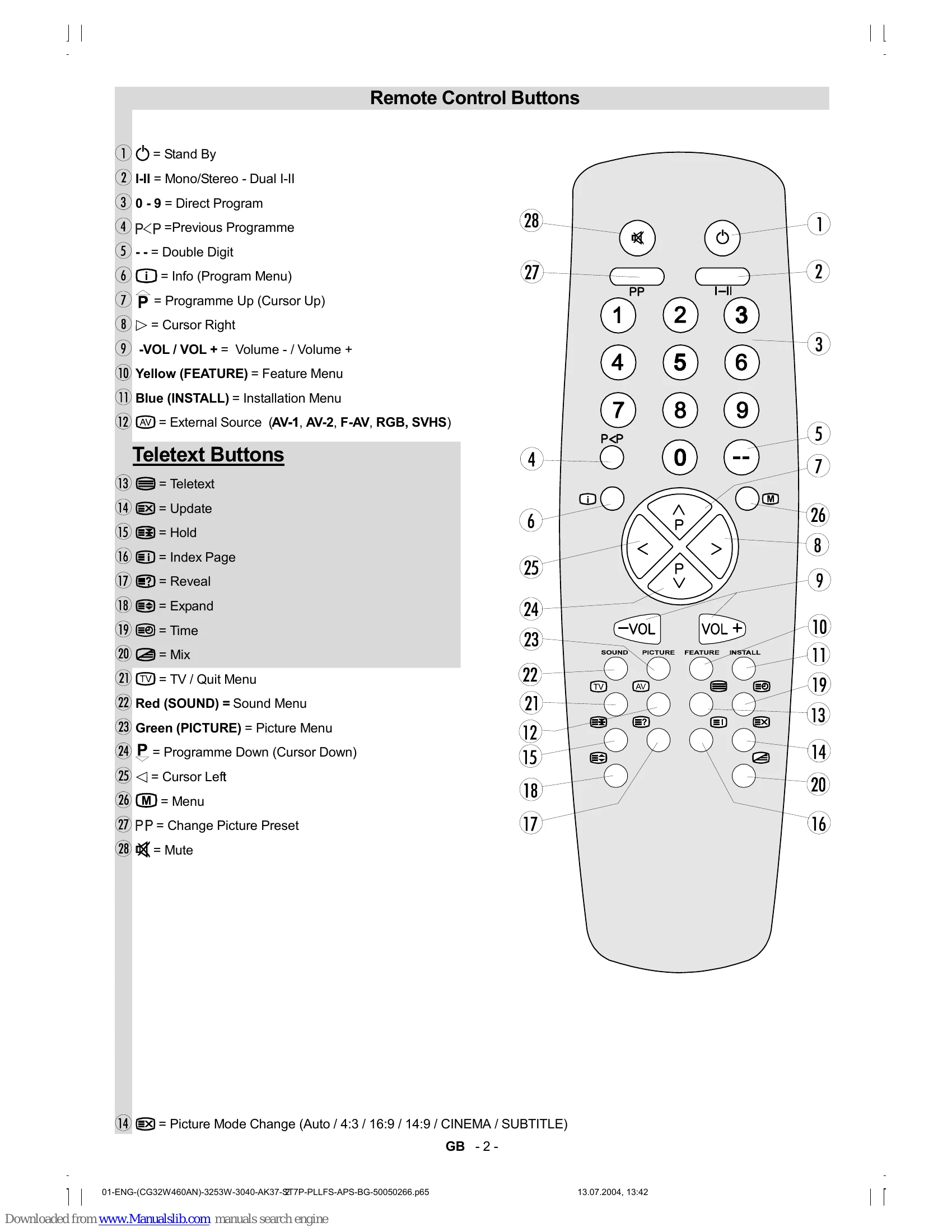
Remote Control Buttons

  • Stand By (①): Turns the TV on/off.
  • Mono/Stereo (I-II) (②): Selects audio mode.
  • Direct Program (③): Enter numbers 0-9 to select channels.
  • Previous Programme (P Switches to the last viewed channel.
  • Double Digit (--): For channels above 9.
  • Info (i) (⑥): Displays program information.
  • Programme Up/Down (⑦, ⑦): Navigates through channels.
  • Cursor Right (⑧): Navigates menus.
  • Volume +/- (VOL/VOL+) (⑨): Adjusts volume.
  • Feature Menu (Yellow) (⑩): Accesses feature settings.
  • Installation Menu (Blue) (⑪): Accesses installation settings.
  • AV Source (AV) (⑫): Selects external input.
  • Teletext (13): Activates Teletext.
  • Update (14): Refreshes Teletext/information.
  • Hold (15): Pauses Teletext.
  • Index Page (16): Goes to the Teletext index page.
  • Reveal (17): Uncovers hidden Teletext information.
  • Expand (18): Enlarges Teletext text.
  • Time (19): Displays current time via Teletext.
  • Mix (20): Mixes TV picture with Teletext.
  • TV/Quit Menu (TV) (21): Returns to TV mode or quits menus.
  • Sound Menu (Red) (22): Accesses sound settings.
  • Picture Menu (Green) (23): Accesses picture settings.
  • Programme Down (P) (24): Navigates down channels/menus.
  • Cursor Left (25): Navigates menus.
  • Menu (M) (26): Opens the main menu.
  • Change Picture Preset (PP) (27): Selects a predefined picture setting.
  • Mute (28): Silences the audio.

Preparation & Safety

  • Place TV on a solid surface with adequate ventilation (100mm gaps).
  • Read operating instructions before use.
  • Handle with care, especially glass panels.
  • Do not modify the plug; use approved extension leads.
  • Do not operate if damaged or if in doubt.
  • Avoid water spills and do not place liquids on the TV.
  • Do not block ventilation slots to prevent overheating.
  • Use only manufacturer-approved stands and fixings.
  • Do not expose to rain or moisture.
  • Never let children push objects into openings.
  • Disconnect power and aerial during storms.
  • Refer servicing to qualified personnel.

Connecting Equipment

  • Connect peripherals like VCRs, decoders, cameras, and headphones to the appropriate AV or RF inputs.
  • Use SCART cables for Euroconnector connections (EXT.1, EXT.2).
  • Front AV input available for cameras and camcorders.
  • NTSC playback supported via Euroconnector or front RCA jack.

Basic Operation

  • Switching On/Off: Use the power button on the front or the 'Stand By' button on the remote. The LED indicates standby (RED) or on (GREEN).
  • A.P.S. (Automatic Programming System): Automatically searches and sorts TV channels upon first use. Can be cancelled.
  • Operating with TV buttons: Volume and Program selection can be done using front panel buttons.
  • Operating with Remote Control: All functions are accessible via the remote handset.
  • Menu System: Press 'M' to access Main Menu. Use navigation buttons to select Sound, Picture, Feature, Install, or Program menus.
  • Sound Menu: Adjust Volume, Balance, Mode (Mono/Stereo/Dual), AVL, Effect, Equalizer, and Headphone settings.
  • Picture Menu: Adjust Brightness, Contrast, Colour, Sharpness, Mode (picture size/aspect ratio), and Hue.
  • Feature Menu: Access Sleep Timer, Child Lock, Language, and AV-2 Output settings.
  • Install Menu: Fine-tune channels and perform searches.
  • Programme Menu: Manage channels, including naming, deleting, inserting, and Autostore.
  • Teletext: Access information services by pressing the TELETEXT button. Navigate pages using digit buttons, 'Up'/'Down' arrows, or Fastext colors.

Tips

  • Care of Screen: Clean with a soft, damp cloth. Avoid abrasives.
  • Poor Picture: Check TV system, aerial, frequency, and avoid nearby audio equipment.
  • No Picture: Ensure aerial is connected properly, plugs are secure, and the correct remote keys were used.
  • Sound Issues: Check mute, balance settings, and speaker connections.
  • Remote Control Issues: Press 'TV' button, check batteries, or use front panel buttons.
  • No Solution: Power cycle the TV. Contact service personnel for repairs.

Specifications

  • TV Broadcasting: PAL B/G
  • Receiving Channels: VHF, UHF, Hyperband, Cable TV (S1-S20/S21-S41)
  • Preset Channels: 100
  • Channel Indicator: On Screen Display
  • RF Aerial Input: 75 Ohm (unbalanced)
  • Operating Voltage: 220-240V AC, 50 Hz
  • Audio Output: German + Nicam Stereo
  • Audio Output Power: 2 x 10 WRMS (%10 THD)
  • Power Consumption: 135W (max.)
  • Picture Tube: 32" 16:9 (82 cm.)
  • Dimensions (mm): D: 573, L: 880, H: 532
  • Weight: 46 kg

Troubleshooting and error codes

Problem Possible Solution
Poor Picture
  • Check TV system.
  • Ensure TV or aerial is not too close to loudspeakers or audio equipment.
  • Reposition aerial.
  • Check frequency settings.
  • Disconnect one peripheral if two are connected.
No Picture
  • Check aerial connection and cable.
  • Ensure correct plugs are used.
  • Press the correct remote control keys.
  • Consult your dealer if unsure.
Sound Issues
  • Check if the sound is muted (press the mute key).
  • Check speaker balance settings.
  • Ensure sound is coming from both speakers.
Remote Control Not Responding
  • Press the 'TV' button.
  • Check or replace batteries.
  • Use front panel buttons.
General Issues / No Solution
  • Switch the TV off and on again.
  • Contact service personnel for repairs.
Privacy Policy