Brand: Honeywell
Category: Other
Document Type: Manual
Language: EN
Brand: Honeywell
Category: Other
Document Type: Manual
Language: EN
Uploaded: Nov. 21, 2025, 6:13 p.m.
Refer to the separate Safety & Maintenance Guide for warranty information.
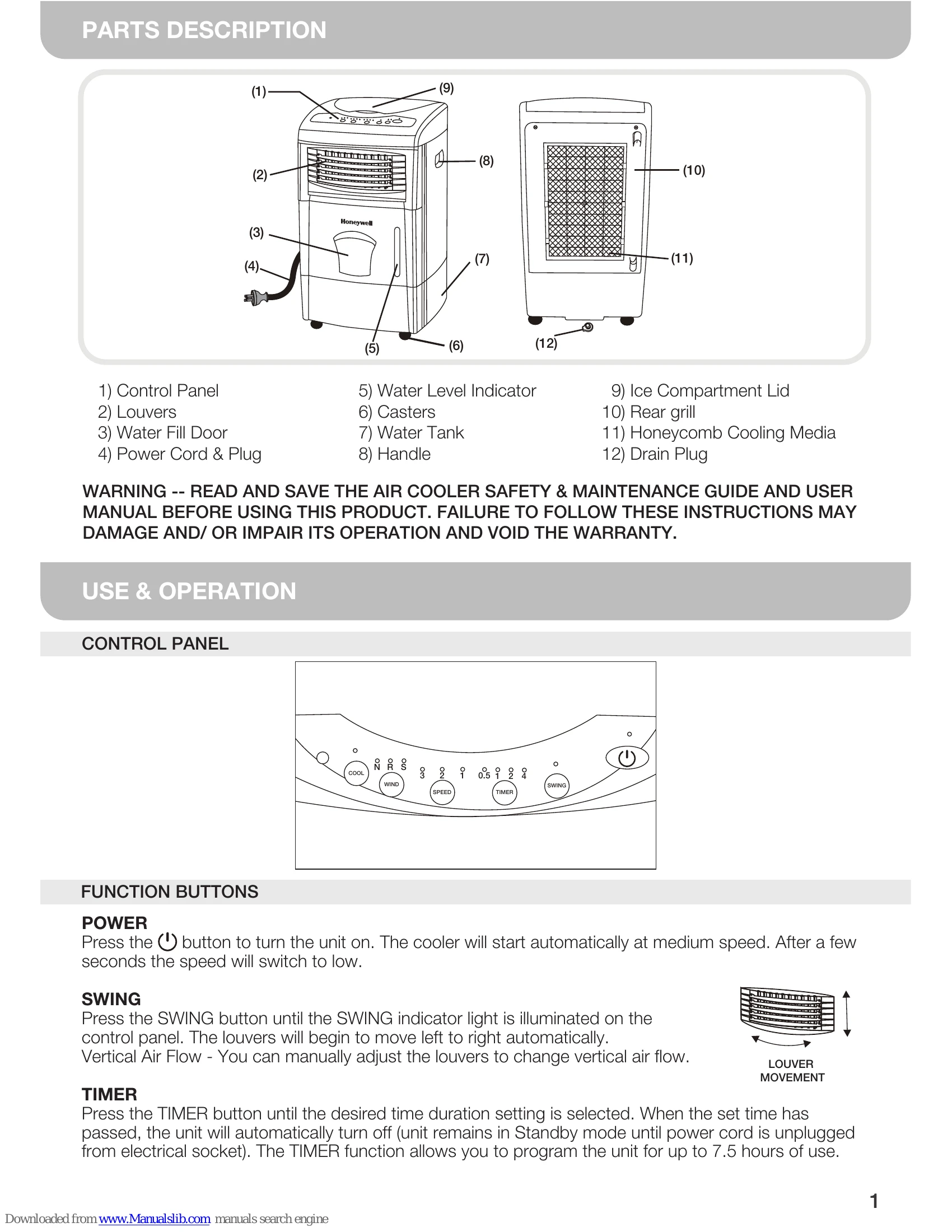
POWER: Press to turn the unit on. Starts at medium speed, then switches to low.
SWING: Press to activate louver movement left to right. Manual adjustment for vertical airflow is possible.
TIMER: Press to set an auto shut-off time, up to 7.5 hours.
SPEED: Press repeatedly to cycle through High (3), Medium (2), and Low (1) fan speeds.
WIND: Select wind type: NORMAL (N), RANDOM (R - alternates speeds), or SLEEP (S - gradual speed reduction for nighttime comfort).
COOL: Press to activate evaporative cooling. Water pump and honeycomb media are engaged.
Unplug unit before filling. Open Water Fill Door. Refill to the "Max." mark. Ensure water level is above the minimum mark for COOL mode to prevent pump failure. Ice can be added to the Ice Compartment for enhanced cooling.
Drain and refill the water tank regularly. Clean the unit with a damp cloth. For filter and media, remove rear grill and clean components as instructed.