Brand: Honeywell
Category: Other
Document Type: Manual
Language: EN
Brand: Honeywell
Category: Other
Document Type: Manual
Language: EN
Uploaded: Nov. 21, 2025, 7:46 p.m.
Manual Publish Date: 2012-12-01
5-year limited warranty covering parts and labor on the sealed system.
For optimal efficiency, keep doors and windows closed when using the air conditioner or dehumidifier function. If using fan only, position near an open window.
Important: After transporting the unit, place it UPRIGHT for 20 minutes before use to allow refrigerant to stabilize.
Turns the unit on and off.
Offers three settings: Cool, Dehumidify, and Fan. Lights indicate the active setting.
Adjustable to High, Medium, or Low settings.
Auto Turn Off: Set the unit to automatically shut off after a specified number of hours (1-24) in running mode.
Auto Turn On: Set the unit to automatically start after a specified number of hours (1-24) in stand-by mode.
Used for adjusting timer and thermostat. In cool mode, temperature can be adjusted. Pressing "▲" and "▼" simultaneously toggles between Celsius and Fahrenheit.
Flashes if the internal water tank is full, indicating the unit will not operate until drained.
Note: Wait 3 minutes before switching the unit back on after turning it off.
| Problem | Possible Cause | Solution |
|---|---|---|
| The air conditioning unit does not start | • No electricity. • Batteries in the remote control need to be replaced • The power cord is not properly plugged in. • The safety GFI plug has tripped. |
• Check for power. • Change remote control batteries. • Remove and reconnect the power cord. • Reset the safety GFI plug, if problem persists contact our customer support. |
| Runs a short while only | • The thermostat temperature setting is too close to room temperature. • Air outlet is blocked. • There are tight bends in the air exhaust hose. |
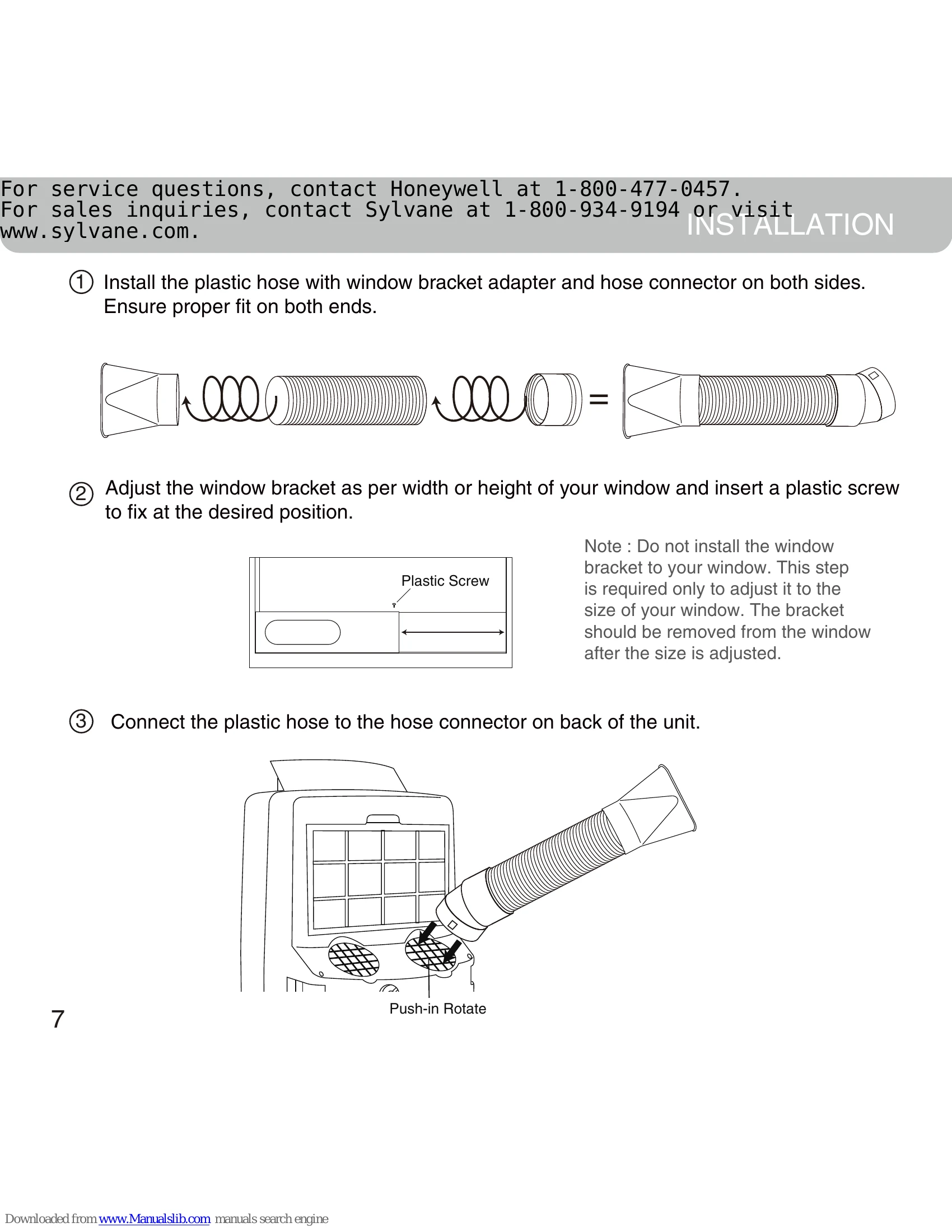
• Lower the set temperature. • Make sure the exhaust hose is properly connected. • Connect exhaust hose as per instructions on page 9. |
| Runs but no cooling | • A door or window is open. • The air filter is dirty. • The exhaust hose is detached. • Temperature setting is too high. |
• Make sure the windows and door are closed. • Clean the air filter • Reinstall exhaust hose properly (Refer page 9, Installation) • Reduce temperature setting on control panel. |
| Will not run and water full indicator light is ON | • Excess water condensation inside the tank. | • Drain the water through the drain plug (Refer page 14, Water Condensation Drainage). |