Brand: HP
Category: Computer
Document Type: Parts/Service
Language: EN
Brand: HP
Category: Computer
Document Type: Parts/Service
Language: EN
Uploaded: Nov. 21, 2025, 8:16 p.m.
Manual Publish Date: 2003-02-27
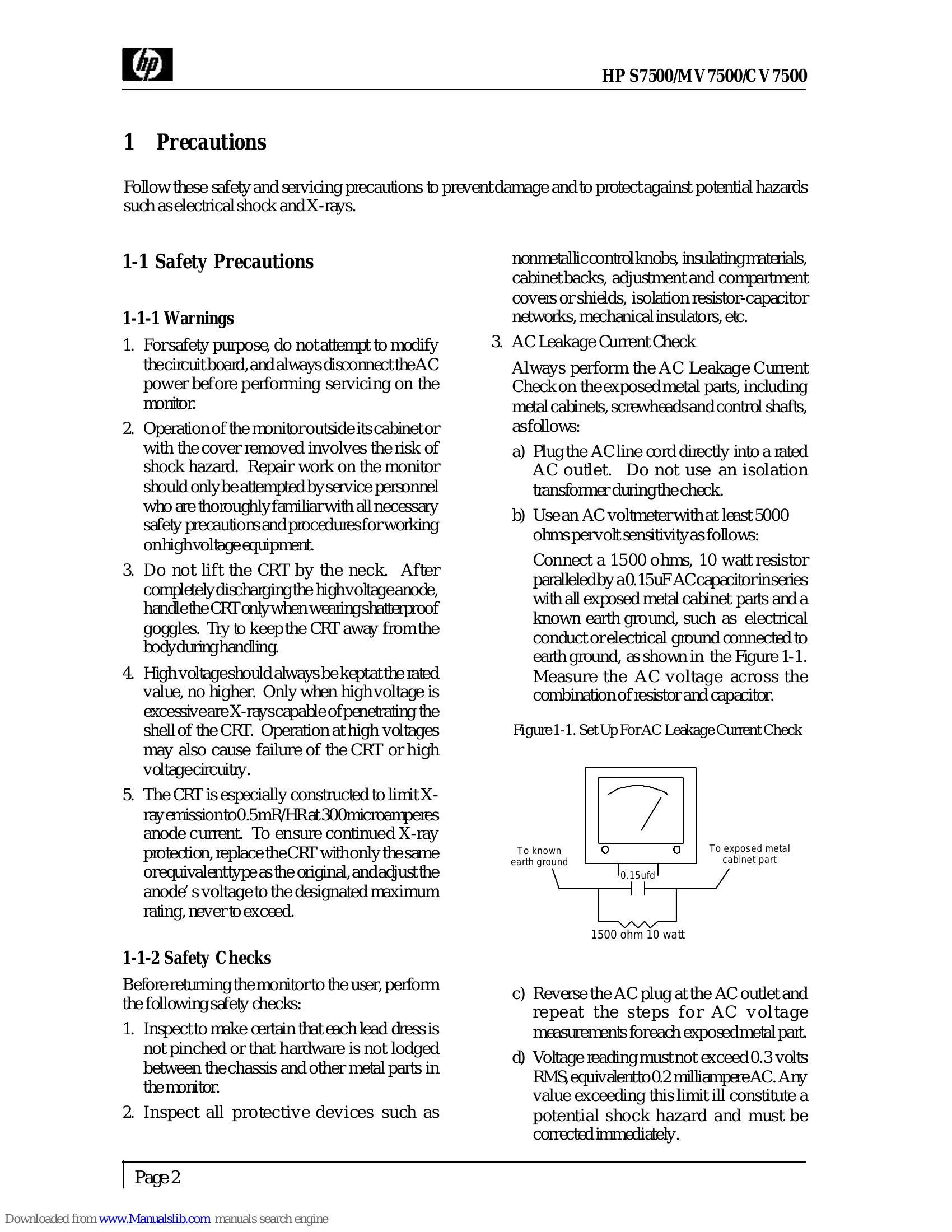
Safety Precautions:
Servicing Precautions:
Hi-Pot Test:
Ground Continuity Test:
| No Raster | Measure voltage of B+ at T402 pin 2 on PWB-MAIN | Normal (68 V, 31.5 kHz) | High (75 V or more) | 0 V |
| Short Circuit at load? | Check voltage of cathode, heater, Grid 1, Grid 2, etc. | Check 1401, 1703, R719, C741, R4F6, R4F5, R4C4 | Yes | |
| No | Check DC B+ line, Q451, Q402, T402 | |||
| Check voltage of C808 | Yes | No | ||
| Check 1801, R807, R808, Q801, Q802, ZD802, VR801 | Check D801, D802, D803, D804, T801, R804, F801 |
| OSD Abnormal | Check 1502 pin 9, 4 is 5V and pin 5, 10, 7, 8 missing? | Yes | No |
| Check R517, L514, R527, R523, R524 OK? | Replace them | ||
| Check P502 OK? | Replace it | ||
| Replace 1502 |
| Function Key Abnormal | Check 1701 and 1703 missing? | Yes | No |
| Power ON/OFF again and check X701, oscillator OK? | Replace X701 | ||
| Check 1703 EEPROM content OK? | Replace 1703 or do ATE again | ||
| Replace 1701 and check uP OK? | Replace 1701 | ||
| Check pin 5 of 1701 is 5V? | Check R775, R735 | ||
| Replace 1705, D703 |
| No Vertical Scan (Raster is one horizontal line) | Check 1301 voltage of pin 1 is 12V, pin 4 is -12V | Yes | No |
| Check pin 5 O/P waveform at 1301 | Check or replace 1301. | ||
| Check pin 6, 7 of 1301 waveform | Check R312, R307 R306, R313 | ||
| Still no vertical scan | Replace 1401 | ||
| Check or replace CRT |
| Out of Horizontal Synchronization | Horizontal sync present at pin 15 of 1401 | Yes | No |
| Check 1401 pin 8 H. output frequency & pin 29 waveform | Check or replace 1401, C406 | ||
| Check Q401, T401, Q402, R424, D401 |
| Out of Vertical Synchronization | Vorizontal sync present at pin 14 of 1401 | Yes | No |
| Check 1401 pin 24 waveform | Check signal cable & V. sync pin 42 of 1701. | ||
| Check 1401 pin 13 & pin 14. | Check or replace 1401, |
| R.G.B. Video Amplifier Abnormal | Check waveform at 1501 pin 5, 6 and 7 | Yes | No |
| Check 1502 pin 1, 2 and 3 collector voltage (normally about 70V) & waveform | Check 1901 | ||
| Video signal present at the pin of the CRT R.G.B. Cathode | |||
| Defective cut-off circuit (DC restore) 1503 |