Brand: HP
Category: Digital Camera
Document Type:
Language: EN
Brand: HP
Category: Digital Camera
Document Type:
Language: EN
Uploaded: Aug. 9, 2025, 11:54 p.m.
Consult the product documentation, HP Customer Care website, or your support contract for warranty information.
Begin by charging the batteries and installing them in the camera. Then, turn on the camera and select your preferred language and region. Set the date and time accurately. If you have an optional memory card, install and format it. Finally, install the necessary software on your computer to transfer and manage your photos.
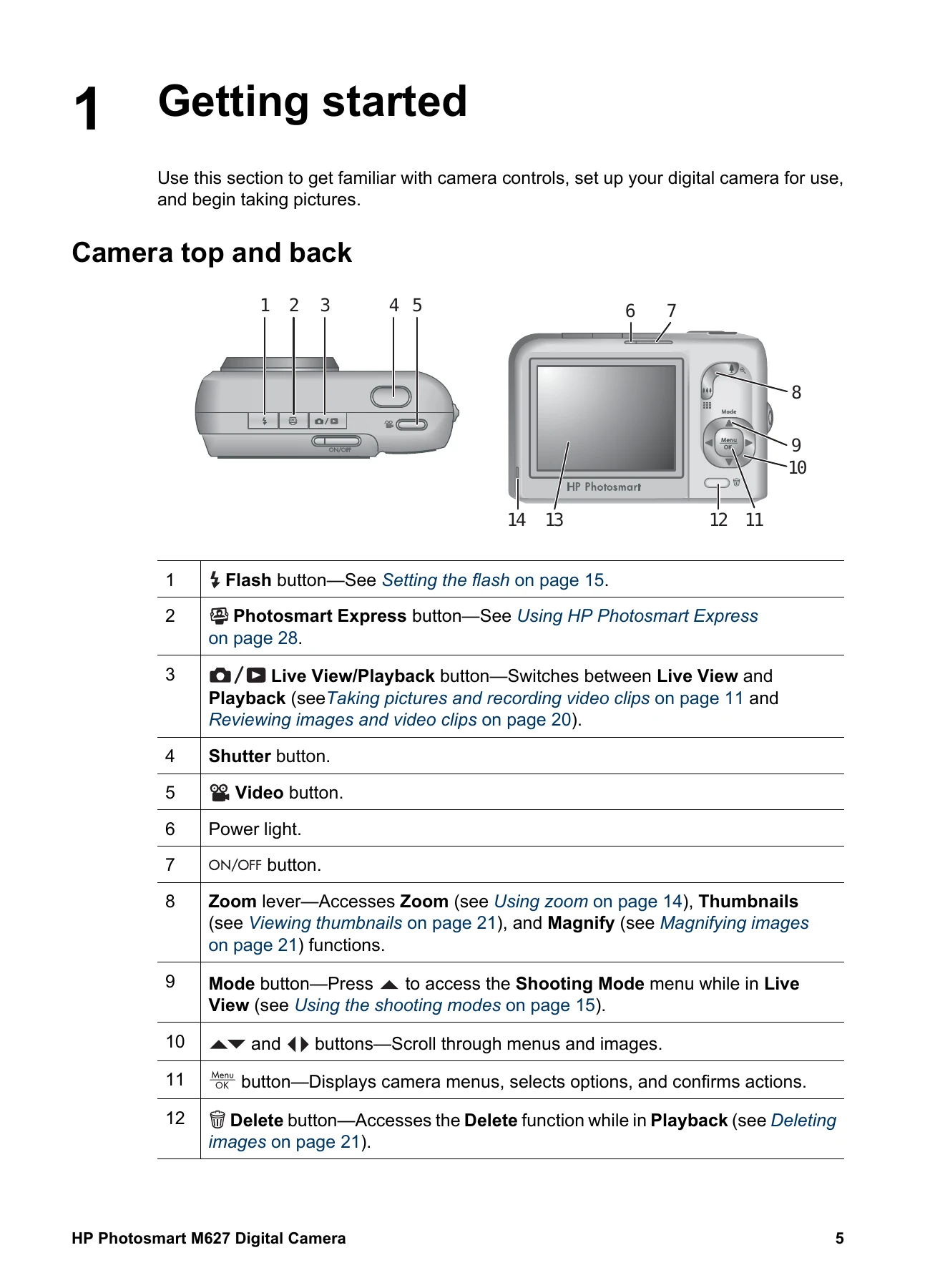
To take a still picture, activate Live View by pressing the Live View/Playback button. Frame your subject, then press the Shutter button halfway to lock focus and exposure. Press the Shutter button fully to take the picture. For video, press the Video button to start recording and press it again to stop.
After taking a picture or video, it will briefly appear in Instant Review. You can access Playback mode to review, delete, or magnify images and video clips using the navigation buttons.
| Problem | Solutions |
|---|---|
| My image is too bright. |
Turn the flash off. Move back from the subject and use zoom. Adjust Exposure Compensation. |
| My image is too dark. |
Wait for natural lighting conditions to improve, use the flash, or add indirect lighting. Adjust Exposure Compensation. If the subject is outside the flash range, turn off the flash and use a tripod or steady the camera. |
| My image is grainy. |
Use a lower ISO Speed setting. Add indirect lighting, use the flash, or wait for natural lighting conditions to improve. Avoid zooming in too far using digital zoom. If the camera is warm, let it cool for best image quality. |
| Images are missing on my camera. | Remove the memory card and check internal memory. |
| The Power light is on but the Image Display is off, or the camera seems stuck and won't operate. |
Press the Live View/Playback button. Reset the camera. |
| The camera responds sluggishly when trying to review images. | See Storage and Memory capacity for tips about memory cards. |
| Video recording terminates abruptly. The video is saved successfully, but it is shorter than expected. | Replace your memory card with a faster card. |
| Video recording terminates abruptly and the video will not play back. | Reformat the card. |
| The camera gets warm (or even hot) to the touch. | This is normal. If anything seems unusual, turn off the camera, remove from AC power, and allow it to cool. |
| My camera stalls when establishing a connection to the computer. |
Ensure the USB cable is properly connected. Try another USB port. Turn the camera off and on again. Reset the camera. Contact HP Support if the problem persists. |
| I cannot transfer images from the camera to my computer. |
Install the HP Photosmart Software or use the Transferring images without HP Photosmart Software option. Set your camera to act as a Disk Drive. |
| I get an error message when transferring images to my computer. | Close the HP Photosmart Transfer Software, remove the camera from the dock or disconnect the USB cable, and reset the camera. Then, restart the image transfer process. |
| I am having a problem installing or using the HP Photosmart Software. |
Ensure your computer meets the minimum system requirements. Refer to the HP Customer Care website. |
| How can I get professional-quality prints if I don't have a photo printer? | Use the Buy Prints Online feature on the Photosmart Express Menu. |