Brand: HP
Category: Digital Camera
Document Type:
Language: EN
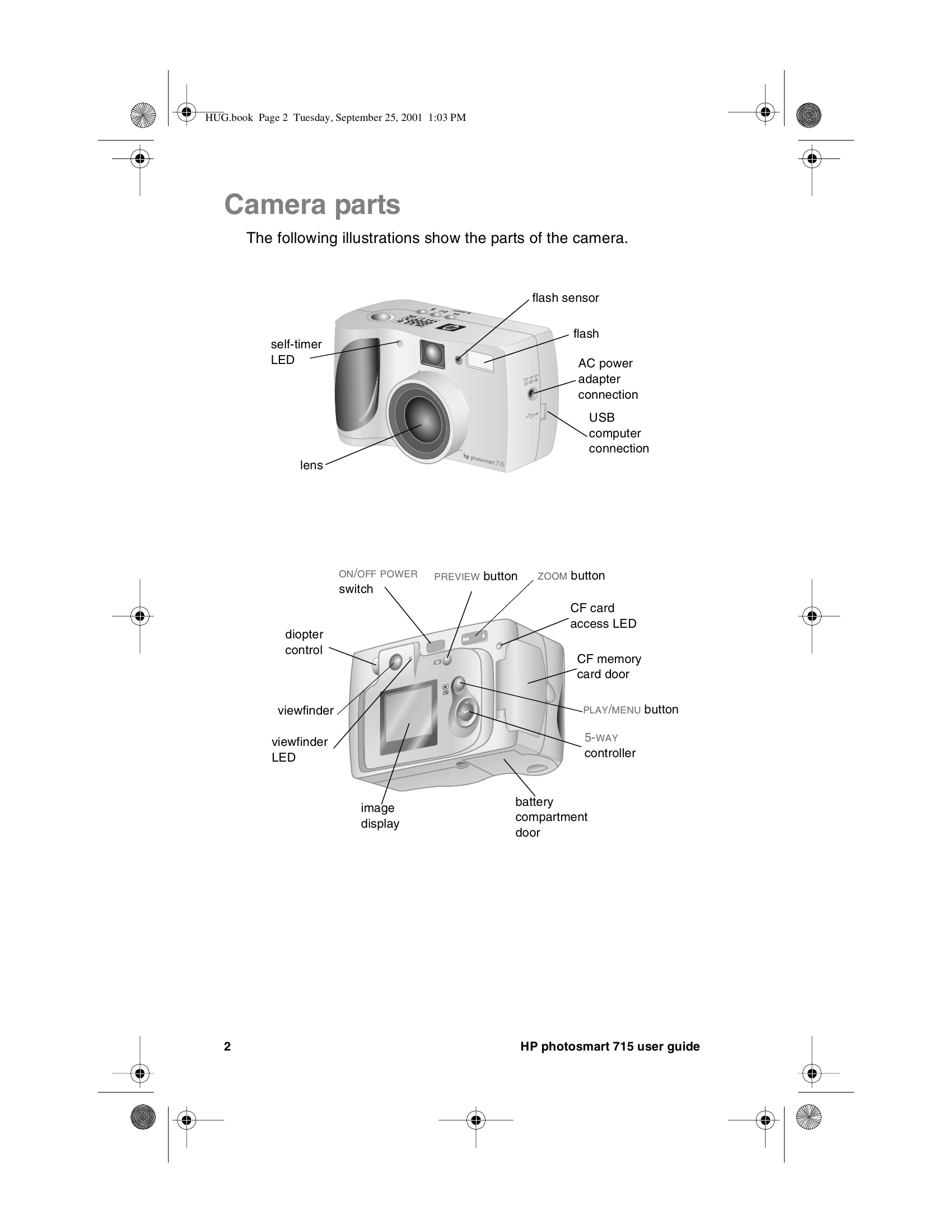
Brand: HP
Category: Digital Camera
Document Type:
Language: EN
Uploaded: Aug. 9, 2025, 11:55 p.m.
No specific warranty period is stated in the provided document excerpt.
Frame your subject in the viewfinder or on the image display. Press the shutter button halfway to adjust focus and exposure. Press it fully to take the picture. Wait for confirmation beeps and observe indicator lights.
Previewing Pictures
Use the image display to preview pictures. Press the PREVIEW button to turn it on. Frame your subject and press the shutter button halfway, then fully to capture the image.
Managing Images
View images on the display, scroll using the controller. Delete unwanted images via the menu. Lock images to prevent accidental deletion.
| Indicator light | State | Meaning |
|---|---|---|
| Viewfinder | Green | The camera has achieved the best focus and exposure and is ready to take a picture. |
| Viewfinder | Green - blinking | The camera cannot find a focus or light is insufficient to take the picture. |
| Viewfinder | Red | The camera cannot take a picture for one of the following reasons:
|
| Self-timer | Red – blinking | The self-timer is counting down 10 seconds and will then take the picture. |
| CF card access | On | The camera is accessing the CF memory card—do not open the CF memory card door. |
| CF card access | Off | You can open the CF memory card door. |