Brand: HP
Category: Digital Camera
Document Type:
Language: EN
Brand: HP
Category: Digital Camera
Document Type:
Language: EN
Uploaded: Aug. 9, 2025, 11:54 p.m.
None
This chapter shows you how to set up your new HP PhotoSmart C500 Digital Camera, including installing the batteries, using an AC power adapter, installing the memory card, setting the date and time, changing the language, turning the camera on and off, and using the camera modes, color LCD and menus.
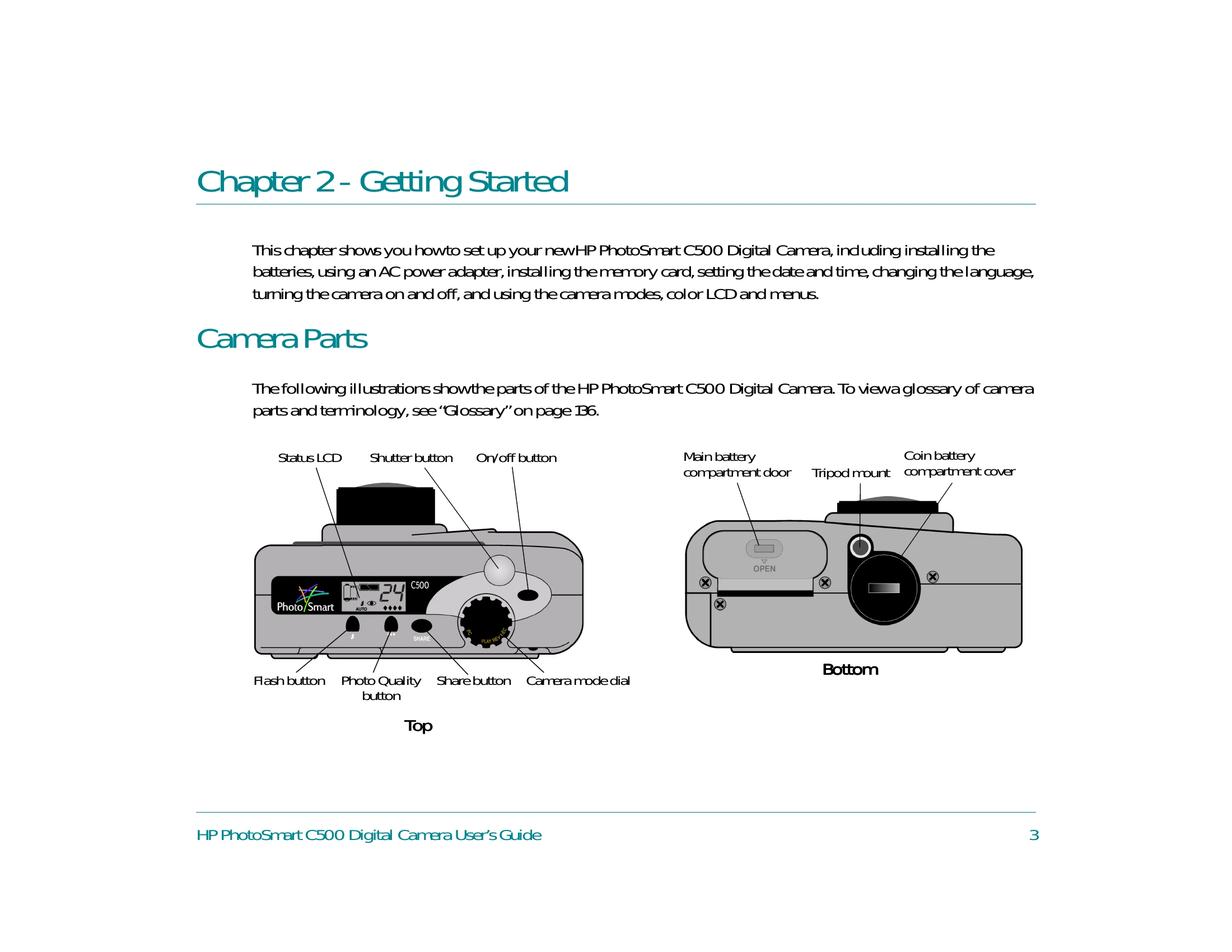
The following illustrations show the parts of the HP PhotoSmart C500 Digital Camera. To view a glossary of camera parts and terminology, see “Glossary" on page 136.
| Problem | Possible Cause | Solution |
|---|---|---|
| Camera does not turn on. | Batteries are discharged. | Install fully charged batteries or use AC power adapter. |
| No picture can be taken. | Memory card is full or not inserted. | Insert a memory card or delete photos. |
| Photos are blurry. | Camera shake or improper focus. | Hold the camera steady or use a tripod. Ensure focus is achieved before taking the picture. |