Manual for Photosmart M22/M23

Manual for Photosmart M22/M23

Brand: HP

Category: Digital Camera

Document Type:

Language: EN
Uploaded: Aug. 9, 2025, 11:54 p.m.

Warranty Information

No warranty information is provided in the extracted pages.

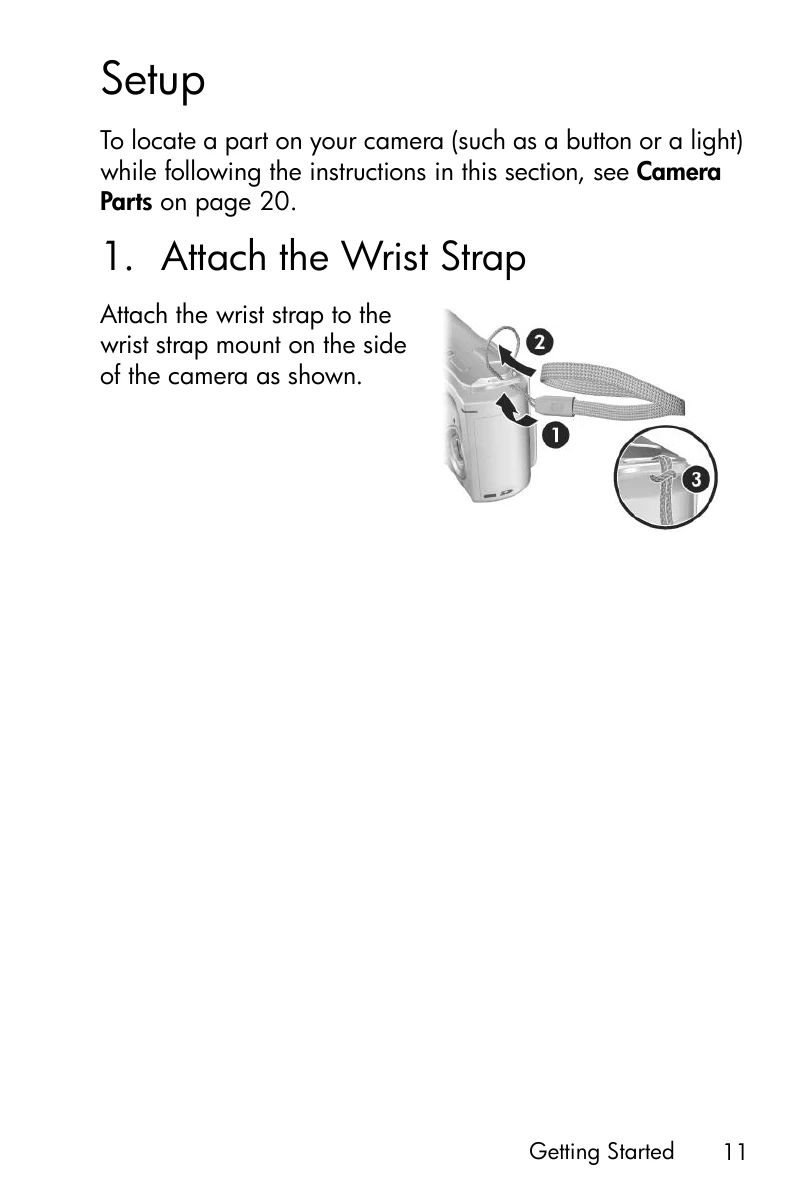
  • Getting Started: Learn how to set up your camera, including attaching the wrist strap, installing batteries, turning on the camera, and setting the language and region.
  • Taking Pictures and Recording Video Clips: Discover how to focus the camera, use different shooting modes, and adjust settings like flash, self-timer, and image quality.
  • Reviewing Images and Video Clips: Explore options for viewing, deleting, rotating, and editing your photos and videos, including red-eye removal.
  • Using HP Instant Share: Learn how to easily share your images online or with others.
  • Transferring and Printing Images: Find instructions on transferring photos to a computer or printing them directly from the camera.
  • Setup Menu: Customize camera settings such as display brightness, sounds, date and time, and USB configuration.
  • Troubleshooting and Support: Get help with common issues, software installation, and error messages.
  • Appendices: Access information on managing batteries, purchasing accessories, caring for your camera, and technical specifications.

Troubleshooting and error codes

Feature Description
Flash working range Maximum with ISO Speed set to Auto: 5 meters (16.5 feet)
External flash No
Flash settings Flash Off, Auto Flash (default), Red-Eye, Flash On, Night
Image Display 1.5-inch color active matrix TFT LTPS with backlight, 61,600 pixels (280 by 220)
Image capture options
  • Still (default)
  • Self-Timer—still picture or video clip taken after 10-second delay
  • Video—24 frames per second (includes audio), until the camera runs out of memory
Audio capture
  • Still pictures—audio clip length is 30 seconds or until the camera runs out of memory, whichever comes first
  • Video clips—audio is recorded automatically
Shooting modes Auto (default), Macro, Action, Landscape, Portrait, Panorama, Beach, Snow, Sunset
Image Quality settings
  • 4MP Best
  • 4MP (default)
  • 2MP
  • VGA
Adaptive Lighting settings Off (default), Low, High
Color settings Full Color (default), Black & White, Sepia
Date & Time Imprint settings Off (default), Date Only, Date & Time
Privacy Policy