Brand: HP
Category: Digital Camera
Document Type:
Language: EN
Brand: HP
Category: Digital Camera
Document Type:
Language: EN
Uploaded: Aug. 9, 2025, 11:54 p.m.
Contact your point of purchase or an authorized HP reseller for warranty service.
Attach the camera strap for safety. Insert the battery into the compartment at the bottom of the camera, ensuring correct orientation. Charge the battery using the provided USB cable. Insert an SD/SDHC/SDXC memory card for expanded storage.
When powering on for the first time, set the display language and date & time using the navigation controls and OK button.
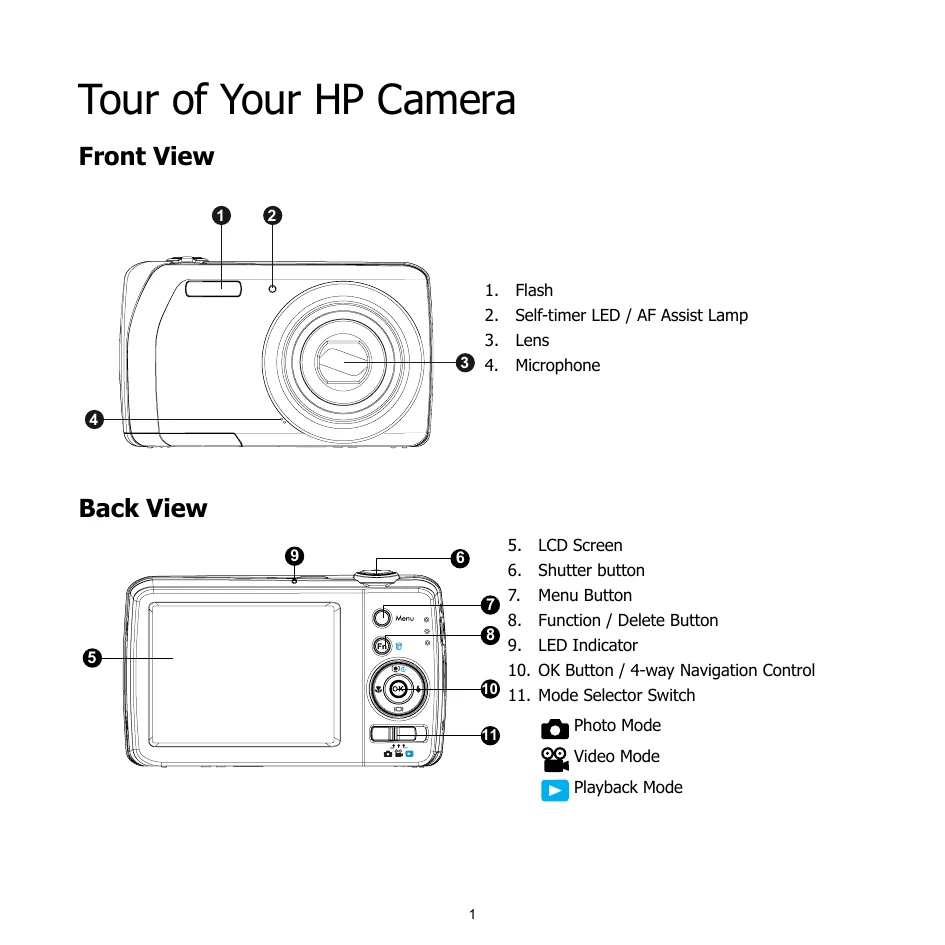
Switch between Photo Mode, Video Mode, and Playback Mode using the mode selector switch.
Power on the camera, select Photo Mode, frame your shot, lightly press the shutter button to focus, and then press fully to take the picture.
Press the FUNC button to access settings like resolution, EV compensation, AWB, ISO, Metering, and Color mode.
Slide the mode switch to Playback mode to view photos, videos, and audio clips. Use the navigation keys to browse and the OK button to play movies or audio clips.
Access the Setup menu by pressing the Menu button to configure general settings such as Sound, Power Save, LCD Save, Date & Time, and Language.