Brand: HP
Category: Digital Camera
Document Type: Manual
Language: EN
Brand: HP
Category: Digital Camera
Document Type: Manual
Language: EN
Uploaded: Nov. 21, 2025, 7:23 p.m.
Contact the original point of purchase or an authorized HP reseller for service within the warranty period.
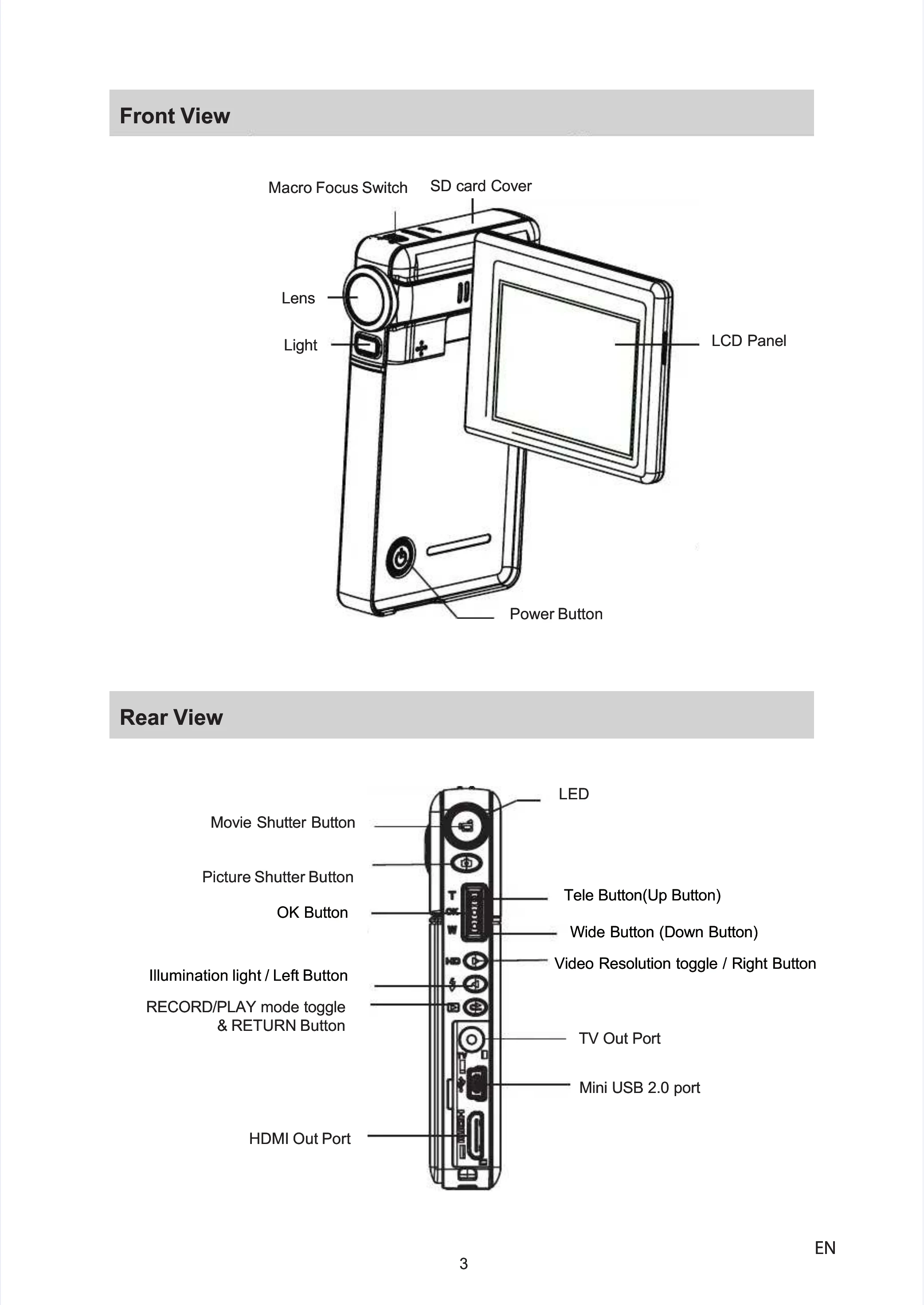
Load the Lithium-ion rechargeable battery following the arrow and correct polarity. Insert the SD memory card and ensure it is in the writeable position for recording. To turn on the camera, flip out the LCD panel or press the Power Button. Use the Movie Shutter Button to take movies and the Picture Shutter Button to take pictures. Toggle the RECORD/PLAY mode to switch to Playback Mode.
Use the Direction Buttons for mode switching, digital zoom, and light control. Press the OK Button to access menus. The Movie Shutter Button starts and stops recording movies. The Picture Shutter Button takes pictures. Use the Macro Focus Switch for close-up shots.
Use the Direction Buttons to navigate between movies/pictures and adjust volume. The RECORD/PLAY mode toggle switches between record and playback modes. The Movie Shutter Button starts playing recorded movies.
| Rating | 6x |
|---|---|
| Speed (MB/s) | 0.9 |
| SD Class | n/a |
| Rating | 10x |
| Speed (MB/s) | 1.5 |
| SD Class | n/a |
| Rating | 13x |
| Speed (MB/s) | 2.0 |
| SD Class | 2 |
| Rating | 26x |
| Speed (MB/s) | 4.0 |
| SD Class | 3 |
| Rating | 32x |
| Speed (MB/s) | 4.8 |
| SD Class | 4 |
| Rating | 40x |
| Speed (MB/s) | 6.0 |
| SD Class | 6 |
| Rating | 66x |
| Speed (MB/s) | 10.0 |
| SD Class | 6 |
| Rating | 100x |
| Speed (MB/s) | 15.0 |
| SD Class | 6 |
| Rating | 133x |
| Speed (MB/s) | 20.0 |
| SD Class | 6 |
| Rating | 150x |
| Speed (MB/s) | 22.5 |
| SD Class | 6 |
| Rating | 200x |
| Speed (MB/s) | 30.0 |
| SD Class | 6 |
| Rating | 266x |
| Speed (MB/s) | 40.0 |
| SD Class | 6 |
| Rating | 300x |
| Speed (MB/s) | 45.0 |
| SD Class | 6 |