Manual for mp3320 series

Manual for mp3320 series

Brand: HP

Category: Projector

Document Type: Manual

Language: EN
Uploaded: Nov. 21, 2025, 8:41 p.m.

Manual Publish Date: 2006-01-01

Warranty Information

This document contains warranty statements and disclaimers, but does not specify a duration.

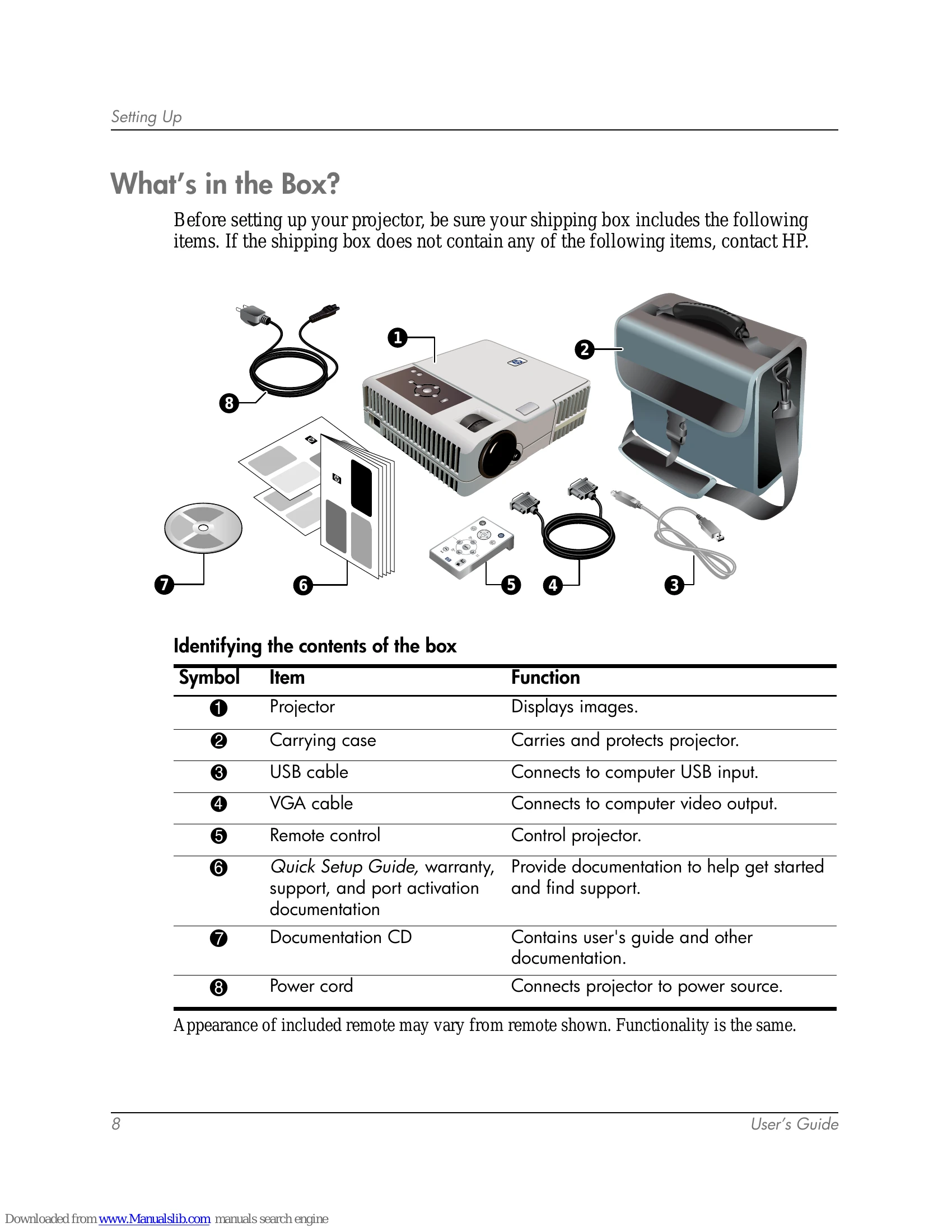
  • Setting Up: Learn to unpack, identify components, position, connect power, and connect computers or video sources to your HP digital projector.
  • Giving Presentations: Master the remote control for presentations, and learn how to present from a computer or other video sources.
  • Adjusting the Projector: Fine-tune picture and sound settings using the on-screen menu for optimal viewing.
  • Maintaining the Projector: Understand routine maintenance, including cleaning and replacing the lamp.
  • Installing Permanently: Get instructions for various permanent installation methods like ceiling or tripod mounting.
  • Fixing Problems: Find troubleshooting suggestions for common issues like start-up, picture, sound, or remote control problems.
  • Reference: Access specifications, safety information, and regulatory details.

Troubleshooting and error codes

Problem Possible Cause Solution
No power Power cord not connected. Connect the power cord to the projector and an electrical outlet.
No image No signal from source. Check connections and ensure the correct source is selected.
Distorted image Incorrect resolution or sync. Adjust resolution and use the auto sync button.
Privacy Policy