Brand: HTC
Category: Smartphone
Document Type:
Language: EN
Brand: HTC
Category: Smartphone
Document Type:
Language: EN
Uploaded: Aug. 10, 2025, 12:04 a.m.
The manual provides general information and does not specify a warranty period.
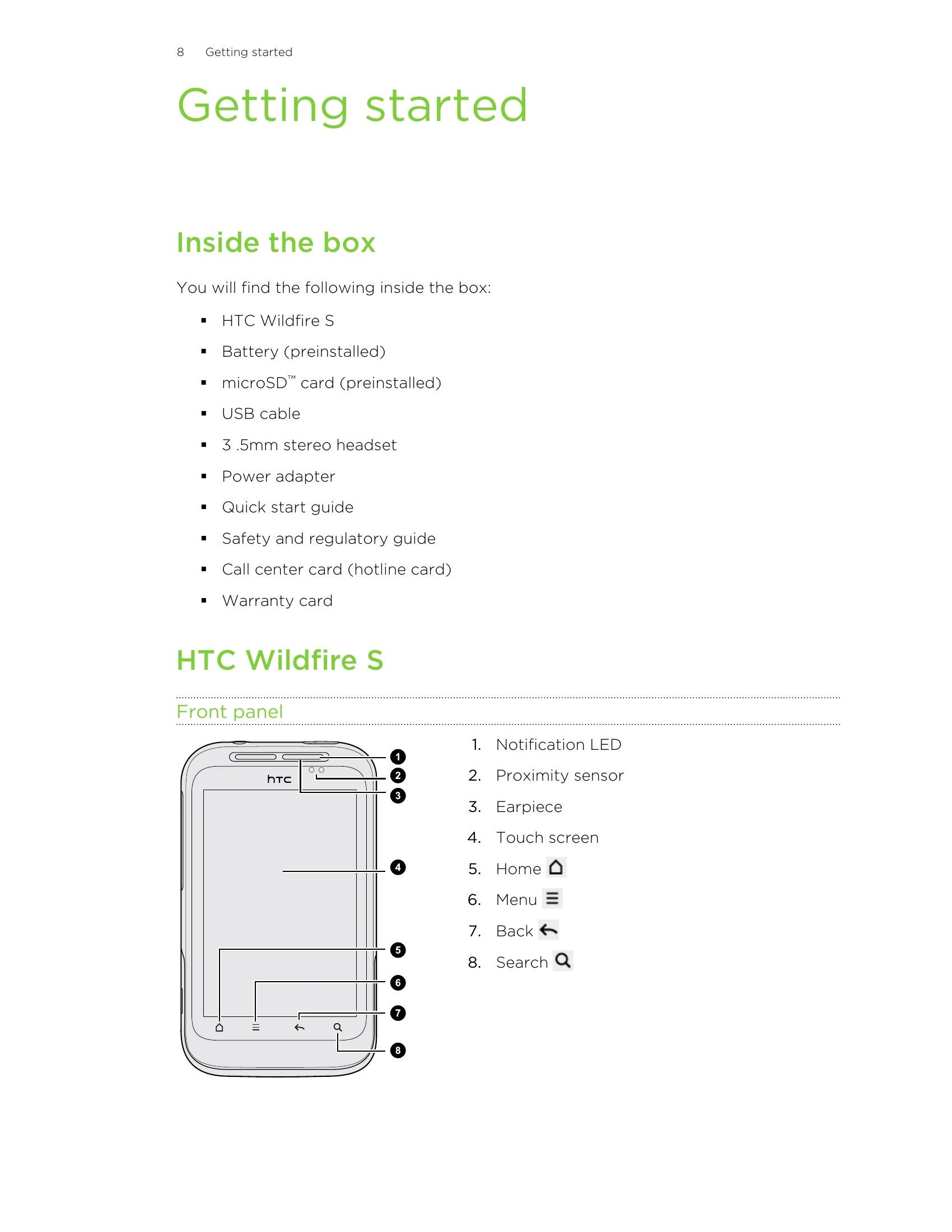
Getting Started: Learn to set up your HTC Wildfire S, insert SIM and storage cards, and charge the battery.
Basics: Adjust volume, manage sleep mode, understand status icons, and connect to a computer.
Personalizing: Customize your phone with scenes, wallpapers, widgets, and rearrange the home screen.
Phone Calls: Make calls, manage contacts, and use features like speed dial.
Internet & Apps: Browse the web, download apps, and manage your online accounts.
Camera & Media: Take photos, record videos, and manage your music.
Messaging & Email: Send texts, multimedia messages, and manage emails.
Settings: Explore various settings for display, sound, language, battery, memory, and more.
Updates & Reset: Learn to update software and perform factory resets.
| Header 1 | Header 2 | Header 3 | Header 4 |
|---|---|---|---|
| Data A1 | Data B1 | Data C1 | Data D1 |
| Data A2 | Data B2 | Data C2 | Data D2 |
| Data A3 | Data B3 | Data C3 | Data D3 |