Manual for IdeaHub S2, ES2, S2 Pro, and ES2 Pro 2.1.1

Manual for IdeaHub S2, ES2, S2 Pro, and ES2 Pro 2.1.1

Brand: HUAWEI

Category: display

Document Type: Manual

Language: EN
Uploaded: Nov. 21, 2025, 8:31 p.m.

Manual Publish Date: 2022-12-12

Warranty Information

Warranty information is not explicitly detailed in this section of the manual.

Product Highlights:

  • Next-gen hardware platform with high-computing power and HarmonyOS.
  • Supports Bring Your Own Meeting (BYOM), HD immersive meetings, Wi-Fi 6 projection, and ultra-low writing latency.
  • Ideal for regular meeting rooms, executive offices, and open office areas.
  • Professional-grade 4K video cameras for clear images.
  • All-scenario intelligent meeting features, including full 4K video and adaptation to mainstream cloud meetings.
  • BYOM with P2P projection, intelligent whiteboard, Multi-Window, and App Multiplier.
  • Massive app ecosystem with one-tap downloads and SDKs for enterprise integration.
  • Chip-device-pipe-cloud E2E protection and CC EAL5+ security certification.

Platform Access:

  • SMC Platform: Connects to SMC for video communication and O&M management.
  • Huawei Cloud Meeting: Public cloud architecture for HD audiovisual conferencing.
  • Huawei Cloud WeLink: Public cloud architecture for audio/video conferencing and collaboration.
  • IdeaManager: Endpoint management solution for enterprises.

Meeting Quality:

  • SMC: Supports on-premises meetings with dual-stream capabilities (1080p or 4K).
  • Huawei Cloud Meeting/WeLink: Supports HD video meetings up to 1080p with various layouts and one-click call initiation.
  • IdeaManager: N/A for meeting quality.

Client Capabilities:

  • SMC: IdeaShare client for projection.
  • Huawei Cloud Meeting/WeLink: Browser-based whiteboard transfer, QR code scanning for content transfer.
  • IdeaManager: IdeaShare client for projection, WeChat for whiteboard transfer (cloud service).

Access Modes:

  • SMC: Manual activation code entry.
  • Huawei Cloud Meeting/WeLink: Manual activation code or QR code scan.
  • IdeaManager: Manual access code or QR code scan (cloud service), manual access code (on-premises).

Troubleshooting and error codes

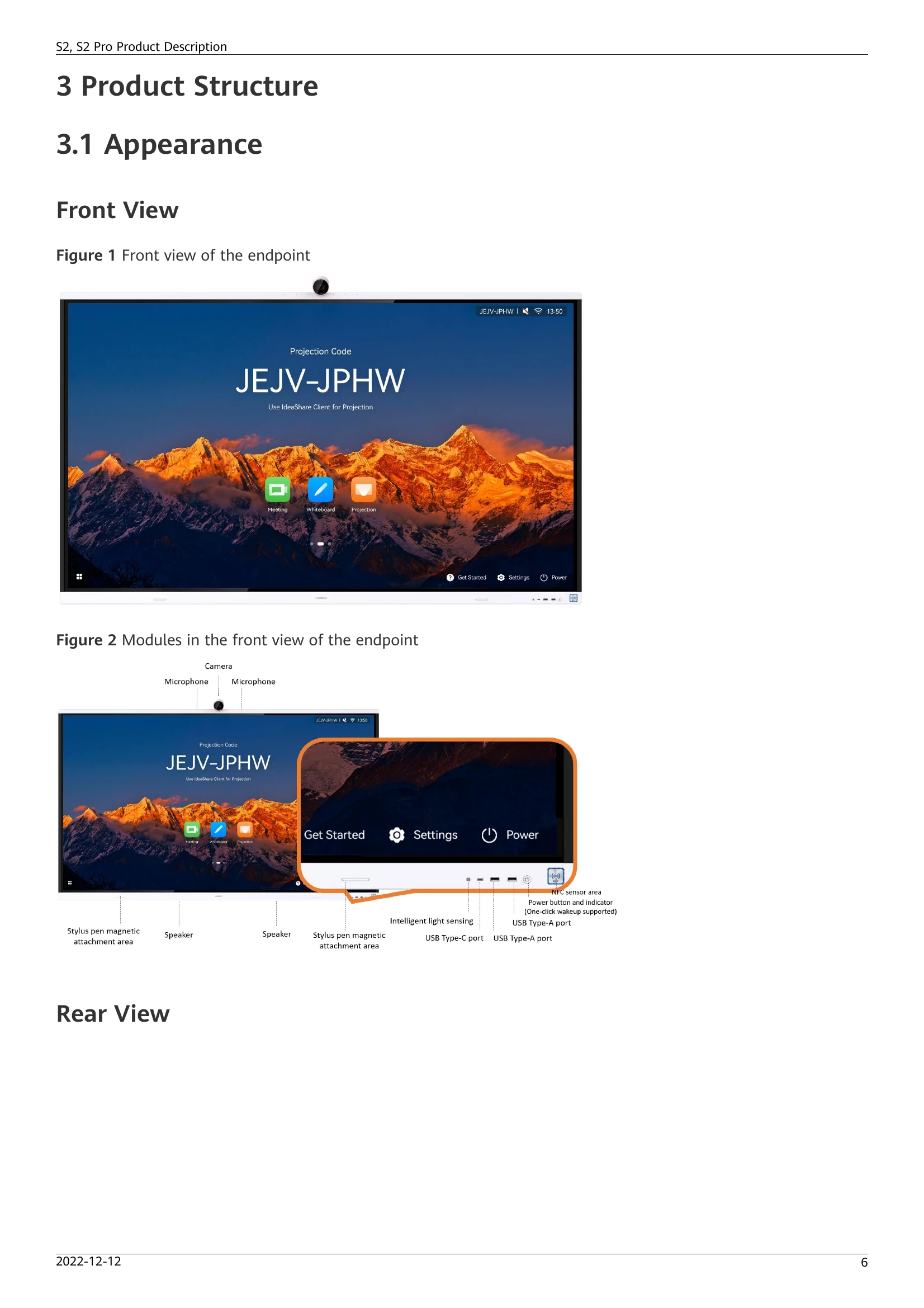
Indicator status Endpoint Status
Off Powered off
Blinking green once per second Diagnosing
Blinking green twice per second Powering on
Blinking green four times per second Upgrading
Steady green Working properly
Breathing green (gradually lighting, then dimming) Sleep
Blinking red once every 5s Faulty hardware
Blinking red twice every 5s Overheating
Blinking red once per second Touchscreen abnormal
Blinking red twice per second IP address conflict
Blinking red four times per second Faulty software
Privacy Policy