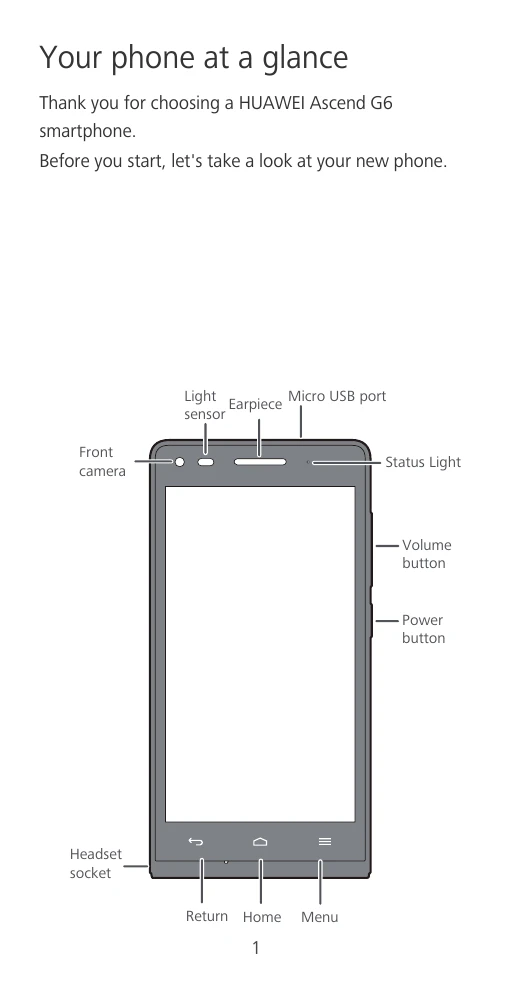
Your phone at a glance
Thank you for choosing a HUAWEI Ascend G6 smartphone.
Before you start, let's take a look at your new phone.
Installation
Follow the instructions in the following figures to complete the installation. Then, press and hold the power button to turn your phone on.
Using the Simple UI
On the home screen, touch and hold a blank area to display the Set Home Screen dialog box, and then touch Simple home.
On the simple home screen, touch Standard Home to switch to standard home screen style.
More information
Encounter any issues while using your phone? For the full user guide, visit http://consumer.huawei.com/en/ and search for HUAWEI Ascend G6.
Want to learn more about Huawei Emotion UI? Visit http://en.ui.vmall.com/ for the latest information.
Personal Information and Data Security
- Place your device in a safe area to prevent it from unauthorized use.
- Set your device screen to lock and create a password or unlock pattern to open it.
- Periodically back up personal information kept on your SIM/UIM card, memory card, or stored in your device memory.
- If you are worried about viruses when you receive messages or emails from a stranger, you can delete them without opening them.
- If you use your device to browse the Internet, avoid websites that might pose a security risk to avoid theft of your personal information.
- If you use services such as Wi-Fi tether or Bluetooth, set passwords for these services to prevent unauthorized access.
- Install or upgrade device security software and regularly scan for viruses.
- Be sure to obtain third-party applications from a legitimate source.
- Some applications require and transmit location information.
- If you have concerns about the security of your personal information and data, please contact [email protected].
Safety information
- Do not use your device if its use is prohibited or if it may cause danger or interference with other electronic devices.
- Interference with medical equipment: Consult your doctor and the manufacturer of your medical equipment to determine whether using your phone will interfere with the equipment.
- Protecting your hearing when using a headset: To prevent possible hearing damage, do not listen at high volume levels for long periods.
- Areas with flammables and explosives: Do not use the device in environments where flammables or explosives are stored.
- Traffic safety: Adhere to local laws and regulations while using the device. Do not use your device while driving.
- Operating environment: Avoid environments in which there is dust, damp, dirt, or magnetic fields. Do not use your device during thunderstorms. Ideal operating temperatures are 0°C to 35°C.
- Child's safety: Keep the device and its accessories away from children. Children should use the device only under direct adult supervision.
Accessories
- Using an unapproved or incompatible power adapter, charger, or battery may cause a fire, explosion, or other hazards.
- Use only approved accessories.
- Use only the following Huawei AC adapters/power supplies: HUAWEI: HW-050100U2W, HW-050100E2W, HW-050100B2W, HW-050100A2W.
Charger safety
- For pluggable devices, the socket-outlet shall be installed near the devices and shall be easily accessible.
- Unplug the charger from the electric socket and from the device when not in use.
- Do not drop or cause an impact to the charger.
- If the power cable is damaged or the plug is loose, stop using it immediately.
- Do not touch the power cable with wet hands or pull it to disconnect the charger.
Battery safety
- Do not bridge the battery terminals with conductive material.
- Keep the battery away from excessive heat and direct sunlight.
- Do not attempt to modify the battery, insert foreign objects into it, or immerse or expose it to liquids.
- If the battery leaks, ensure that the electrolyte does not make contact with your skin or eyes.
- If battery deformation occurs, it changes colour, or it overheats while charging or storing, stop using the device immediately and remove the battery.
- Do not dispose of batteries in fire as they may explode.
- Dispose of used batteries in accordance with local regulations.
- Do not allow children or pets to bite or suck the battery.
- Do not damage the battery or expose it to high external pressure.
- Do not drop the device or battery.
- If the device standby time shortens significantly, replace the battery.
- The device has a built-in, non-removable battery.
Cleaning and maintenance
- Keep the device and accessories dry. Do not attempt to dry it with an external heat source.
- Do not expose your device or accessories to extreme heat or cold.
- Avoid collision, which may lead to device malfunctions, overheating, fire, or explosion.
- Before you clean or maintain the device, stop using it, close all applications, and disconnect all cables connected to it.
- Do not use chemical detergents, powders, or other agents (such as alcohol or benzene) to clean the device or accessories.
- Do not place magnetic stripe cards, such as bankcards and phone cards, near the device for extended periods of time.
- Do not dismantle or attempt to modify the device or its accessories.
- If the device screen is damaged, stop using the device immediately.
Emergency calls
The availability of emergency calls is subject to the signal quality, service provider policy, and local laws and regulations. Never rely solely on your device for critical communications such as medical emergencies.
Disposal and recycling information
This symbol on the device, batteries, and/or the packaging, indicates that the device, its electrical accessories, and batteries should not be disposed of as household garbage.
Reduction of hazardous substances
This device is compliant with the REACH Regulation and RoHS Directive Recast.
EU regulatory conformance
- Body worn operation: The device complies with RF specifications when used near your ear or at a distance of 1.5 cm from your body.
- Certification information (SAR): This device meets guidelines for exposure to radio waves.