Brand: HUAWEI
Category: Mobile Phone
Document Type: Manual
Language: EN
Brand: HUAWEI
Category: Mobile Phone
Document Type: Manual
Language: EN
Uploaded: Nov. 21, 2025, 8:53 p.m.
No warranty information is available in this document.
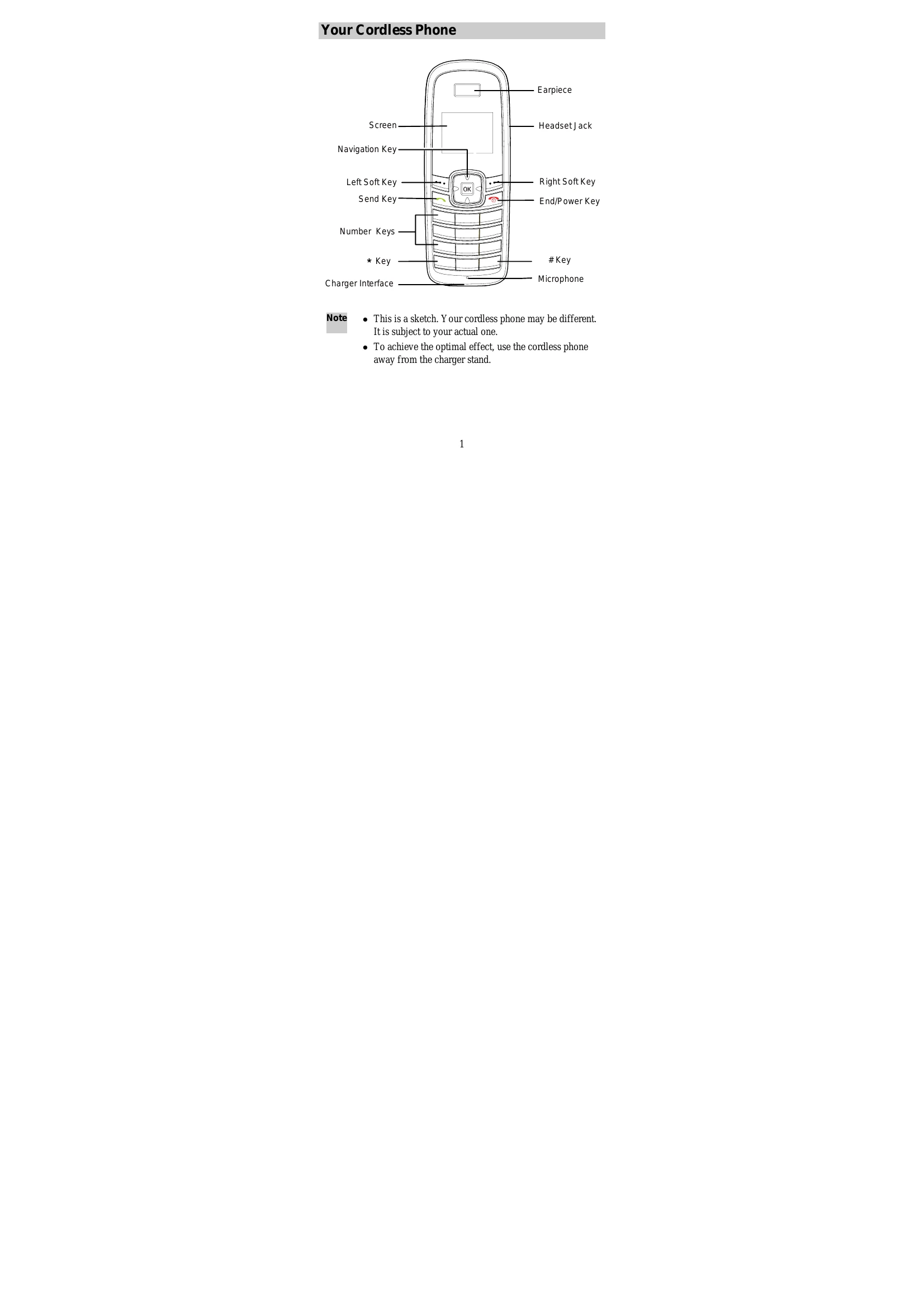
Your Cordless Phone
The cordless phone features a screen, earpiece, headset jack, microphone, and various keys including navigation, soft keys (left/right), send, end/power, number keys, '*' key, and '#' key. It also has a charger interface.
Keys and Functions
Keys are used for viewing calls, making/answering/ending calls, powering the phone on/off, navigating menus, selecting options, entering numbers and characters, speed dialing, and locking/unlocking the keypad. Special keys like '*' and '#' have multiple functions depending on the context.
Screen Icons
Icons indicate network signal strength, calling status, message reception, battery power, alarm clock status, keypad lock, and reminder types (sound/vibration).
Menu Tree
The menu is organized into sections like Messages, Phone Book, Call History, Applications, and Phone Settings, with sub-menus for various functions.
Installation and Operation
Instructions are provided for installing the SIM card and battery, charging the battery, and using the function menu to navigate and select options. Making and answering calls, locking the keypad, and changing text input modes are also detailed.
| Icon | Description | Icon | Description |
|---|---|---|---|
 |
Network signal strength |  |
Battery power level |
 |
Calling |  |
Alarm clock is on |
 |
Message received |  |
Keypad is locked |
 |
Memory for messages is full, when the icon is blinking |  |
Remind by sound / Without sound remind |
 |
Remind by vibration |