Installation Guide for APM30H&TMC11H&IBBS200D&IBBS200T(Ver.B)

Installation Guide for APM30H&TMC11H&IBBS200D&IBBS200T(Ver.B)

Brand: Huawei

Category: Other

Document Type: Installation Guide

Language: EN
Uploaded: Nov. 21, 2025, 6:54 p.m.

Manual Publish Date: 2010-12-20

Installation Procedure Summary

  1. Cabinet Installation: Choose between base, metal pole, or wall mounting. Follow specific steps for each.
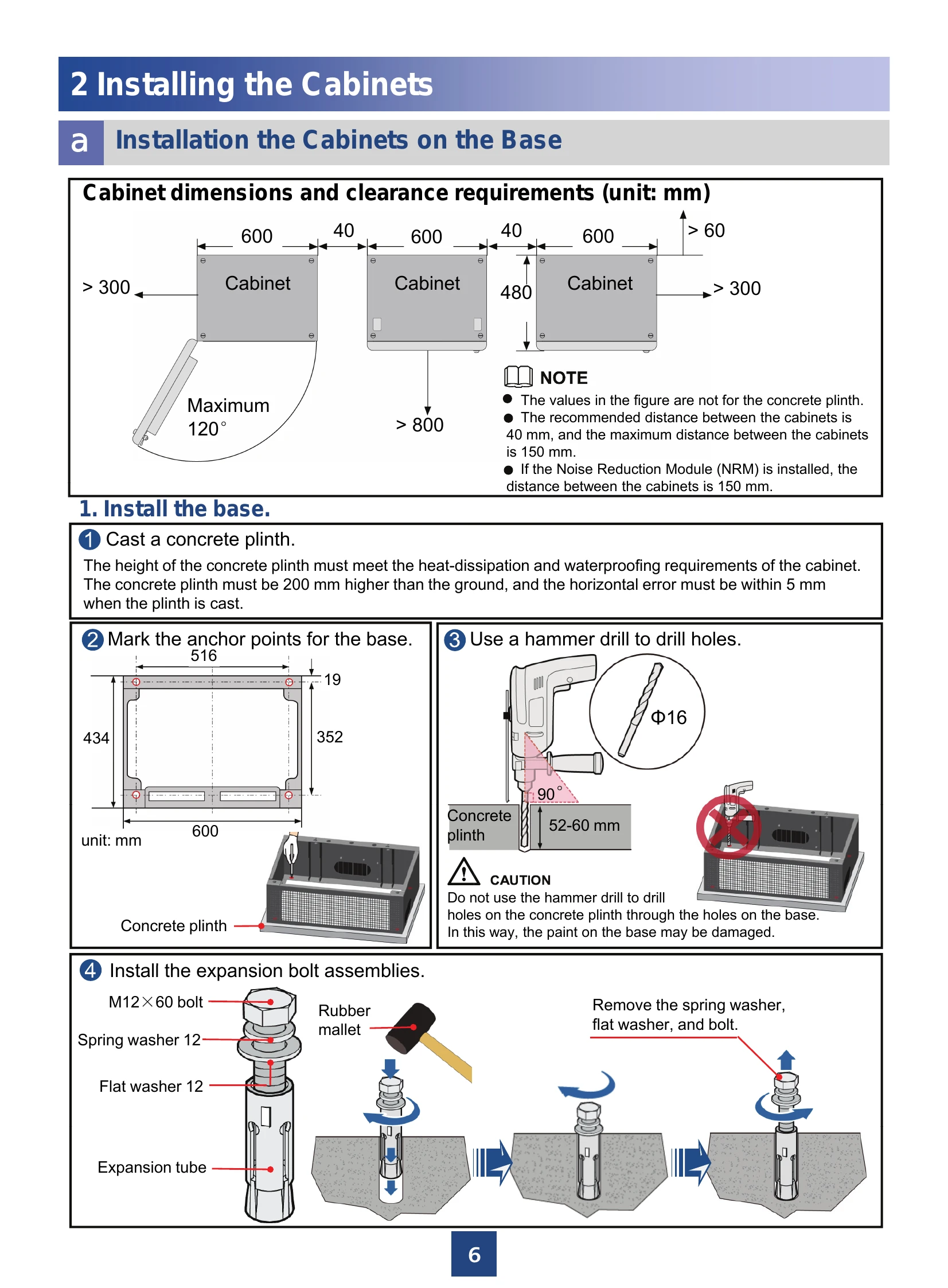
    • Base Mounting: Involves casting a concrete plinth, marking anchor points, drilling holes, installing expansion bolts, checking base level, and securing the cabinet. Optional stacking of two cabinets is also detailed.
    • Metal Pole Mounting: Requires installing a trapezoidal rack, fastening bar, and securing the cabinet with U-shaped pieces.
    • Wall Mounting: Involves marking anchor points, installing expansion bolts, mounting a trapezoidal rack and fastening bar, and attaching the cabinet to the wall.
  2. Earth Grounding: Connect PGND and equipotential cables according to principles to prevent interference and ensure safety.
  3. Optional Module Installation: Instructions are provided for installing modules like SOU, Heater, EMUA, and SLPU in the APM30H and TMC11H cabinets.
  4. Cable Installation: Covers routing principles and specific steps for installing power cables (-48 V DC, +24 V DC, and AC power supply scenarios) for various cabinet configurations.
  5. Sealing Cable Holes: Details how to seal cable holes in both cabinets and the base using fireproof clay and ensuring proper aperture matching.
  6. Battery Installation: Includes steps for installing batteries and connecting their power cables, emphasizing the use of insulated tools and correct polarity.
  7. Checklists: Comprehensive checklists are provided for cabinet installation, field cleanliness, electrical connections, and cable installation to ensure all steps are completed correctly.
  8. Power-On Status Check: Guides users through checking the power-on status for AC and -48 V DC power supply scenarios.

Appendix

Includes detailed procedures for assembling connectors (Power Series 120, Easy Power Receptacle), replacing fuses, repairing damaged paint, and covering equipment with grease.

Troubleshooting and error codes

Scenario Check Item Action
AC Power Supply Scenario Are the LEDs on the PSU/PMU normal? Check PSU/PMU status indicators. Normal indicators for PMU: RUN Blinking, ALM OFF. Normal indicators for PSU: Power Steady green, Protection OFF, Fault OFF.
Is the voltage of the EPS output power normal? The normal voltage range is -43.2 V DC ~ -57 V DC.
Are the LEDs on the CMUA normal? Normal indicators for CMUA: RUN Blinking, ALM OFF.
-48 V DC Power Supply Scenario Is the voltage of the DCDU-03 output power normal? The normal voltage range is -43.2 V DC ~ -57 V DC.
Are the LEDs on the CMUA normal? Normal indicators for CMUA: RUN Blinking, ALM OFF.
Check the fault status. Clear the fault if present.
Privacy Policy