Manual for ETS-2 FC612E

Manual for ETS-2 FC612E

Brand: HUAWEI

Category: Other

Document Type: Manual

Language: EN
Uploaded: Nov. 21, 2025, 7:54 p.m.

Manual Publish Date: 2016-01-01

Warranty Information

Huawei Technologies Co., Ltd. provides no warranty for this manual, and it is provided "AS IS".

Getting Started

Front View

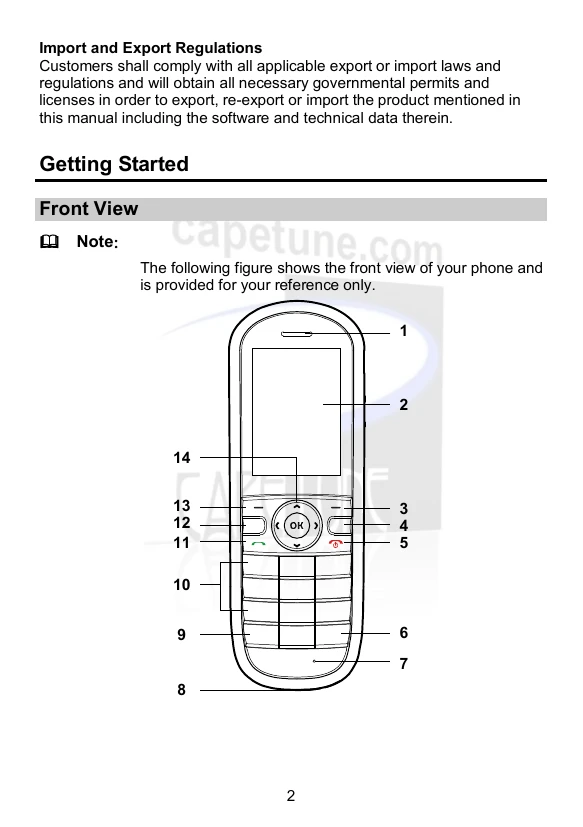
The figure shows the front view of your phone:

  • 1: Earpiece
  • 2: Screen
  • 3: Right soft key
  • 4: Clear key
  • 5: End key
  • 6: # key
  • 7: Microphone
  • 8: Charger jack
  • 9: * key
  • 10: Number keys
  • 11: Call key
  • 12: Profile key
  • 13: Left soft key
  • 14: Navigation keys

Keys

  • Right soft key: Select the option displayed in the lower right corner of the screen.
  • Clear key: Delete the character to the left of the cursor.
  • End key: End or reject a call; Power on or off the phone (by pressing and holding); Return to the standby screen.
  • Number keys: Enter digits or characters; Speed-dial phone numbers; Call the voicemail.
  • Call key: Dial a number or answer a call; View the call log.
  • Profile key: Access Profiles in standby mode.
  • Left soft key: Select the option displayed in the lower left corner of the screen.
  • Navigation keys: Access predefined shortcuts; Adjust volume during a call; Access the main menu; Switch between hands-free and hand-held mode.

Installing the SIM Card and the Battery

Ensure the golden contact area on the SIM card faces downward and is aligned with the SIM card slot.

Charging the Battery

Use either Method 1 (charging cradle) or Method 2 (direct cable connection).

Privacy Policy