Brand: HUAWEI
Category: Other
Document Type: Manual
Language: EN
Brand: HUAWEI
Category: Other
Document Type: Manual
Language: EN
Uploaded: Nov. 21, 2025, 9:17 p.m.
The manual provides information under "NO WARRANTY" stating contents are provided "AS IS" without express or implied warranties.
| Problem | Solution |
| Phone Cannot Be Powered On | 1. Remove the battery cover and check if the battery is installed properly. 2. If the battery is properly installed, charge the battery as it may be low. |
| No Information Is Displayed on the Phone Screen | If the phone has not been used for a long time and the battery is depleted, it may not display information while charging. Power on the phone after it has charged for a while. |
| Battery Cannot Be Charged | 1. Check if the phone and power adapter are connected properly. 2. Check if the power adapter and power socket are connected properly. 3. Replace the power adapter or battery with a new one of the same model. |
| Signal Strength Is Weak | 1. Check that the SIM card is installed properly. 2. Place the phone in an area with strong signals. |
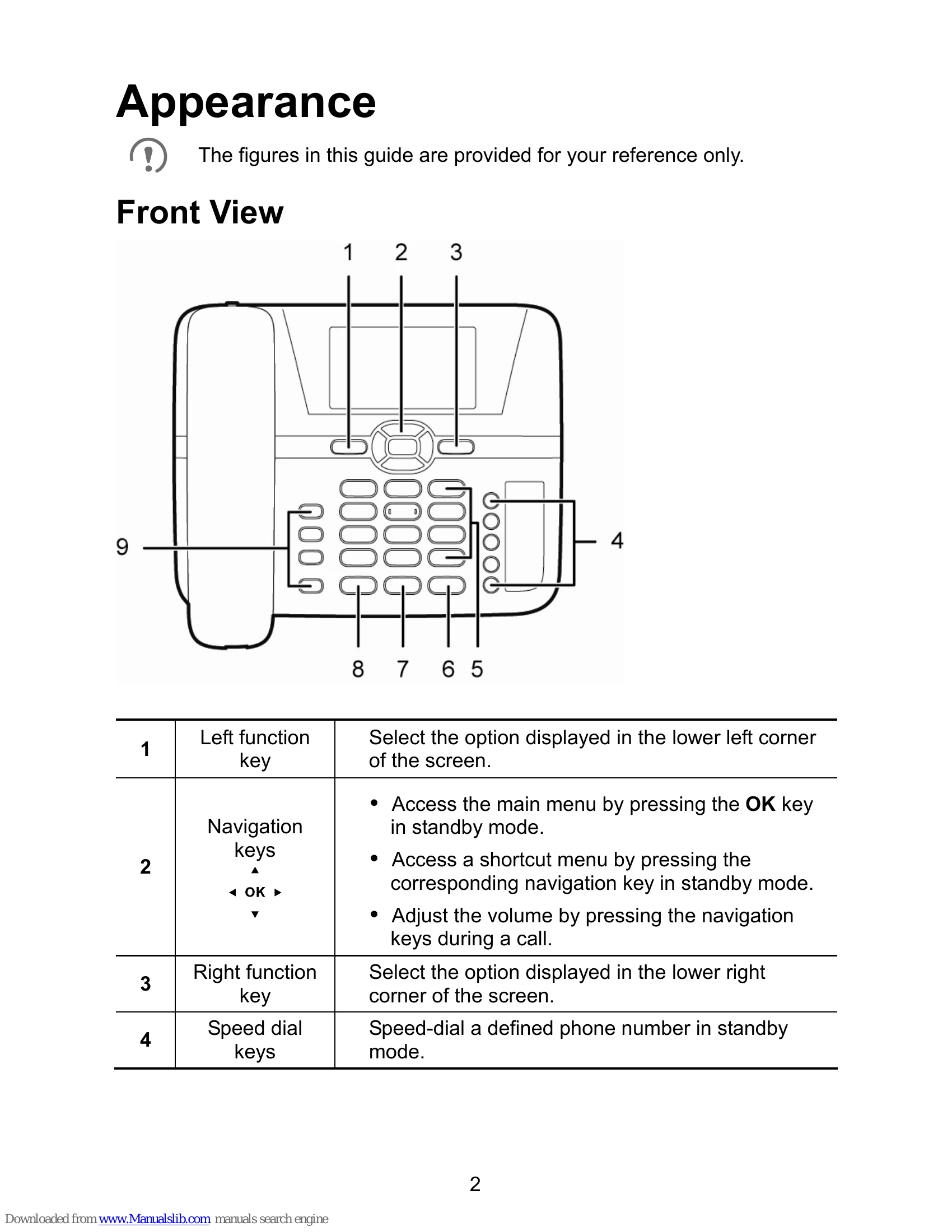
| Call Volume Is Too High or Too Low | During a call, use the navigation keys to adjust the volume. |